Claude Code Permissions: You Are Keyboard-Mashing ‘y’. Here Is How to Stop.
Last Updated on June 3, 2026 by Editorial Team
Author(s): Rick Hightower
Originally published on Towards AI.
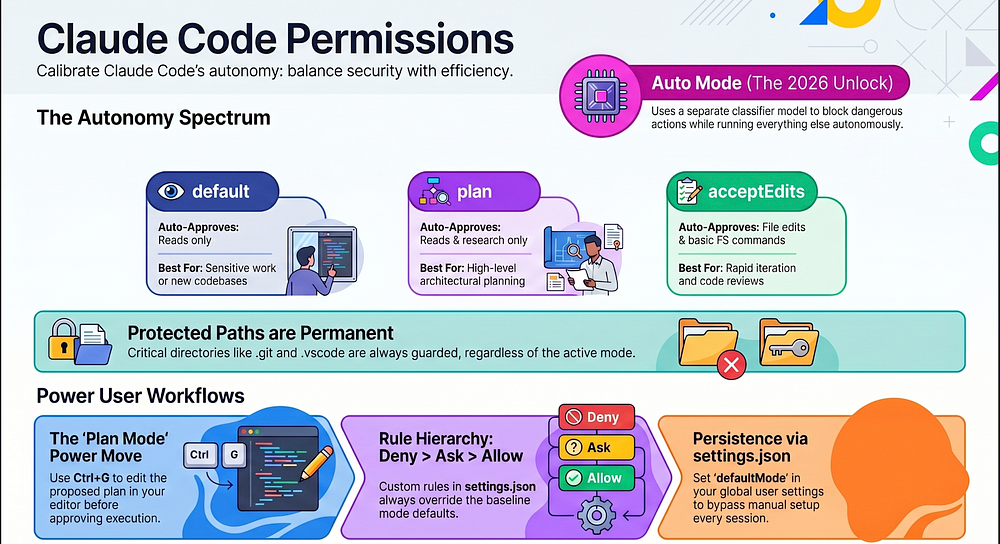
Claude Code 5: Auto mode is the best feature of 2026 so far. Permission modes let you calibrate exactly how much an AI agent can do without asking you first. Master them, and “approve, approve, approve” stops being part of your day.
In this article: Claude Code, Anthropic’s agentic coding tool, asks before it edits a file or runs a command. That safety check is correct in principle and exhausting in practice. This article walks through all six Claude Code permission modes, the permission rules that sit underneath them, and Auto Mode, the 2026 feature that finally lets you walk away from a long task. By the end you will know which mode to reach for, when, and how to wire your project so you almost never click approve again.
The article explains why Claude Code uses permission modes—controlling how much of the “action” phase (edits, commands, network calls) happens without your sign-off—then walks through the six modes (default, acceptEdits, plan, auto, dontAsk, and bypassPermissions) and the two global rules beneath them (no auto-approvals for protected paths; mode plus specific allow/deny rules in settings.json determine real behavior). It shows how to switch modes (Shift+Tab cycles, command-line flags, and project/user defaults), how “plan” mode prevents the most common mistake by producing a proposed, editable plan before implementation, and why Auto Mode is the major 2026 improvement: a classifier reviews each proposed tool call to block risky actions while executing the rest so you can safely step away. The piece also covers Auto Mode limitations (not magic; still subject to deny/allow/review practices and needs sufficient context), what to do when Auto Mode refuses (read the denial reason, switch modes for one turn, or add permission rules), and how permission rules are structured and evaluated (deny → ask → allow → mode; pattern syntax and ordering). It closes with practical guidance—starter settings, a quick checklist to get Auto Mode and allow rules working—and the key lesson to “calibrate, not surrender” by treating permissions as a dial rather than a binary.
Read the full blog for free on Medium.
Join thousands of data leaders on the AI newsletter. Join over 80,000 subscribers and keep up to date with the latest developments in AI. From research to projects and ideas. If you are building an AI startup, an AI-related product, or a service, we invite you to consider becoming a sponsor.
Published via Towards AI
Towards AI Academy
We Build Enterprise-Grade AI. We'll Teach You to Master It Too.
15 engineers. 100,000+ students. Towards AI Academy teaches what actually survives production.
Start free — no commitment:
→ 6-Day Agentic AI Engineering Email Guide — one practical lesson per day
→ Agents Architecture Cheatsheet — 3 years of architecture decisions in 6 pages
Our courses:
→ AI Engineering Certification — 90+ lessons from project selection to deployed product. The most comprehensive practical LLM course out there.
→ Agent Engineering Course — Hands on with production agent architectures, memory, routing, and eval frameworks — built from real enterprise engagements.
→ AI for Work — Understand, evaluate, and apply AI for complex work tasks.
Note: Article content contains the views of the contributing authors and not Towards AI.
Related posts
Recent Posts