The Great AI Coding Shift: From Autocomplete to Autonomous Agents
Last Updated on June 3, 2026 by Editorial Team
Author(s): Shubhojit Dasgupta
Originally published on Towards AI.
The Great AI Coding Shift: From Autocomplete to Autonomous Agents
A Field Guide for API Architects, AI-Integrated Platform Architects & Technology Leaders
Shubhojit Dasgupta — Independent API Architect
Introduction
Picture this: my GitHub Copilot quota expired at the worst possible moment. I was deep into Go codebase, fingers flying, debugging a Go routine that just would not behave. And then — silence. No ghost text. No tab completions. Nothing.
So I turned to Cline. “Help me out, buddy,” I said innocently.
Within seconds, Cline had analysed my entire repository, refactored the Go routine into a proper worker pool pattern, rewritten my Dockerfile, started a build pipeline, and asked if I wanted to deploy to staging.
All I wanted was to fix one Go routine.
That was the moment I realised I had been using AI coding tools completely wrong. It sparked a search for a better way — one that didn’t depend on expiring tokens from Silicon Valley, and one that understood the difference between “predict my next keystroke” and “refactor my architecture.”
What I discovered is not just a tooling gap, but a fundamental industry shift that every architect and technology leader needs to understand.
And the natural answer to “what happens when my tokens run out?” is not to buy more tokens — it is to run coding agents locally.
This blog will take you through the landscape, show you how to configure VS Code for multiple AI tools, compare the traditional IDE approach with Google’s new Antigravity 2.0, and finally walk through a production-grade local AI stack using Kong AI Gateway with semantic caching over Ollama — zero token costs, full data privacy.
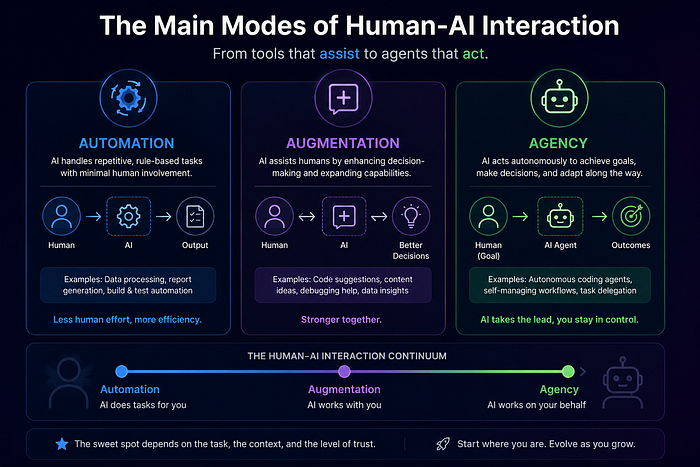
Primary Modes of Human–AI Interaction

Automation: AI performs a specific, well‑defined task based on your instructions; you say what needs to be done and the AI executes it (for example, “summarise this document,” “translate this paragraph”).
When automation works best: when the goal and success criteria are clear, and you mainly want speed and efficiency on a bounded task.
Augmentation: you and the AI work together as thinking partners to complete a task; there is back‑and‑forth dialogue, idea exchange, and exploration, not just one‑shot instructions.
What augmentation is used for: complex, open‑ended, or creative problems where you want help brainstorming, refining, or stress‑testing ideas rather than just automating a step.
A few years ago, an API architect would open an IDE, write OpenAPI specifications manually, configure gateways by hand, debug integrations at 2 AM, and spend days optimising distributed systems.
AI helped occasionally — maybe autocomplete suggested a function name or generated boilerplate code. Useful, but still just a tool.
Today, something fundamentally different is happening.
Imagine this workflow inside a modern engineering organisation:
An API architect describes a new platform capability in natural language:
“Create a Kong Gateway configuration for an AI inference platform with semantic caching, local Ollama inference, pgvector integration, authentication, observability, and OpenAI-compatible routing.”
An AI coding agent begins reasoning.
It generates the Kong declarative configuration.
Creates the Docker Compose stack.
Configures pgvector.
Sets up semantic caching policies.
Generates observability dashboards.
Creates Terraform templates.
Runs integration tests.
Detects a failed route configuration.
Fixes it automatically.
Re-runs the tests.
Documents the architecture.
The human never wrote a single YAML file.
This is not traditional automation.
This is not autocomplete.
This is the emergence of Agency in Human–AI interaction.
Agency: you configure AI systems to act independently on your behalf in the future, sometimes interacting with other humans or AI systems (for example, auto‑sorting email, monitoring data, or triggering workflows).
How agency is different: you set up goals, rules, and knowledge patterns instead of giving step‑by‑step commands, and then the AI decides when and how to act within those boundaries.
The AI Coding Tools Landscape
The first thing to understand is that “AI coding tools” is no longer a single category. We have two fundamentally different paradigms that serve different purposes:

This distinction is critical for architects designing AI-Integrated developer platforms. Your choice is not either/or — it is both.

Why Cline Feels Different from GitHub Copilot
When your Copilot quota expired and Cline did not replace that experience, you were observing a genuine architectural difference.
GitHub Copilot’s Model
- Inline ghost-text completions
- “Press Tab to accept” workflow
- Predictive next-line generation
- Whole-function suggestions
- Background context indexing
This is the classic type → AI predicts → press Tab loop, powered by VS Code’s inline completion APIs with fast, low-latency inference from dedicated autocomplete models.
Cline’s Model
Cline is more like an autonomous coding companion:
- Reads your entire repository for context
- Executes shell commands
- Modifies multiple files across the codebase
- Operates as an agentic workflow engine
It behaves much closer to Claude Code, Aider, Goose, and OpenCode than to Copilot-style inline prediction.
So when Copilot expired, you lost inline tab completions and background predictive coding — and Cline was never designed to replace that specific UX.
Managing AI Tools in VS Code
One of VS Code’s greatest strengths is its extension ecosystem — but running multiple AI tools simultaneously requires thoughtful configuration. Here’s how to manage them:
Per-Tool Feature Toggling
VS Code’s settings.json gives you granular control over which AI features are active:
{
 "editor.inlineSuggest.enabled": true,
 "github.copilot.enable": {
 "*": true,
 "plaintext": false,
 "markdown": true
 },
 "continue.enableTabAutocomplete": true,
 "continue.allowAgentTasks": false
}
When to Disable Autocomplete
During heavy agentic workflows, temporarily disable inline completions to avoid interference:
- Command Palette →
Developer: Toggle Keyboard Shortcuts Troubleshooting - Toggle
editor.inlineSuggest.enabledvia keybinding
Extension Conflicts
- Only one extension should own inline tab completion at a time (Copilot OR Continue.dev OR Supermaven)
- Agentic tools don’t conflict since they operate on different scopes
- MCP-based tools operate outside VS Code entirely
The Industry Shift
The ecosystem is undergoing a major transition that every Architect working with APIs and AI should be tracking.

The Old Era
- IDE plugins and snippets
- Autocomplete-centric workflows
The New Era
- Autonomous coding agents that understand entire repositories
- Terminal-native AI that works alongside your existing CLI workflows
- Multi-agent orchestration and MCP integrations
- Repo-wide reasoning rather than line-level predictions
This shift is being driven by major players across the industry, including Anthropic with Claude Code, Google with Gemini CLI and Antigravity, OpenAI with Codex CLI, and a vibrant open-source ecosystem.
Building the Right Stack
For API architects and platform engineers building with Go, Kubernetes, and cloud-native technologies, the following is my recommended tooling stack:

Layer 1: Inline Autocomplete — Continue.dev
Connects to Ollama for local models or any provider. Replaces Copilot’s inline experience.
Layer 2: Terminal Agent — Aider
Mature Git-aware terminal pair programming. Handles multi-file edits gracefully.
Layer 3: VS Code Agent — Cline
Autonomous repo understanding inside VS Code for complex refactoring.
Layer 4: Advanced Experimentation — Goose
Desktop + CLI modes, deep MCP integrations, subagent orchestration. Linux Foundation backed.
Layer 5: Local Inference — Ollama
Self-hosted local model inference for privacy-sensitive work.
Layer 6: Heavy Reasoning (Optional) — Claude Code
Strongest terminal coding agent for complex reasoning tasks (requires API key).
Deep Dive into Key Tools
Aider
- Excellent Git integration with automatic commits
- Multi-file editing for Go repositories
brew install aider
Goose
- Desktop + CLI dual-mode
- Native MCP integrations
- Subagent orchestration
brew install goose
OpenCode
- Beautiful TUI, vim-like workflow
brew install sst/tap/opencode
Continue.dev
- Bridges autocomplete and agent workflows
- Local model support via Ollama
Claude Code
brew install anthropics/anthropic/claude
Gemini CLI
- Generous free tier
brew install gemini-cli
AtomCode
- Rust-based, model-provider agnostic
VS Code + AI Extensions vs Google Antigravity 2.0
In May 2026, Google repositioned Antigravity from an AI agent builder into a full agentic development suite. This is not a traditional IDE — it is a fundamentally different approach.


Ecosystem Maturity

Tier 1: Mature / Open-Source Leaders
Aider, Cline, OpenCode
Tier 2: Fast-Rising
Goose, AtomCode, Gemini CLI
Tier 3: Experimental / Niche
Continue.dev, LocalCode, Kimi CLI
The Token-Free Architecture — Running AI Coding Agents Locally
Remember that expired Copilot quota I started with? The answer is not to buy more tokens — it is to run coding agents locally with Kong AI Gateway and AI Semantic Cache in front of Ollama.

Prerequisites: The AI Semantic Cache plugin is part of Kong’s AI Gateway Enterprise offering and requires an AI license. Ensure your Kong Gateway instance is version 3.8+ (3.10+ if using pgvector as the vector database backend).
How It Works
1. AI Coding Agents (Cline, Aider, OpenCode, Goose, Continue.dev) send OpenAI-compatible requests:http://localhost:8000/v1/chat/completionsNo changes are needed in the agent configuration. Kong’s OpenAI-compatible endpoint means any tool already wired for OpenAI works out of the box.
2.Kong AI Gateway acts as the unified AI control plane providing:
Kong intercepts every request before it reaches a model, providing:
- OpenAI-compatible endpoint abstraction — one stable endpoint regardless of the backend model
- API authentication — OIDC, key-auth, or token-based access control
- Rate limiting — token-level and request-level throttling
- Request routing — model selection and traffic steering
- AI traffic governance — observability, audit logging, and policy enforcement
3. The AI Semantic Cache Plugin: Two Models, Not One
The plugin involves two separate model calls — an embeddings model and a chat/completion model — which are configured independently.
When a request arrives, the plugin first calls a dedicated embeddings model to convert the incoming prompt into a vector. In this local stack, that is mxbai-embed-large running via Ollama at its embeddings endpoint:
http://localhost:11434/api/embeddings
This vector is then used to query the pgvector database for semantic similarity against previously cached prompts.
Note: The embeddings model is configured under
config.embeddingsin the plugin configuration — it is separate from the chat model configured in your AI Proxy plugin underconfig.model. Do not conflate the two.
4. The pgvector Semantic Cache: What Lives Where
On a cache hit — where a semantically similar prompt already exists above your configured similarity threshold — the cached response is returned immediately without invoking any chat model.
The pgvector database stores:
- Prompt embeddings — vector representations of past prompts
- Semantic similarity metadata — scores used to evaluate match quality
- Cached response references — pointers to stored LLM responses
Separation of concerns: The plugin uses Redis to store the actual LLM response payloads, and pgvector to store the embeddings and perform similarity search. These are two distinct backing services. In a minimal local setup you can run both, but understand that pgvector handles the vector search layer while Redis handles the response cache layer.
Kong returns the cached response with the following header so you can verify cache behaviour:
X-Cache-Status: Hit # served from cache
X-Cache-Status: Miss # forwarded to Ollama
5. On Cache Miss: Kong Forwards to Ollama
When no semantically similar prompt exists, the plugin forwards the request to Ollama, which runs the coding model locally. Supported models include:
- Codestral — optimised for code generation and completion
- CodeLlama — Meta’s open-source coding model family
- DeepSeek Coder — strong at repository-level code understanding
- Qwen 2.5 Coder — excellent multilingual code reasoning
Ollama handles all inference locally. No request ever leaves your machine.
6. Response Flows Back Through Kong and Gets Cached
The generated response from Ollama travels back through Kong, where two things happen in parallel:
- The response is streamed back to the coding agent in real time
- The prompt embedding and response payload are stored — embedding in pgvector, response in Redis — so future semantically similar prompts can be served from cache
Benefits
- Zero API token costs — fully local inference with Ollama
- Full data privacy — source code, prompts, and responses never leave your infrastructure. No third-party telemetry.
- Semantic response caching — unlike exact-match caches, the plugin understands meaning. “How do I write a binary search?” and “Can you show me binary search in Python?” can hit the same cache entry.
- Lower latency for repeated prompts —semantic cache hits return instantly, bypassing model inference entirely.
- Reduced GPU/CPU utilisation — avoids unnecessary model execution. Repeated or similar prompts skip model execution, preserving resources for genuinely novel requests.
- OpenAI-compatible architecture — any existing agent or tool already configured for the OpenAI API works without modification.
- Vendor independence — no dependency on OpenAI, Anthropic, or any external provider.
- Works offline —ideal for air-gapped environments, secure development networks, or restricted enterprise infrastructure.
- Centralised AI governance — Kong provides observability, routing, policy enforcement, and audit trails across all model traffic from a single control plane.
Configuration
# 1. Start Ollama with a coding model
# Pull the chat/completion model
ollama pull qwen2.5-coder:14b

# Pull the embeddings model (required separately for the semantic cache)
ollama pull mxbai-embed-large

# Start Ollama
ollama serve
# 2. Kong AI Gateway with semantic cache plugin
# (Configure via kong.yml)
Configure the AI Semantic Cache Plugin
The plugin requires two model configurations: one for the chat/completion backend (via AI Proxy), and one for the embeddings model. A minimal kong.yaml excerpt:
plugins:
 - name: ai-proxy
 config:
 route_type: llm/v1/chat
 model:
 provider: ollama
 name: qwen2.5-coder:14b
 options:
 ollama_host: http://host.docker.internal:11434

 - name: ai-semantic-cache
 config:
 embeddings:
 provider: ollama # embeddings model — configured separately
 name: mxbai-embed-large
 upstream_url: http://host.docker.internal:11434
 vectordb:
 strategy: pgvector # requires Kong Gateway 3.10+
 threshold: 0.9 # cosine similarity threshold for cache hit
 dimensions: 1024 # must match mxbai-embed-large output dimensions
 pgvector:
 host: pgvector
 port: 5432
 user: kong
 password: kongpass
 database: kong_semantic_cache
Reminder:
config.embeddings(for vector generation) and the model inai-proxy(for inference) are independent. Both must be configured correctly for the plugin to function.
Point Your Agent to Kong
# Set in your agent's environment or config file
OPENAI_API_KEY=local # arbitrary value — Kong validates presence, not the key itself
OPENAI_BASE_URL=http://localhost:8000/v1
All agents that support a custom base URL (Cline, Aider, Continue.dev, Goose, OpenCode) can be redirected to Kong with these two environment variables.
Kong AI Gateway — Semantic Cache Demo
Cache miss — shows the full journey: Kong intercepts → mxbai-embed-large generates the embedding → pgvector finds no match → request forwarded to Ollama → qwen2.5-coder:14b inference at ~3.8s → response stored in pgvector + Redis.

Cache hit — exact same prompt run again: embedding generated → pgvector returns score 1.000 → Redis serves cached response at 6ms. The X-Kong-Upstream-Latency header drops from 3812ms to 6ms . Zero GPU cycles with 99.8% latency reduction.

Similar prompt — "Can you show me how to reverse a string in Rust?"vs the original "Write a Rust function to reverse a string" — different wording, cosine similarity 0.943, still above the 0.90threshold, still a cache hit. This is what distinguishes semantic caching from exact string matching — repeated intent, not repeated wording, drives the cache hit.

How to Discover AI Tools in Homebrew
brew search ai
brew search llm
brew search agent
brew info aider
The Bottom Line for Architects and Leaders
The AI coding landscape is in the middle of a paradigm shift from “AI predicts my next line” to “AI understands my codebase and acts autonomously.”
- For API Architects: Terminal agents that understand Go/K8s are now practical. Run them locally with Kong + Ollama.
- For Platform Architects: Combine inline completion, autonomous agents, and local inference into a comprehensive platform with enterprise-grade API management via Kong AI Gateway.
- For Technology Leaders: The open-source ecosystem has matured. You can build a complete AI-assisted workflow without vendor lock-in. Google’s Antigravity 2.0 represents a new category worth watching.
The terminal is becoming the primary AI coding interface again. Architects who understand this shift will be better positioned to design the developer platforms of tomorrow — with or without paid tokens.
This blog was written from the perspective of an AI-Integrated Platform and API Architect. Tools referenced are based on publicly available information as of May 2026.
References
- Cline GitHub
- Aider GitHub
- Goose Official Docs
- OpenCode GitHub
- Continue.dev
- Claude Code Docs
- Gemini CLI GitHub
- AtomCode
- Google Antigravity 2.0
- Kong AI Gateway
- Kong AI Semantic Cache
- Ollama
Join thousands of data leaders on the AI newsletter. Join over 80,000 subscribers and keep up to date with the latest developments in AI. From research to projects and ideas. If you are building an AI startup, an AI-related product, or a service, we invite you to consider becoming a sponsor.
Published via Towards AI
Towards AI Academy
We Build Enterprise-Grade AI. We'll Teach You to Master It Too.
15 engineers. 100,000+ students. Towards AI Academy teaches what actually survives production.
Start free — no commitment:
→ 6-Day Agentic AI Engineering Email Guide — one practical lesson per day
→ Agents Architecture Cheatsheet — 3 years of architecture decisions in 6 pages
Our courses:
→ AI Engineering Certification — 90+ lessons from project selection to deployed product. The most comprehensive practical LLM course out there.
→ Agent Engineering Course — Hands on with production agent architectures, memory, routing, and eval frameworks — built from real enterprise engagements.
→ AI for Work — Understand, evaluate, and apply AI for complex work tasks.
Note: Article content contains the views of the contributing authors and not Towards AI.
Related posts
Recent Posts