


Your Camera Doesn’t Just See — It Explains
Author(s): Lindo St. Angel
Originally published on Towards AI.

Smart-home cameras are noisy storytellers. A leaf moves, a light flickers, and your phone buzzes again. What you get is motion — not meaning.
The Video Analyzer inside the Home Generative Agent integration for Home Assistant changes that.
It transforms a stream of motion snapshots into one clean, factual sentence — the kind of line you can rely on for automation without false alarms.
The bigger picture: part of Home Generative Agent
The Video Analyzer isn’t a standalone add-on. It’s a core subsystem of Home Generative Agent (HGA) — a custom Home Assistant integration that gives your home an intelligent memory and language interface.
At the architectural level:
— HGA connects multiple large models — vision, language, and embeddings under one orchestration layer.
— Each category (chat, VLM, summarization, embedding) uses pluggable providers — OpenAI, Ollama, or Gemini.
— The integration exposes structured outputs as Home Assistant entities and events, allowing automations, dashboards, and vector-based “memories” to interoperate.
In that ecosystem, the Video Analyzer is the visual limb. It speaks to cameras, invokes the vision and summarization models, and publishes the semantic result back to the system.
If the agent were a brain, the Video Analyzer is its occipital lobe — constantly turning pixels into concise, automation-ready meaning.
Why build it at all?
Motion sensors are interrupts, not meaning. They trigger on shadows, noise, or sunlight, but can’t say what happened.
What you want is a reliable abstraction — a textual state that describes the scene:
“Two packages on the porch; no person present.”
“Alice is at the front door.”
“A person picks up a box and leaves.”
That’s the promise: semantic compression — turning gigabytes of video into a single, precise sentence.
The functional flow
Trigger → Capture → Describe → Publish → Notify → Remember
Trigger: Cameras or motion sensors start a short capture loop.
Capture: snapshots enter per-camera asyncio queues, deduped via perceptual hash + heartbeat logic.
Describe:
— Heuristic path for single frames (fast, deterministic).
— Vision-Language Model (VLM) + summarizer for multi-frame context.
Publish: updates “latest” image + “recognized people” entities; fires HA events.
Notify: optional mobile push (always or on anomaly).
Remember: the vector DB stores text and metadata for long-term recall.
A quick mental model
[Camera] --> [Queue] --> [Describe (VLM + heuristic)] --> frame texts + identities
 |
 v
 [Summarizer LLM + rules] --> {summary, recognized_people}
 |
 +--> Publish entities
 +--> Notify user
 +--> Store vectors
Where the models come in
The Video Analyzer uses three model tiers, each tuned by configuration constants in const.py.
1. Vision-Language Model (VLM) — describes a single frame
Default: Ollama qwen3-vl:8b (temperature 0.2)
System prompt (core clauses):
“Produce a short, factual description (1–3 sentences).
Do NOT speculate, infer identity, or describe unseen content.
Use consistent phrasing across similar frames.
Never assume gender if unclear.”
Why: It enforces neutral, deterministic phrasing so similar images yield similar sentences — crucial for reliable embeddings and anomaly detection.
When previous frame text is available, the VLM may describe motion only if multiple cues agree; otherwise, it defaults to “stands” or “walks nearby.” This approach minimizes false motion narratives that plague consumer AI cameras.
User prompt:
“Describe this image clearly and factually in 1–3 sentences. Do not add names, timestamps, or speculation.”
A focused variant accepts keywords (Primary attention: {key_words}) when you want to bias attention toward, say, packages or doors.
The VLM only describes what’s visually present — it doesn’t recognize faces or assign identities. Person recognition happens later in the pipeline through a separate face-recognition service, which tags frames with known identities before the summarization step. This separation keeps the VLM neutral and privacy-safe while still allowing the system to link actions to recognized individuals when appropriate.
2. Summarization model — weave multiple frames into one line
Default: Ollama qwen3:8b (temperature 0.2)
System rules excerpt:
“≤150 characters, ≤2 sentences.
Narrate events in order (t+Xs).
Include up to two known names; otherwise say ‘a person’.
Treat ‘Unknown Person’ as human.
Describe visible actions only; no speculation.”
These constraints force concise, automation-safe summaries.
When multiple frames exist, the summarizer fuses them chronologically:
“Lindo St. Angel steps onto the porch, then leans on the railing.”
Suppose there’s only one frame, a heuristic tries first — cleaning text, inserting the subject if recognized, and truncating length. Only when that path fails is the LLM called.
User prompt reminder:
“Write ≤150 characters (≤2 sentences). Obey all rules and narrate in order.”
3. Embedding & chat layers — memory and reasoning
Embedding prompt:
“Represent this sentence for searching relevant passages: {query}”
This ensures every caption becomes a stable vector entry for later retrieval or novelty scoring.
Chat summarizer system message:
“You are a bot that summarizes messages from a smart home AI.”
Together, these make the HGA memory continuous: video events, text logs, and automations all share the same language space.
Prompts as contracts
Every model prompt is a contract between you and the language model. Break it, and your automations will drift. Keep it tight and your system stays explainable.
These contracts enforce:
- Neutral, observable language
- Short, deterministic phrasing
- Stable embeddings for anomaly detection
- Privacy-safe content (no gender or intent guessing)
These prompts live as versioned, editable constants — not buried in code — so you can evolve them responsibly.
How it integrates with the rest of HGA
The Video Analyzer operates as part of a coordinated visual stack inside the Home Generative Agent (HGA). It doesn’t work alone — it collaborates with a dedicated Face Recognition service and the HGA runtime to turn raw camera input into structured, searchable memory.
- Video Analyzer → Face Recognition → Summarization → Runtime:
When a new frame arrives, the Video Analyzer first sends it to the Vision-Language Model (VLM) for description. The text describes the visible scene — lighting, motion, posture, and objects — but never guesses who is present. The Face Recognition module processes the same frame in parallel, which compares faces against the local database of known identities. The recognized names (if any) are attached as metadata and passed back to the Video Analyzer. The Summarization Model then fuses the frame text and the identity metadata into a single, human-readable caption, such as:
“Lindo St. Angel steps onto the porch, then leans on the railing.” - Structured output and signals:
Each summarized event is posted to the HGA runtime store — a Postgres-backed vector database — indexed under("video_analysis", camera_name)for semantic search. The analyzer also fires structured Home Assistant signals (hga_new_latest,hga_recognized_people), which update entities and trigger automations in real time. - Notifications and image protection:
When the analyzer detects anomalies or unfamiliar faces, it can send mobile push notifications via the configurednotify_service. The relevant snapshot is marked for retention to prevent it from being deleted by cleanup jobs. - Unified memory through embeddings:
Every generated caption — whether from video, chat summaries, or sensor logs — is embedded into the same vector space. This lets HGA recall or reason across modalities:
“Who came to the porch after sunset?”
“Was anyone seen before the door opened?”
By separating visual perception (VLM), identity recognition, and semantic synthesis (Summarization), the system stays modular, explainable, and privacy-aware. Each component does one job well — and together they let your home not only see, but understand.
Why this works
- Heuristic before model — prioritize speed and determinism; use the LLM second.
- Short summaries — 150-char max keeps embeddings and notifications fast.
- Chronology— events unfold logically, preventing misordered narratives.
- Neutral voice — automation triggers stay predictable.
- Tight async loops — each camera runs independently; queues and semaphores to avoid overload.
The result is a camera subsystem that behaves like a colleague, not a parrot — brief, factual, reliable.
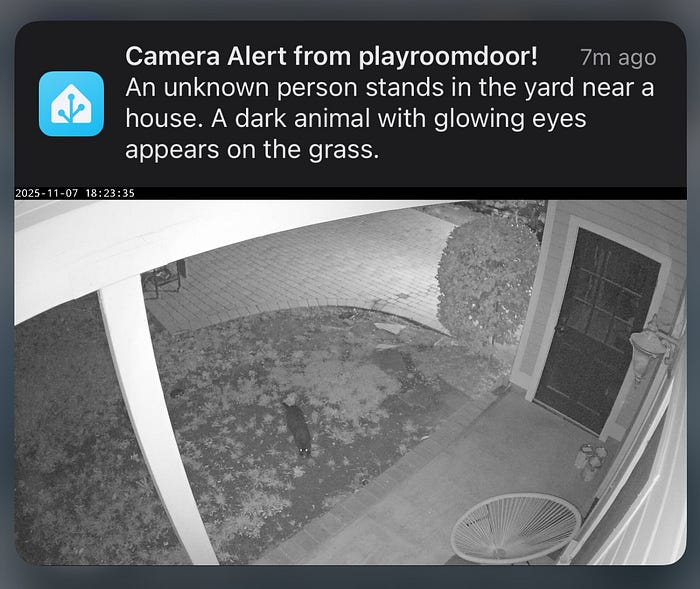
Real-world results: the Video Analyzer in action
Note: The face-recognition module inserts named individuals into the captions; the VLM itself produces person-neutral descriptions.

“Lindo St. Angel walks on the pathway with bags, then stands on the porch holding one.”
(A concise narrative that joins multiple frames — movement and arrival — into a single 17-word sentence suitable for automation triggers.)

“A person walks near the house, then climbs the porch steps. They carry a backpack, later hold a leaf blower, and eventually walk away, leaving the porch empty.”
(Multiple frames stitched chronologically; the summarizer keeps the verbs concrete and factual.)

“A person in an orange shirt walks on a grassy area near a house, carrying a trash can. They bend over, pick up items, and later sweep leaves near the porch.”
(Here, the LLM combines posture, object, and sequential verbs into one compact summary — no excess detail, no guesses.)

“Lindo St. Angel stands near the gate, then walks on the pathway.”
(A short, multi-frame progression reflecting direct visual cues.)

“A person stands on the porch next to a dark door, holding a white object. A black cat is on the porch near a wicker chair.”
(The analyzer correctly identifies both entities — a person and a cat — without over-describing or inferring relationships.)
The bigger picture
Home Assistant handles the sensors and cameras; the Video Analyzer interprets what they see. Each event becomes a single, factual sentence — concise enough for automation, expressive enough for understanding. Those sentences are fed into the Home Generative Agent core, where they are embedded, indexed, and retained. Other agents can then search, summarize, and act on that knowledge.
The result is a closed loop: see → describe → remember → respond. Every frame that passes through becomes part of a living memory — one that can reason about what’s happening, not just record it.
A step toward meaningful perception
The Video Analyzer is more than an engineering module; it’s a small demonstration of what grounded, explainable AI can look like in a real home. By enforcing neutral language and deterministic prompts, it replaces noise with narrative and makes machine vision accountable.
Pixels become sentences. Sentences become context. Context becomes understanding. Sometimes the model drifts — but the constraints pull it back to truth and meaning.
System map — how the Video Analyzer fits inside Home Generative Agent
The Video Analyzer sits between Home Assistant’s cameras and HGA’s memory core, converting raw motion into structured language.
┌───────────────────────────────────────────────────────────────┐
│ Home Generative Agent (HGA) │
│ ┌──────────────────────────┐ ┌───────────────────────┐ │
│ │ Language + Memory Core │◄────►│ Vector Store (Postgres │
│ │ - Chat / Summarization │ │ + Embeddings Index) │
│ │ - Context Manager │ └───────────────────────┘ │
│ └──────────▲───────────────┘ │
│ │ │
│ │ (semantic summaries, embeddings) │
│ │ │
│ ┌──────────┴──────────────┐ │
│ │ Video Analyzer │ │
│ │ - Captures frames │ │
│ │ - Runs VLM + Summary │ │
│ │ - Detects anomalies │ │
│ │ - Publishes entities │ │
│ └──────────▲──────────────┘ │
│ │ │
│ │ (events, images, people, summaries) │
│ │ │
│ ┌──────────┴──────────────┐ │
│ │ Home Assistant Core │ │
│ │ - Cameras │ │
│ │ - Sensors │ │
│ │ - Automations │ │
│ └─────────────────────────┘ │
│ │
│ Notifications → Mobile App (via notify.mobile_app_*) │
│ Dashboards → Lovelace or custom UI │
│ Memory Search → “What happened on the porch today?” │
└───────────────────────────────────────────────────────────────┘
Home Assistant handles the sensors and cameras; the Video Analyzer interprets what they see. It turns images into language — one factual sentence per event — and feeds that text to the Home Generative Agent core. HGA then embeds and stores those sentences in its vector memory, where other agents and automations can search, summarize, or act on them. The same data powers mobile notifications, dashboards, and contextual reasoning. Together, these modules form a closed loop: see → describe → remember → respond.
Join thousands of data leaders on the AI newsletter. Join over 80,000 subscribers and keep up to date with the latest developments in AI. From research to projects and ideas. If you are building an AI startup, an AI-related product, or a service, we invite you to consider becoming a sponsor.
Published via Towards AI
Towards AI Academy
We Build Enterprise-Grade AI. We'll Teach You to Master It Too.
15 engineers. 100,000+ students. Towards AI Academy teaches what actually survives production.
Start free — no commitment:
→ 6-Day Agentic AI Engineering Email Guide — one practical lesson per day
→ Agents Architecture Cheatsheet — 3 years of architecture decisions in 6 pages
Our courses:
→ AI Engineering Certification — 90+ lessons from project selection to deployed product. The most comprehensive practical LLM course out there.
→ Agent Engineering Course — Hands on with production agent architectures, memory, routing, and eval frameworks — built from real enterprise engagements.
→ AI for Work — Understand, evaluate, and apply AI for complex work tasks.
Note: Article content contains the views of the contributing authors and not Towards AI.
Related posts
Recent Posts


