


Where Should Your Automation Live? Lessons From a Jira Integration That Quietly Broke
Last Updated on May 29, 2026 by Editorial Team
Author(s): Rajesh Vishnani
Originally published on Towards AI.

Where Should Your Automation Live? Lessons From a Jira Integration That Quietly Broke
A QA workflow stopped working after a project migration. Nothing in the app had changed. The bug taught us more about automation architecture than any blog post we’d read.
The Slack message
It came in on a Monday afternoon: “Hey, the test management tool isn’t working. I click Pass on a test case and the Jira work item doesn’t move to Done anymore. Can you check the logs?”
Easy enough. I pulled up the logs expecting a stack trace or a 500. Instead I saw this:
[TESTCASE_UPDATE_RESULT] Updating outcome for TEST-355 to: Passed
[TESTCASE_UPDATE_RESULT] Found editable Outcome field: customfield_11515 (Outcome)
[TESTCASE_UPDATE_RESULT] Successfully updated TEST-355 outcome to Passed
Three lines. Clean success. No error. From the app’s point of view, everything had worked.
But the work item was still sitting in To Do.
Where the bug actually was
I’ll cut to the part that’s worth writing about: the code that transitions the Jira work item to Done was never in our app. It had always lived in a Jira project-level automation rule. We just didn’t realize it, because for two years it had run reliably and felt like part of the app.
The QA team had recently moved from Project A to Project B in Jira. Project A had this automation rule:
WHEN the field “Outcome” changes IF Outcome is “Passed” → Transition issue to “Done” IF Outcome is “Failed” → Transition issue to “To Do”
Project B didn’t. So the moment they switched projects, half the behavior the QA experienced as “the app” silently disappeared.
The app’s contribution — updating a custom field — was working exactly as it always had. We had just never noticed that half the workflow lived somewhere we don’t version-control.
The two-layer mental model
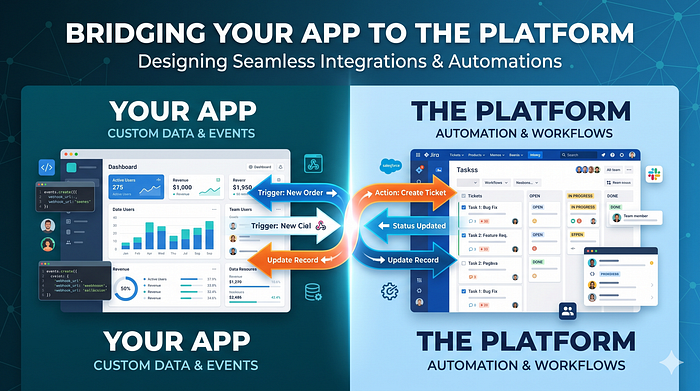
Every integration with a platform like Jira (or GitHub, Salesforce, Linear) actually has automation living in two places:
Layer 1 — App-side automation. The code your team writes. Lives in your repo. Visible in your logs. Travels with your build artifacts. Versioned, reviewable, testable.
Layer 2 — Platform-side automation. Automation rules, webhooks, workflow post-functions, screen schemes, and field configurations that live inside the platform itself. Project-scoped, often configured through a UI by non-engineers, often invisible from your app’s perspective.
A user clicking a button in your app doesn’t care which layer reacts. To them it’s one feature. To you, the moment something breaks, it matters enormously — because each layer fails differently, gets debugged differently, and gets migrated differently.
Most teams I’ve seen don’t draw this line on purpose. It emerges accidentally. Someone adds a Jira automation rule one afternoon to ship a feature faster. The rule works. Nobody documents it. A year later, somebody changes projects.
Why each layer is tempting
Platform-side is tempting because it’s fast. You can wire up “when X changes, transition to Y” in five minutes through a UI, with no deploy, no PR, no testing pipeline. For small workflow tweaks it genuinely is the right tool — fighting that with code would be over-engineering.
App-side is tempting because it’s yours. It shows up in your git history. Your CI tests it. Your logs prove whether it ran. When something breaks at 2 AM, you don’t have to also have admin access to a SaaS platform to see what happened.
Both have a place. The trick is being intentional about which one you reach for, and then making the choice visible later.
A three-question decision rule
After this incident I started using a three-question filter when deciding where to put a piece of automation. It’s not a law, it’s a sanity check:
1. Will this need to work across multiple projects, tenants, or environments? If yes, app-side. Platform-side rules are project-scoped almost everywhere and don’t follow your data when admins copy projects, restore from backup, or spin up new tenants.
2. If this step silently fails, would someone notice within an hour or within a quarter? If the answer is “a quarter,” app-side. App-side automations get logged, alerted on, and seen by the engineers who own the feature. Platform-side automations sit in a separate audit log that nobody opens unless they already suspect a problem.
3. Does this step encode a business rule or a workflow rule? A business rule (“a test case marked Passed counts toward the sprint’s pass percentage”) belongs in the app — it’s yours. A workflow rule (“when a test case is Passed, the work item moves to Done”) is debatable, but if the workflow is something you’d want to keep working when you swap platforms, lean app-side.
In our case all three questions pointed at app-side, and we’d accidentally landed in platform-side. That’s the whole story.
The companion mistake: hardcoded custom field IDs
While we were already in the codebase fixing this, we found a sibling problem that comes from the same family of mistakes — baking platform-specific configuration into application code.
In Jira, custom fields have numeric IDs that differ per tenant (and sometimes per project, depending on how fields are scoped). The “Outcome” field we were updating had id customfield_11348 in the old project and customfield_11515 in the new one. Same field name, same purpose, completely different id.
We were doing this right on the write path by looking the field up dynamically at runtime:

That pattern is small but valuable. Jira’s editmeta API tells you exactly which fields are editable on a given issue and what their ids are. Resolve by name at request time, not by id at code-write time. It costs one extra API call. It buys you portability across projects and tenants forever.
And we were doing this wrong on the read path, where someone — me, probably, in a hurry — had inlined a custom field id from one specific project:
fields: ‘summary,status,priority,assignee,…,customfield_11139,parent’,
customfield_11139 was the Outcome field in yet another project the app had been demoed on. It didn't exist in the new project at all. So reads always returned null, and the UI button that should have shown "this test case is Passed" forgot the state the moment the page refreshed.
Same root cause as the missing transition: we let configuration that belongs to a specific platform project leak into code that’s supposed to be project-agnostic.
Make the boundary visible
The single most useful change we made after this incident wasn’t a code fix. It was logging.
We added one line at the boundary between our app and the platform automation we were depending on:

That one line means future-us, looking at app logs alone, can see whether our half of the contract was met and what we expected the other half to do. If a QA reports the same bug six months from now, the first thing we’ll see is “we wrote the field; the platform was supposed to transition; check the platform automation.” We don’t need to re-derive the architecture from first principles every time.
If you only take one thing from this article, take this one: at every place your app hands off behavior to a platform automation, leave a breadcrumb in your logs that names what you expect to happen next. It’s a five-word log line. It’s cheaper than any test. It will save somebody a half-day of debugging the first time you migrate.
What we eventually did
We had two real options:
- Leave the transition in Jira and re-create the automation rule on the new project. Fastest. Re-creates the same fragility the next time we migrate.
- Move the transition into the app by adding a
POST /issue/{key}/transitionscall after the Outcome write, with a dynamic lookup of the target transition by status name (sameeditmeta-style resolve-by-name pattern). Slower to ship. Removes the project-scoped dependency for good.
We went with option 2. Not because option 1 is wrong — for some teams it’s right — but because for our QA team the cost of “every project migration silently breaks half the tool” had now happened twice, and the decision rule above pointed firmly at app-side.
The takeaway
When something stops working and nothing in your code has changed, the question to ask isn’t “what broke?” — it’s “what was doing this thing in the first place?” Sometimes the answer is “not us.” That’s a perfectly valid architecture for a while. It stops being valid the moment your platform configuration starts moving without your code moving with it.
Be intentional about where each piece of automation lives. Resolve platform-specific configuration by name, not by id. And leave a breadcrumb at every handoff so the next person — possibly you, in six months — can see the full picture from the logs alone.
The original Slack message turned out to have an embarrassingly correct second line, which I had skipped past the first time: “Earlier when I used to click Pass, it used to mark the Jira item as Done.” The QA had told me exactly what changed. I just hadn’t yet understood why “earlier” was the important word.
Join thousands of data leaders on the AI newsletter. Join over 80,000 subscribers and keep up to date with the latest developments in AI. From research to projects and ideas. If you are building an AI startup, an AI-related product, or a service, we invite you to consider becoming a sponsor.
Published via Towards AI
Towards AI Academy
We Build Enterprise-Grade AI. We'll Teach You to Master It Too.
15 engineers. 100,000+ students. Towards AI Academy teaches what actually survives production.
Start free — no commitment:
→ 6-Day Agentic AI Engineering Email Guide — one practical lesson per day
→ Agents Architecture Cheatsheet — 3 years of architecture decisions in 6 pages
Our courses:
→ AI Engineering Certification — 90+ lessons from project selection to deployed product. The most comprehensive practical LLM course out there.
→ Agent Engineering Course — Hands on with production agent architectures, memory, routing, and eval frameworks — built from real enterprise engagements.
→ AI for Work — Understand, evaluate, and apply AI for complex work tasks.
Note: Article content contains the views of the contributing authors and not Towards AI.
Related posts
Recent Posts






