


Multilingual Text Detection with FastText and Hugging Face: A Beginner’s Guide (Part 1)
Last Updated on October 4, 2025 by Editorial Team
Author(s): Gift Ojeabulu
Originally published on Towards AI.

Introduction
Language detection is one of the first and most crucial steps in any multilingual Natural Language Processing (NLP) pipeline. Before you can translate text, classify it, or feed it into an AI model, you need to know which language you’re dealing with.
Think about the everyday scenarios where this matters:
- A customer support chatbot needs to route messages to the right language model.
- A global content moderation system must detect language before applying the correct rules.
- A multilingual search engine has to understand queries in dozens of languages.
In all these cases, language identification is the unsung hero that makes the rest of the pipeline work.
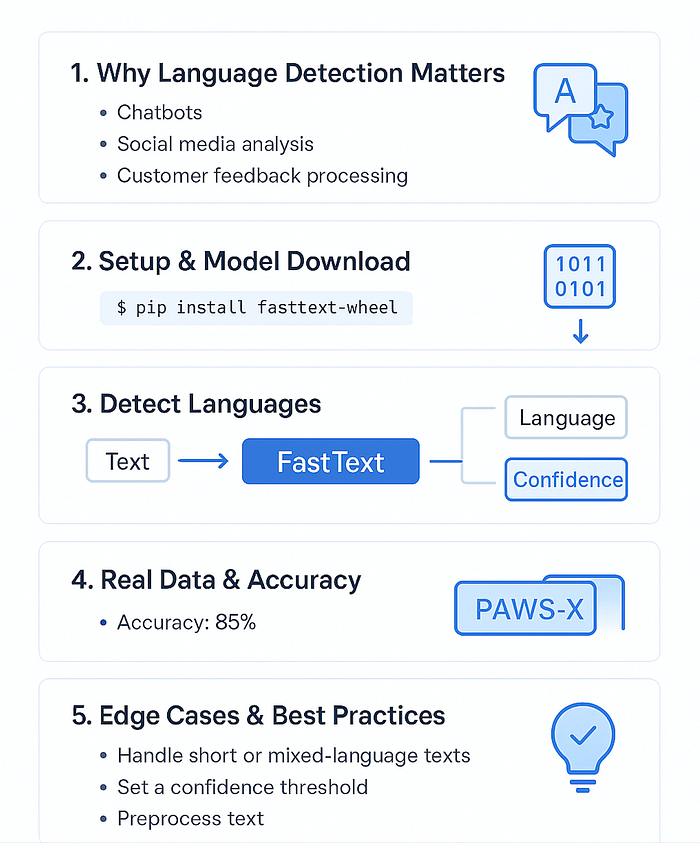
This beginner-friendly guide is the first part of a two-part series on language detection. Here, we’ll walk through how to build a practical, production-ready language detector using FastText, a powerful open-source library from Meta AI, and real-world multilingual data from Hugging Face, a great foundation for most NLP projects.
In Part 2, we’ll build on this foundation to tackle one of the field’s toughest problems: creating reliable language detection models for African and other low-resource languages, where pre-trained models often struggle.
FastText vs Other Language Detection Libraries
Here’s how FastText compares to popular alternatives:

Why Choose FastText?
- Speed: Processes thousands of texts per second
- Accuracy: Trained on massive datasets, handles real-world text well
- Offline: No API keys, network calls, or usage limits
- Robust: Works well with noisy, informal text (social media, chat)
- Maintained: Actively developed by Facebook Research
By the end, you’ll know how to:
- Set up and run FastText for language detection.
- Test your model on real multilingual datasets.
- Build a reusable language detection class for production.
- Handle tricky cases like short text, slang, or code-switching.
Let’s dive in and see how surprisingly simple and powerful multilingual text detection can be.
Prerequisites
- Basic Python knowledge
- Familiarity with installing packages using pip
Step 1: Setting Up Your Environment
First, let’s install the required packages:
Quick Setup: You can also clone the repository and run
pip install -r requirements.txtfor automatic setup:
git clone https://github.com/Gift-Ojeabulu/fasttext-language-detection.git
cd fasttext-language-detection
pip install -r requirements.txt
What’s in the repo: The complete codebase includes organized examples, test data, and a production-ready class; see the project structure for details.
pip install fasttext-wheel pandas datasets
Now let’s import what we need:
import fasttext
import pandas as pd
from datasets import load_dataset
import urllib.request
import os

# Download FastText's language detection model
def download_language_model():
 model_url = 'https://dl.fbaipublicfiles.com/fasttext/supervised-models/lid.176.bin'
 model_path = 'lid.176.bin'

 if not os.path.exists(model_path):
 print("Downloading FastText language detection model...")
 urllib.request.urlretrieve(model_url, model_path)
 print("Model downloaded successfully!")

 return model_path
# Download and load the model
model_path = download_language_model()
language_model = fasttext.load_model(model_path)
Step 2: Understanding FastText Language Detection
FastText returns language codes with confidence scores. Here’s a quick reference for common languages:
LANGUAGE_NAMES = {
 'en': 'English',
 'es': 'Spanish',
 'fr': 'French',
 'de': 'German',
 'it': 'Italian',
 'pt': 'Portuguese',
 'ru': 'Russian',
 'ja': 'Japanese',
 'ko': 'Korean',
 'zh': 'Chinese',
 'ar': 'Arabic',
 'hi': 'Hindi',
 'tr': 'Turkish',
 'nl': 'Dutch'
}

def clean_language_code(pred_lang):
 """FastText returns '__label__en' format, we want just 'en'"""
 return pred_lang.replace('__label__', '')
def get_language_name(code):
 return LANGUAGE_NAMES.get(code, f'Unknown ({code})')
Step 3: Basic Language Detection
Let’s start with a simple function:
def detect_language(text, min_confidence=0.7):
 """
 Detect language using FastText

 Args:
 text (str): Text to analyze
 min_confidence (float): Minimum confidence threshold (0-1)

 Returns:
 dict: Detection results
 """
 if not text or len(text.strip()) < 3:
 return {
 'text': text,
 'language': 'unknown',
 'language_name': 'Unknown',
 'confidence': 0.0,
 'status': 'too_short'
 }

 # Clean the text
 clean_text = text.replace('\n', ' ').strip()

 # Predict language
 predictions = language_model.predict(clean_text, k=1) # k=1 means top 1 prediction

 pred_lang = clean_language_code(predictions[0][0])
 confidence = float(predictions[1][0])

 status = 'success' if confidence >= min_confidence else 'low_confidence'

 return {
 'text': text,
 'language': pred_lang,
 'language_name': get_language_name(pred_lang),
 'confidence': confidence,
 'status': status
 }

# Test with sample texts
sample_texts = [
 "Hello, how are you doing today?",
 "Bonjour, comment allez-vous?",
 "Hola, ¿cómo estás?",
 "Guten Tag, wie geht es Ihnen?",
 "こんにちは、元気ですか?",
 "OK", # Short text
 "This is a longer English sentence that should be detected easily."
]
print("Basic Language Detection Results:")
print("-" * 50)
for text in sample_texts:
 result = detect_language(text)
 print(f"Text: '{text}'")
 print(f"Language: {result['language_name']} ({result['confidence']:.3f})")
 print(f"Status: {result['status']}\n")
Step 4: Working with Real Data from Hugging Face
Now let’s work with actual multilingual data from the PAWS-X dataset, a multilingual collection of sentence pairs used for paraphrase detection.
This dataset contains the same content translated across 7 languages (English, Spanish, French, German, Japanese, Korean, and Chinese), making it perfect for testing our language detector on real, diverse text samples.
About the dataset
The PAWS-X dataset we will be using contains over 56,000 sentence pairs across 7 languages, originally created by Google Research for cross-lingual paraphrase identification. It’s an excellent resource for multilingual NLP tasks.

- You can explore the full dataset, find more details and other language variants at: https://huggingface.co/datasets/google-research-datasets/paws-x
# Load a multilingual dataset from Hugging Face
# We'll use the "paws-x" dataset which contains paraphrases in multiple languages
print("Loading real multilingual data from Hugging Face...")

def load_multilingual_sample():
 """Load sample data from different languages"""
 try:
 # Load PAWS-X dataset (paraphrases in multiple languages)
 dataset = load_dataset("paws-x", "en", split="train[:100]") # English samples
 english_texts = [item['sentence1'] for item in dataset]

 dataset_es = load_dataset("paws-x", "es", split="train[:100]") # Spanish samples
 spanish_texts = [item['sentence1'] for item in dataset_es]

 dataset_fr = load_dataset("paws-x", "fr", split="train[:100]") # French samples
 french_texts = [item['sentence1'] for item in dataset_fr]

 # Combine samples
 sample_data = []

 # Take first 20 from each language
 for text in english_texts[:20]:
 sample_data.append({"text": text, "true_language": "en"})

 for text in spanish_texts[:20]:
 sample_data.append({"text": text, "true_language": "es"})

 for text in french_texts[:20]:
 sample_data.append({"text": text, "true_language": "fr"})

 return sample_data

 except Exception as e:
 print(f"Error loading dataset: {e}")
 # Fallback to manual examples
 return [
 {"text": "The quick brown fox jumps over the lazy dog.", "true_language": "en"},
 {"text": "El zorro marrón rápido salta sobre el perro perezoso.", "true_language": "es"},
 {"text": "Le renard brun rapide saute par-dessus le chien paresseux.", "true_language": "fr"}
 ]
# Load the data
sample_data = load_multilingual_sample()
print(f"Loaded {len(sample_data)} text samples")
# Process the real data
results = []
correct_predictions = 0
print("\nProcessing real multilingual data...")
print("-" * 50)
for i, item in enumerate(sample_data):
 result = detect_language(item['text'])
 result['true_language'] = item['true_language']
 result['correct'] = result['language'] == item['true_language']

 if result['correct']:
 correct_predictions += 1

 results.append(result)

 # Show first few results
 if i < 5:
 print(f"Text: '{item['text'][:60]}...'")
 print(f"True: {get_language_name(item['true_language'])}")
 print(f"Predicted: {result['language_name']} ({result['confidence']:.3f})")
 print(f"Correct: {result['correct']}\n")
accuracy = correct_predictions / len(results)
print(f"Accuracy: {accuracy:.2%} ({correct_predictions}/{len(results)})")
Step 5: Building a Practical Language Detector Class
Let’s create a reusable class for your projects:

class SimpleLanguageDetector:
 """A simple, production-ready language detector using FastText"""

 def __init__(self, confidence_threshold=0.7):
 self.confidence_threshold = confidence_threshold
 self.model = language_model # Use the model we loaded earlier
 self.language_names = LANGUAGE_NAMES

 def detect(self, text):
 """Detect language of text"""
 return detect_language(text, self.confidence_threshold)

 def detect_batch(self, texts, show_progress=True):
 """Detect language for multiple texts"""
 results = []

 for i, text in enumerate(texts):
 result = self.detect(text)
 results.append(result)

 if show_progress and (i + 1) % 50 == 0:
 print(f"Processed {i + 1}/{len(texts)} texts...")

 return results

 def get_summary(self, results):
 """Get summary statistics from batch results"""
 total = len(results)
 successful = len([r for r in results if r['status'] == 'success'])

 # Count languages
 language_counts = {}
 for result in results:
 if result['status'] == 'success':
 lang = result['language_name']
 language_counts[lang] = language_counts.get(lang, 0) + 1

 return {
 'total_texts': total,
 'successful_detections': successful,
 'success_rate': successful / total if total > 0 else 0,
 'language_distribution': language_counts
 }

# Example usage
detector = SimpleLanguageDetector(confidence_threshold=0.6)
# Test with our real data
print("\nUsing Language Detector Class:")
print("-" * 40)
batch_results = detector.detect_batch([item['text'] for item in sample_data[:10]], show_progress=False)
summary = detector.get_summary(batch_results)
print(f"Summary Statistics:")
print(f"- Total texts: {summary['total_texts']}")
print(f"- Successful detections: {summary['successful_detections']}")
print(f"- Success rate: {summary['success_rate']:.2%}")
print(f"- Languages found: {list(summary['language_distribution'].keys())}")
Step 6: Handling Common Challenges
Here are solutions for common issues you’ll encounter:

def handle_challenging_texts():
 """Demonstrate handling of challenging cases"""

 challenging_cases = [
 "OK", # Very short
 "123 456 789", # Numbers only
 "Hello mundo!", # Mixed languages
 "@user check this out! https://example.com", # Social media style
 "", # Empty string
 "LOL ROFL LMAO" # Internet slang
 ]

 print("Handling Challenging Cases:")
 print("-" * 40)

 for text in challenging_cases:
 result = detector.detect(text)
 print(f"Text: '{text}'")
 print(f"Result: {result['language_name']} ({result['status']})")
 if result['confidence'] > 0:
 print(f"Confidence: {result['confidence']:.3f}")
 print()

handle_challenging_texts()
Tips for Better Results
- Text Length: FastText works best with at least 10–20 characters
- Clean Data: Remove URLs, mentions, and excessive punctuation when possible
- Confidence Thresholds: Adjust based on your needs (0.5–0.9 typically)
- Mixed Languages: For texts with multiple languages, consider splitting sentences first
What’s Next?
Tackling African and Low-Resource Languages
This article gave us a solid foundation for multilingual language detection using FastText and Hugging Face. But the real world is more complex; many languages, especially across Africa, are underrepresented in existing models.
In Part 2 of this series, we’ll take the next step by:
- Collecting and preparing real-world African language datasets from Hugging Face.
- Evaluating how standard models perform on these languages and why they often fail.
- Fine-tuning or training new detection models specifically for low-resource languages.
- Exploring practical applications where accurate African language detection makes a difference.
If you’re passionate about NLP for underrepresented languages, you won’t want to miss it.
Conclusion
You now have a working language detector using FastText!
Here’s what you learned:
- How to set up and use FastText for language detection
- Working with real multilingual data from Hugging Face
- Building a reusable language detection class
- Handling common challenges and edge cases
This detector can handle most real-world scenarios and is fast enough for production use. You can integrate it into chatbots, content management systems, or data analysis pipelines.
Next Steps
- Try it with your own multilingual data.
- Experiment with different confidence thresholds.
- Combine with other text processing tools.
- Consider adding language-specific preprocessing for your use case.
FastText makes language detection surprisingly simple and accurate now, so you can build multilingual applications with confidence!
References
- Bojanowski, P., Grave, E., Joulin, A., & Mikolov, T. (2017). Enriching Word Vectors with Subword Information. Transactions of the Association for Computational Linguistics, 5, 135–146. https://github.com/facebookresearch/fastText
- Yang, Y., Zhang, Y., Tar, C., & Baldridge, J. (2019). PAWS-X: A Cross-lingual Adversarial Dataset for Paraphrase Identification. arXiv preprint arXiv:1908.11828. https://arxiv.org/abs/1908.11828
- Lhoest, Q., Villanova del Moral, A., von Platen, P., Wolf, T., et al. (2021). Datasets: A Community Library for Natural Language Processing. Proceedings of the 2021 Conference on Empirical Methods in Natural Language Processing. https://huggingface.co/docs/datasets/
- Facebook Research. (2023). FastText Language Identification Model (176 languages). https://dl.fbaipublicfiles.com/fasttext/supervised-models/lid.176.bin
- Google Research Datasets. PAWS-X: A Cross-lingual Adversarial Dataset for Paraphrase Identification. Hugging Face Datasets. https://huggingface.co/datasets/google-research-datasets/paws-x
Additional Resources
- FastText Documentation: https://fasttext.cc/docs/en/language-identification.html
- Python Package (fasttext-wheel): https://pypi.org/project/fasttext-wheel/
- ISO 639–1 Language Codes: https://www.iso.org/iso-639-language-codes.html
Join thousands of data leaders on the AI newsletter. Join over 80,000 subscribers and keep up to date with the latest developments in AI. From research to projects and ideas. If you are building an AI startup, an AI-related product, or a service, we invite you to consider becoming a sponsor.
Published via Towards AI
Towards AI Academy
We Build Enterprise-Grade AI. We'll Teach You to Master It Too.
15 engineers. 100,000+ students. Towards AI Academy teaches what actually survives production.
Start free — no commitment:
→ 6-Day Agentic AI Engineering Email Guide — one practical lesson per day
→ Agents Architecture Cheatsheet — 3 years of architecture decisions in 6 pages
Our courses:
→ AI Engineering Certification — 90+ lessons from project selection to deployed product. The most comprehensive practical LLM course out there.
→ Agent Engineering Course — Hands on with production agent architectures, memory, routing, and eval frameworks — built from real enterprise engagements.
→ AI for Work — Understand, evaluate, and apply AI for complex work tasks.
Note: Article content contains the views of the contributing authors and not Towards AI.
Related posts
Recent Posts






