


Jules by Google 🐙
Last Updated on December 2, 2025 by Editorial Team
Author(s): Intelligent Hustle
Originally published on Towards AI.
Jules by Google 🐙
When Google built an AI that doesn’t just complete your code — it completes your entire workday

The 3 AM Epiphany That Changed Software Development
Picture this: It’s 3 AM, and you’re lying in bed, staring at the ceiling. That bug you couldn’t fix before leaving work is eating at you. The refactoring task your team needs done by tomorrow morning looms over you. You mentally calculate: if you wake up at 6 AM and skip breakfast, you might finish by the standup meeting.
But what if you didn’t have to?
What if, instead of losing sleep, you could simply write a message — “Fix the authentication bug in the user service and add comprehensive tests” — hit send, and wake up to a pull request waiting for your review? Not a code suggestion. Not a half-baked snippet. A complete, tested, thoughtfully planned solution with a detailed explanation of what was changed and why.
Welcome to the world of Jules, Google’s autonomous coding agent. And if you think this sounds like science fiction, you’re about six months behind the curve. Because Jules isn’t coming — it’s already here, and it’s already changing how thousands of developers work. 🚀
What Exactly IS Jules? (And Why “Agent” Changes Everything)
Let’s get the fundamentals straight: Jules is an autonomous coding agent from Google that integrates with GitHub and operates asynchronously in secure cloud environments. But those words — “autonomous” and “asynchronous” — are doing a lot of heavy lifting.
Here’s what makes Jules fundamentally different from every other AI coding tool you’ve used:
Not a Copilot. An Actual Pilot. ✈️
Most AI coding assistants are like a really smart passenger giving you directions while you drive. GitHub Copilot suggests the next line. ChatGPT writes functions when you ask. Cursor helps you refactor as you code.
Jules is different — it’s an autonomous agent that reads your code, understands your intent, and gets to work independently. You’re not pair programming with Jules. You’re delegating to Jules.
Think of it this way:
- GitHub Copilot = Your very smart autocomplete
- ChatGPT/Claude for coding = Your instant consultant
- Jules = Your junior developer who works the night shift
The Architecture That Makes It Work
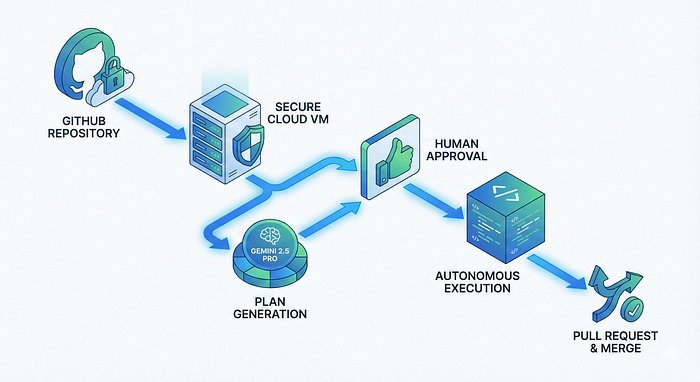
Jules clones your codebase into a secure Google Cloud virtual machine, understands the full project context, and performs tasks like writing tests, fixing bugs, and building features. Here’s the beautiful part: while it works, you can literally close your laptop and go home.
The workflow looks like this:
- You assign a task → Either through the Jules web interface or by labeling a GitHub issue with “jules”
- Jules creates a plan → It analyzes your codebase and presents a detailed execution plan
- You approve (or modify) the plan → Full control before any code is touched
- Jules executes asynchronously → Works in the background in a secure VM
- You review the diff → See exactly what changed, with reasoning explained
- Jules creates a PR → Ready to merge or request changes
🎯 The game-changer: You can assign Jules a task at 5 PM and review the completed work at 9 AM the next day. Or assign three tasks and let Jules work on them overnight while you binge-watch your favorite show.
Why Jules Matters Right Now (The Perfect Storm of Timing)
Three major forces are colliding in 2025 that make Jules not just useful, but essential:
1. The Async Work Revolution 🌍
Remote work taught us something profound: synchronous collaboration is overrated. The best teams operate asynchronously — working when they’re most productive, not when everyone else is online.
Jules extends this philosophy to AI assistance. You don’t need to babysit it. You don’t need to be online while it works. You assign, it executes, you review. This matches how modern teams actually work.
2. The Junior Developer Shortage 📉
Here’s an uncomfortable truth: companies can’t find (or afford) enough junior developers to handle the grunt work — writing tests, fixing bugs, updating dependencies, refactoring legacy code.
Jules fills that gap. Not by replacing juniors entirely, but by handling the tasks that would typically fall to them, freeing human developers to focus on architecture, design, and complex problem-solving.
How Jules Actually Works: Under the Hood 🔧
Let’s get technical for a moment, because understanding Jules’s architecture explains why it’s so powerful.
The Gemini 2.5 Pro Advantage
Jules uses the advanced thinking capabilities of Gemini 2.5 Pro to develop coding plans, giving it several superpowers:
Extended Context Windows: Jules can “see” your entire codebase at once — not just snippets, but the full context of how everything connects.
Reasoning Capabilities: It doesn’t just pattern-match code. It reasons about why certain changes are needed and how they’ll affect other parts of your system.
Multimodal Understanding: Jules now supports multimodal capabilities, meaning it can look at your web application UI, understand visual elements, and generate code based on what it sees.
The Secure Sandbox Environment
Here’s what happens when you assign Jules a task:
Step 1: Repository Cloning
Jules fetches your repository and clones it to a Cloud VM, creating an isolated environment that’s completely separate from your production code.
Step 2: Context Analysis
Jules reads through your codebase, understanding:
- File structure and dependencies
- Coding patterns and conventions
- Existing tests and documentation
- Special instructions (more on this below)
Step 3: Plan Generation
Jules develops a plan utilizing the latest Gemini 2.5 Pro model, breaking down the task into specific changes with clear reasoning.
Step 4: Human-in-the-Loop Approval
Before touching any code, Jules presents its plan. You can approve, modify, or reject it. You’re always in control.
Step 5: Execution & Testing
Jules makes the changes, runs your test suite, and verifies everything works. If tests fail, it iterates until they pass.
Step 6: Pull Request Creation
Jules creates a PR of the changes with detailed diffs, ready for your review and approval.
🔒 Privacy Guarantee: Jules is private by default — it doesn’t train on your private code, and your data stays isolated within the execution environment.
Real-World Examples: What Can Jules Actually Do?
Let’s move from theory to practice. Here are actual use cases where Jules shines:
Example 1: The Midnight Bug Fix 🐛
Scenario: A critical bug appears in production at 11 PM. The authentication service is rejecting valid tokens intermittently.
Traditional approach: Call the on-call engineer, spend 2 hours debugging, push a hotfix, stay up until 1 AM monitoring.
With Jules:
Task: "Investigate and fix the intermittent auth token rejection
in the authentication service. Add tests to prevent regression."
Jules:
- Analyzes the auth service code and logs
- Identifies the race condition in token validation
- Implements a fix with proper locking
- Adds comprehensive test coverage
- Creates a PR with detailed explanation
Time saved: 1.5 hours of engineer time, and they sleep through it.
Example 2: The Dependency Update Nightmare 🔄
Scenario: Your Node.js version is two years out of date. Updating means touching dozens of files, updating dependencies, fixing breaking changes.
With Jules:
Task: "Update the codebase from Node.js 16 to Node.js 20.
Handle all breaking changes and update package.json accordingly."
Jules handles tasks like updating the codebase to a new version of Node.js, methodically working through:
- Package.json updates
- Breaking API changes
- Deprecated function replacements
- Test suite updates
- CI/CD configuration changes
The AGENTS.md Secret: Teaching Jules About Your Codebase 📝
Here’s a feature most people miss: Jules automatically looks for a file named AGENTS.md in the root of your repository to better understand your code and generate more relevant plans.
What is AGENTS.md?
Think of it as a README specifically for AI agents. It’s where you document:
- Your codebase architecture and conventions
- How different services communicate
- Special build or test requirements
- Agent-specific instructions and workflows
Example AGENTS.md:
# Agent Instructions for Jules
## Architecture Overview
This is a microservices architecture with:
- Frontend: React + TypeScript in /client
- Backend: Node.js Express services in /services
- Database: PostgreSQL with Prisma ORM## Coding Conventions
- Use async/await, never callbacks
- All functions must have TypeScript types
- Tests go in __tests__ folders next to source files
- Use ESLint and Prettier (configs in root)## Testing
- Run `npm test` to execute all tests
- Integration tests require Docker (docker-compose up -d)
- Minimum 80% coverage for new code## Common Tasks
When updating dependencies:
1. Update package.json
2. Run npm install
3. Run test suite
4. Update CHANGELOG.md
💡 Pro tip: Keeping AGENTS.md updated dramatically improves Jules’s output quality. It’s like having a comprehensive onboarding document that Jules actually reads (unlike some of your teammates).
Jules vs. The Competition: How It Stacks Up 🥊
The AI coding assistant space is crowded. How does Jules compare?
Jules vs. GitHub Copilot
Copilot’s strength: Real-time code completion and inline suggestions
Copilot’s limitation: Doesn’t work asynchronously or handle full tasks autonomously
Jules’s strength: Explicitly designed as an asynchronous, GitHub-integrated agent that executes in a secure cloud VM, returning plan/diff artifacts for review
Jules’s limitation: Not integrated into your IDE for instant suggestions
Verdict: They serve different purposes. Copilot is your coding companion. Jules is your coding colleague.
Jules vs. OpenAI’s Codex Agent
This is the most direct comparison. OpenAI recently released an autonomous Codex agent that works in a sandbox, much like Jules.
Early testing suggests: One tester remarked that “Jules beats Codex by a lot” on specific tasks, though the competition is fierce and constantly evolving.
Jules’s advantage: Tight GitHub integration, polished UX, Google Cloud infrastructure
Codex’s advantage: Potentially more powerful base model, OpenAI’s track record
Verdict: Too close to call definitively. Both are excellent; choice may depend on your existing toolchain.
The New Developer Experience: Command Line & API 🖥️
Google recently introduced Jules Tools, a command-line interface that lets you bring Jules directly into your terminal, allowing you to start, stop, and verify tasks alongside your normal commands.
Why this matters:
Before: Switch to Jules web interface → Assign task → Switch back to terminal → Wait → Switch back to check
After:
$ jules start "Add error handling to payment service"
✓ Task started: jules-task-abc123
$ jules status
⏳ Task in progress: Planning changes...
$ jules approve # After reviewing the plan
✓ Executing changes...
The Jules API (Early Access)
Jules is also sharing an early look at the Jules API, which will allow you to integrate Jules directly into your own systems and workflows.
Potential integrations:
- Trigger Jules tasks from your CI/CD pipeline
- Auto-assign Jules to specific GitHub issue types
- Build custom dashboards showing Jules activity
- Integrate with project management tools
This opens the door to truly autonomous development workflows where tasks flow automatically from conception to implementation to review.
Common Pitfalls & How to Avoid Them ⚠️
Jules is powerful, but it’s not magic. Here are mistakes developers make and how to avoid them:
Pitfall #1: Vague Task Descriptions
Bad: “Fix the bug”
Good: “Fix the authentication timeout issue in /services/auth/token-validator.js. The problem appears when tokens are validated under high concurrent load.”
Why it matters: Jules is smart, but specific instructions produce dramatically better results.
Pitfall #2: Not Reviewing Plans
Jules always shows you its plan before executing. Don’t just auto-approve.
What to check:
- Is the approach sensible?
- Are all edge cases considered?
- Are the right files being modified?
- Does the plan match your mental model?
You can modify the plan if needed. Use this power!
Pitfall #3: Ignoring AGENTS.md
AGENTS.md helps Jules and your teammates work with your repo more effectively. Skipping it means Jules has to guess your conventions.
Investment: 30 minutes to write a good AGENTS.md
Payoff: Dramatically better results on every subsequent task
Pitfall #4: Wrong Tool for the Job
Jules excels at:
- Bug fixes with clear symptoms
- Test generation
- Refactoring and code updates
- Documentation
- Dependency updates
- Repetitive tasks
Jules struggles with:
- Greenfield architecture decisions
- Complex algorithm design requiring novel solutions
- Tasks requiring significant creative problem-solving
- Debugging issues without clear reproduction steps
Know when to use Jules and when to code yourself.
Implementation Guide: Getting Started with Jules in 30 Minutes ⚡
Let’s get you up and running. Here’s your step-by-step guide:
Phase 1: Initial Setup (10 minutes)
Step 1: Visit jules.google and sign in with your Google account
Step 2: Connect your GitHub account
- Click “Connect GitHub”
- Authorize Jules to access your repositories
- Select which repositories Jules can access
Step 3: Choose your first repository
- Pick a smaller, non-critical project for testing
- Jules needs read/write access to create branches and PRs
Phase 2: Prepare Your Repository (10 minutes)
Step 4: Create an AGENTS.md file in your repo root
# Agent Instructions
## Project Overview
[Brief description of your project]## Technology Stack
- Language/Framework: [e.g., Python/Django]
- Database: [e.g., PostgreSQL]
- Testing: [e.g., pytest]## Coding Conventions
[Your team's standards]## Running Tests
[Command to run tests]
## Common Patterns
[Any important patterns Jules should follow]
Step 5: Commit and push AGENTS.md to your repository
Phase 3: Your First Task (10 minutes)
Step 6: Assign a simple, contained task
Good first tasks:
- “Add type hints to all functions in utils/helpers.py”
- “Write unit tests for the UserService class”
- “Update the README with installation instructions”
Step 7: Review Jules’s plan
- Read through what Jules proposes to do
- Make sure it makes sense
- Approve or modify as needed
Step 8: Let Jules work
- Jules will execute in the background
- Check your email for completion notification (enable in settings)
- Or poll the Jules dashboard
Step 9: Review the PR
- Look at the diff Jules created
- Run tests locally if you want
- Request changes or merge
Step 10: Iterate
- Did Jules do what you expected?
- Update your task description or AGENTS.md if needed
- Try a slightly more complex task next
Advanced Workflows: Leveling Up Your Jules Game 🎮
Once you’re comfortable with basics, try these advanced patterns:
Pattern 1: The Overnight Build
Before leaving work:
Task 1: "Implement password reset functionality with email verification"
Task 2: "Add integration tests for password reset flow"
Task 3: "Update API documentation for new password reset endpoints"
Review all three PRs in the morning. Ship a complete feature before your coffee gets cold.
Pattern 2: The Dependency Cascade
Task: "Update all outdated npm packages to latest stable versions.
Handle breaking changes. Ensure all tests pass. Update
CHANGELOG.md with list of updated packages."
What would take hours of careful work becomes a delegated task.
Pattern 3: The Documentation Sprint
Task: "Generate comprehensive README.md files for all services
in /microservices/*. Include purpose, setup instructions, API
endpoints, and environment variables. Follow the template in
/docs/readme-template.md"
Tackle documentation debt systematically without the soul-crushing boredom.
Pattern 4: The Test Coverage Blitz
Task: "Analyze test coverage in /src/services. For any file
with coverage below 80%, write additional unit tests to reach
90% coverage. Focus on edge cases and error conditions."
Improve your codebase quality while you work on new features.
The Future: Where Jules (and Autonomous Agents) Are Heading 🔮
We’re at an inflection point. Google describes this moment as a turning point where agentic development is shifting from prototype to product and quickly becoming central to how software gets built.
What’s Coming Next:
Multi-Agent Collaboration
Imagine multiple Jules-like agents working together — one handling frontend, one backend, one tests, one documentation — coordinating to build complete features autonomously.
Proactive Agents
Future versions might not wait for assignments. They could scan your issue tracker, understand priorities, and propose solutions before you ask.
Deeper Integration
IDE plugins, VS Code extensions, deeper CI/CD integration — Jules everywhere in your development workflow.
Learning Your Team
Agents that learn your specific team’s patterns, preferences, and conventions over time, producing increasingly tailored solutions.
The Philosophical Shift
We’re moving from:
- “AI assists me while I code” → “I delegate tasks to AI”
- Synchronous collaboration → Asynchronous orchestration
- AI as tool → AI as team member
This isn’t just a productivity boost. It’s a fundamental rethinking of what “software development” means.
Key Takeaways: What You Need to Remember 🔑
Let’s distill everything into the essentials:
1. Jules is a paradigm shift: It’s not about faster coding — it’s about autonomous task completion.
2. Asynchronous is the killer feature: Assign work and move on. Jules doesn’t need you watching over its shoulder.
3. Privacy is built-in: Jules doesn’t train on your private code, and your data stays isolated.
4. You maintain control: Every change goes through plan approval and PR review. You’re the manager, Jules is the executor.
5. Start small, scale up: Begin with simple tasks, build trust, then delegate more complex work.
6. AGENTS.md is your secret weapon: Invest time in this file for dramatically better results.
7. It’s tool selection, not replacement: Know when to use Jules and when to code yourself.
8. The competition is heating up: Jules, Codex, Cursor — we’re in a golden age of AI coding assistance.
9. The ROI is clear: Even modest time savings pay for themselves many times over.
10. This is just the beginning: Autonomous agents will become standard practice in software development.
Final Thoughts: The New Contract Between Humans and AI 🤝
Here’s what keeps me up at night (in a good way): Jules represents something deeper than just another developer tool.
For decades, the relationship between programmers and their tools has been simple: tools do what we tell them, when we tell them, exactly how we tell them. They’re fast, precise, and utterly dependent on our constant direction.
Jules breaks that contract.
When you assign Jules a task and walk away, you’re entering a new kind of relationship — one based on trust, delegation, and collaboration rather than direct control. You’re managing, not micromanaging. You’re reviewing, not doing.
This shift is uncomfortable for some developers. “What if Jules makes a mistake?” they ask. “What if it misunderstands the requirements?”
But here’s the thing: junior developers make mistakes too. They misunderstand requirements too. Yet we delegate to them anyway, because that’s how teams scale. We provide context, review their work, and help them improve.
Jules is no different. It’s a team member that works asynchronously, never needs sleep, doesn’t take vacations, and continuously gets smarter with every model update.
The question isn’t whether to adopt tools like Jules. The question is how quickly you can adapt your workflows to leverage them before your competitors do.
Your Action Plan: What to Do Right Now 🎯
Don’t let this be another article you read and forget. Here’s your concrete next steps:
Today:
- Visit jules.google and create an account
- Connect a non-critical repository to experiment
- Create a basic AGENTS.md file
This Week:
- Assign Jules 3 simple tasks
- Review the results and iterate on your task descriptions
- Expand AGENTS.md with learnings
This Month:
- Integrate Jules into your team’s workflow
- Identify regular tasks that Jules can handle autonomously
- Measure time saved and quality of output
- Share learnings with your team
This Quarter:
- Develop standard practices for your team’s Jules usage
- Build custom integrations using Jules API (when available)
- Train team members on effective delegation to AI agents
- Evaluate upgrading to Pro or Ultra tier based on usage
In Closing: Welcome to the Future of Software Development 🚀
Thousands of developers have already completed tens of thousands of tasks with Jules, resulting in over 140,000 code improvements shared publicly. These aren’t experiments or toys. These are real developers shipping real code to production, with an AI agent doing significant portions of the work.
The future of software development isn’t about AI replacing developers. It’s about developers who use AI replacing developers who don’t.
Jules is your opportunity to be on the right side of that divide.
So here’s my challenge to you: assign Jules a task today. Not tomorrow. Not after you’ve read more articles or watched more tutorials. Today.
Pick something simple. See what happens. Start building your experience with autonomous coding agents now, while it’s still early enough to be a differentiator.
Because in five years, every development team will have AI agents handling routine tasks. The question is: will you have five years of experience using them, or will you be frantically trying to catch up?
The future is already here, running in a Google Cloud VM, waiting for you to assign it a task.
What are you going to delegate first? 🤔
P.S. — Yes, Jules helped me research parts of this article. No, it didn’t write it — I did. But it did save me hours of documentation review. And that’s exactly the point.
Join thousands of data leaders on the AI newsletter. Join over 80,000 subscribers and keep up to date with the latest developments in AI. From research to projects and ideas. If you are building an AI startup, an AI-related product, or a service, we invite you to consider becoming a sponsor.
Published via Towards AI
Towards AI Academy
We Build Enterprise-Grade AI. We'll Teach You to Master It Too.
15 engineers. 100,000+ students. Towards AI Academy teaches what actually survives production.
Start free — no commitment:
→ 6-Day Agentic AI Engineering Email Guide — one practical lesson per day
→ Agents Architecture Cheatsheet — 3 years of architecture decisions in 6 pages
Our courses:
→ AI Engineering Certification — 90+ lessons from project selection to deployed product. The most comprehensive practical LLM course out there.
→ Agent Engineering Course — Hands on with production agent architectures, memory, routing, and eval frameworks — built from real enterprise engagements.
→ AI for Work — Understand, evaluate, and apply AI for complex work tasks.
Note: Article content contains the views of the contributing authors and not Towards AI.
Related posts
Recent Posts






