


I Built CommitRecap so Your GitHub Year Reads Like a Story
Last Updated on December 29, 2025 by Editorial Team
Author(s): Kushal Banda
Originally published on Towards AI.

GitHub shows totals and a grid. You already know you wrote code this year; what you want is the story behind it.
CommitRecap turns a username into a guided recap that feels personal, visual, and easy to share.
Live demo: https://commit-recap.vercel.app
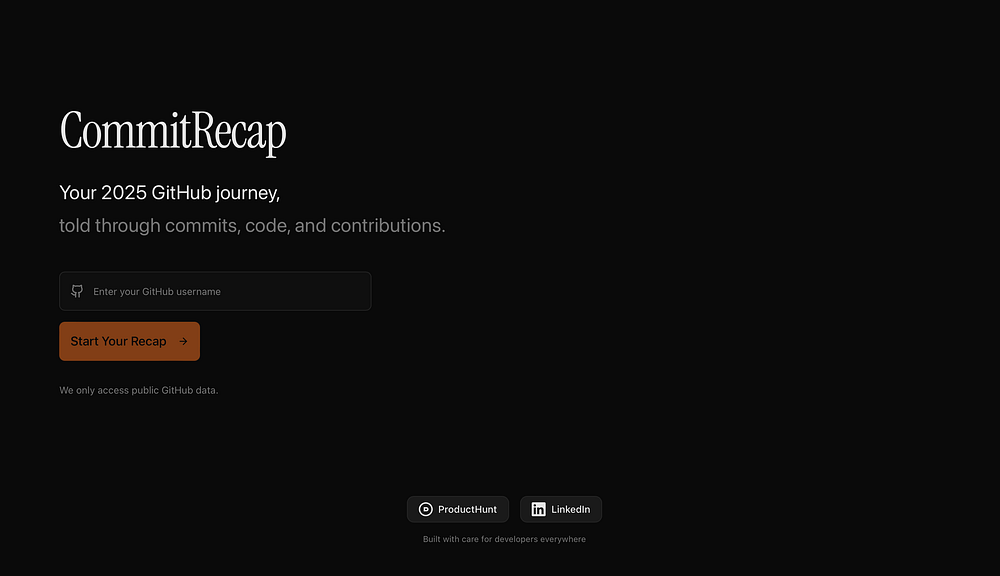
The landing screen sets the promise
One input, one action, no detours. The line “We only access public GitHub data” tells you the scope and removes privacy anxiety before you start.
I built it this way because a recap is a flow. If you slow people down at the start, they never reach the pages that make them smile. The start screen exists to reduce friction and make the next click inevitable.
The recap flow is built to move

The large number gives you the headline: commits in the year. Then the supporting stats follow, like PRs and reviews. It’s the right order. Developers scan the big number, then confirm with the smaller ones.
The activity timeline underneath is the second act. It highlights the busiest day with a sharp spike. That single highlight does more work than a dense chart. It gives you a memory: you can look at that peak and think about what you shipped.
The ending needs to feel shareable

The recap ends with a compact share card and two actions; download or copy. This is the whole point. Recaps are for
sharing, and the share artifact has to stand on its own. The card compresses your year into a few lines: top
languages, commit count, PRs, reviews, and a streak. It is small, readable, and looks good on a timeline.
This screen also proves a broader lesson, the recap is not done until it can travel.
Architecture overview
CommitRecap runs on two separate systems: a Next.js client hosted on Vercel and a FastAPI backend running on AWS Lambda.
┌─────────────────────────────────────────────────────────────────┐
│ Vercel Edge │
│ ┌───────────────────────────────────────────────────────────┐ │
│ │ Next.js App Router │ │
│ │ │ │
│ │ ┌─────────────┐ ┌─────────────┐ ┌─────────────────┐ │ │
│ │ │ React Query │───│ Zustand │───│ Page Components │ │ │
│ │ │ (fetch) │ │ (store) │ │ (render) │ │ │
│ │ └─────────────┘ └─────────────┘ └─────────────────┘ │ │
│ └───────────────────────────────────────────────────────────┘ │
└─────────────────────────────────────────────────────────────────┘
 │
 │ HTTPS
 ▼
┌─────────────────────────────────────────────────────────────────┐
│ AWS Lambda │
│ ┌───────────────────────────────────────────────────────────┐ │
│ │ FastAPI Application │ │
│ │ │ │
│ │ ┌─────────────┐ ┌─────────────┐ ┌─────────────────┐ │ │
│ │ │ Router │───│ Services │───│ GitHub Client │ │ │
│ │ │ /github/* │ │ (aggregate) │ │ (REST + GQL) │ │ │
│ │ └─────────────┘ └─────────────┘ └─────────────────┘ │ │
│ └───────────────────────────────────────────────────────────┘ │
└─────────────────────────────────────────────────────────────────┘
 │
 │ GraphQL / REST
 ▼
┌─────────────────────────────────────────────────────────────────┐
│ GitHub API │
│ REST (profiles, repos) + GraphQL (contributions) │
└─────────────────────────────────────────────────────────────────┘
Why this split works
Vercel for the client handles edge caching, automatic deployments from Git, and global CDN distribution. The Next.js App Router gives me file-based routing and server components where needed.
AWS Lambda for the backend runs FastAPI in a serverless function. Cold starts are minimal because the function stays warm during peak usage. Lambda scales automatically when multiple users hit the app simultaneously, and I only pay for actual compute time.
This separation keeps concerns clean. The client handles rendering and user flow. The backend handles GitHub API calls, rate limiting, and data aggregation.
Server architecture
The FastAPI backend runs on AWS Lambda through Mangum, an adapter that translates Lambda events into ASGI requests.
server/
├── lambda_handler.py # AWS Lambda entry point (Mangum wrapper)
├── main.py # FastAPI app initialization
├── config/
│ ├── env.py # Environment variables
│ ├── cors.py # CORS configuration
│ └── exceptions.py # Custom exception handlers
├── api/
│ ├── routers/
│ │ ├── health_router.py
│ │ └── github_search_router.py
│ └── controllers/
│ └── github_search_controller.py
├── telemetry/
│ └── logging.py # Structured logging
├── utils/
│ └── pathing.py
└── python-layer/ # Lambda layer with dependencies
 └── python/
 ├── mangum/ # ASGI adapter for Lambda
 ├── fastapi/
 ├── pydantic/
 ├── requests/
 ├── starlette/
 └── anyio/
Request flow through the server
- Lambda receives the event. AWS triggers the function when a request hits the API Gateway endpoint.
- Mangum translates the event. The
lambda_handler.pywraps the FastAPI app with Mangum, converting the Lambda event into a standard ASGI request. - FastAPI routes to the appropriate handler. The
github_search_router.pymaps endpoints like/github/search/year-summary/{username}to controller methods. - Controller handles business logic. The
github_search_controller.pycalls GitHub's REST and GraphQL APIs, aggregates the data, and computes narratives. - Response flows back. Mangum converts the FastAPI response into a Lambda-compatible format, and API Gateway returns it to the client.
Why the router-controller pattern
Routers define HTTP endpoints and handle request validation. Controllers contain the business logic. This separation makes testing straightforward: you can unit test controllers without spinning up HTTP servers.
The GitHub search controller is the core of the backend. It handles year summary totals (commits, PRs, reviews, issues), monthly commit counts for the timeline, language breakdown by bytes written, and commit size distribution with narrative generation.
Each method returns a focused response. The API is organized around questions, not data types.
Lambda layer for dependencies
The python-layer/ directory contains pre-packaged dependencies. This layer gets deployed separately from the function code, which speeds up deployments and keeps the function package small.
Key dependencies in the layer: Mangum for Lambda-to-ASGI translation, FastAPI and Starlette for the web framework, Pydantic for request/response validation, Requests for GitHub API calls, and orjson for fast JSON serialization.
Client architecture
The Next.js client follows a clear data flow pattern.
client/src/
├── app/
│ ├── page.tsx # Landing page (username input)
│ ├── layout.tsx # Root layout with providers
│ ├── globals.css
│ └── recap/
│ └── [username]/
│ ├── page.tsx # Main recap orchestrator
│ └── loading.tsx # Loading skeleton
├── components/
│ ├── pages/ # Full-screen recap pages
│ │ ├── welcome-page.tsx
│ │ ├── opening-page.tsx
│ │ ├── activity-timeline-page.tsx
│ │ ├── monthly-journey-page.tsx
│ │ ├── top-languages-page.tsx
│ │ ├── commit-size-distribution-page.tsx
│ │ └── battle-card-page.tsx # Final share card
│ ├── charts/
│ │ ├── contribution-dots.tsx # GitHub-style heatmap
│ │ └── activity-bars.tsx # Monthly bar chart
│ ├── shared/
│ │ ├── animated-number.tsx # Count-up animations
│ │ ├── typing-text.tsx # Typewriter effect
│ │ └── keyboard-hint.tsx # Navigation hint
│ ├── ui/ # Design system primitives
│ │ ├── button.tsx
│ │ ├── card.tsx
│ │ ├── input.tsx
│ │ ├── avatar.tsx
│ │ ├── badge.tsx
│ │ ├── progress.tsx
│ │ ├── chart.tsx
│ │ └── skeleton.tsx
│ ├── layout/
│ │ └── page-container.tsx # Consistent page wrapper
│ └── providers.tsx # React Query + theme providers
├── hooks/
│ ├── use-github-data.ts # React Query fetch logic
│ └── use-page-navigation.ts # Keyboard + swipe navigation
├── stores/
│ └── recap-store.ts # Zustand state management
├── lib/
│ ├── api.ts # API client for Lambda backend
│ ├── utils.ts # Shared utilities
│ ├── ranks.ts # Gamification rank logic
│ └── achievements.ts # Badge calculations
└── types/
 └── api.ts # TypeScript interfaces
Data flow through the client
- User enters a username on the landing page. The form submits and navigates to
/recap/[username]. - React Query fetches all data in parallel. The
use-github-data.tshook dispatches multiple requests to the Lambda backend simultaneously: year summary, monthly commits, languages, commit sizes, and heatmap data. - Zustand store normalizes the responses. Once data arrives, the
recap-store.tsstores it in a normalized format. Pages read from the store, not from individual query results. - Page components render the recap sequence. The user navigates through
welcome-page.tsx,opening-page.tsx,activity-timeline-page.tsx, and so on. Each page is a self-contained screen. - Navigation is keyboard and swipe enabled. The
use-page-navigation.tshook listens for arrow keys and touch gestures to move between pages. - The battle card is the final output. The
battle-card-page.tsxrenders a compact share card with download and copy actions.
Why Zustand over prop drilling
The recap has seven pages. Passing data through props would create a tangled hierarchy. Zustand gives each page direct access to the data it needs without intermediary components.
React Query handles caching. If a user navigates back to the landing page and enters the same username, the data loads instantly from cache.
The pages directory pattern
Each file in components/pages/ is a full-screen recap page. This pattern keeps the UI organized:
welcome-page.tsx— Animated intro with the user's avataropening-page.tsx— Total commits, PRs, reviews with animated numbersactivity-timeline-page.tsx— Monthly bar chart with peak highlightmonthly-journey-page.tsx— Contribution dots heatmaptop-languages-page.tsx— Language breakdown by percentagecommit-size-distribution-page.tsx— Small/medium/large commits with narrativebattle-card-page.tsx— Final shareable card with download button
Each page has one job. When a page tried to show two metrics, I split it.
Request flow: end to end
Here’s what happens when someone enters a username:
1. User types "username" and clicks Generate
 │
 ▼
2. Next.js navigates to /recap/username
 loading.tsx shows skeleton UI
 │
 ▼
3. use-github-data.ts dispatches parallel requests
 to Lambda backend via lib/api.ts
 │
 ▼
4. Lambda cold starts if needed (~200ms)
 Mangum translates event to FastAPI request
 │
 ▼
5. github_search_router.py routes to controller
 github_search_controller.py calls GitHub API
 │
 ▼
6. Controller aggregates data, computes narratives
 Returns focused JSON response
 │
 ▼
7. React Query caches responses (5 min TTL)
 recap-store.ts normalizes and stores data
 │
 ▼
8. Page components render from Zustand store
 Navigation between pages is instant (no API calls)
 │
 ▼
9. User reaches battle-card-page.tsx
 Downloads or copies their year-end wrap
The share card: the whole point
The recap ends with a compact share card and two actions: download or copy.
Recaps are for sharing. The share artifact has to stand on its own. The card compresses your year into a few lines: top languages, commit count, PRs, reviews, and a streak. It’s small, readable, and looks good on a timeline.
This screen proves a broader lesson: the recap isn’t done until it can travel.
Performance decisions that matter
Parallel fetching on the client. All recap data loads at once through React Query’s parallel queries. The user sees a loading skeleton, then the full recap appears. No progressive disclosure that feels slow.
5-minute client cache. React Query caches responses so navigating back and forth between recap pages doesn’t trigger new Lambda calls. Re-entering the same username loads instantly.
Lambda warm starts. During peak usage, Lambda functions stay warm. Typical response times hit 100–200ms. Cold starts add ~500ms but only happen after periods of inactivity.
Aggregation on the backend. The API returns computed insights, not raw data. The commit size endpoint returns a narrative like “Mostly small, steady commits with occasional medium pushes” instead of raw percentiles. This keeps payloads small and moves computation off the client.
Lambda layer for dependencies. Pre-packaged dependencies in python-layer/ speed up cold starts because Lambda doesn't need to unzip the same libraries repeatedly.
The biggest learning
A recap isn’t a report. It’s a narrative powered by data.
That framing changes how you design pages, how you order them, and how you choose what to compute. GitHub gives you totals. Your job is to turn those totals into a story worth sharing.
If you want to see your year in code, open commit-recap.vercel.app and run a username. If you want to build your own recap, start with a single question and build one page that answers it cleanly. The rest will follow.
🌐 Connect
For more insights on AI and LLM systems follow me on:
Join thousands of data leaders on the AI newsletter. Join over 80,000 subscribers and keep up to date with the latest developments in AI. From research to projects and ideas. If you are building an AI startup, an AI-related product, or a service, we invite you to consider becoming a sponsor.
Published via Towards AI
Towards AI Academy
We Build Enterprise-Grade AI. We'll Teach You to Master It Too.
15 engineers. 100,000+ students. Towards AI Academy teaches what actually survives production.
Start free — no commitment:
→ 6-Day Agentic AI Engineering Email Guide — one practical lesson per day
→ Agents Architecture Cheatsheet — 3 years of architecture decisions in 6 pages
Our courses:
→ AI Engineering Certification — 90+ lessons from project selection to deployed product. The most comprehensive practical LLM course out there.
→ Agent Engineering Course — Hands on with production agent architectures, memory, routing, and eval frameworks — built from real enterprise engagements.
→ AI for Work — Understand, evaluate, and apply AI for complex work tasks.
Note: Article content contains the views of the contributing authors and not Towards AI.
Related posts
Recent Posts






