


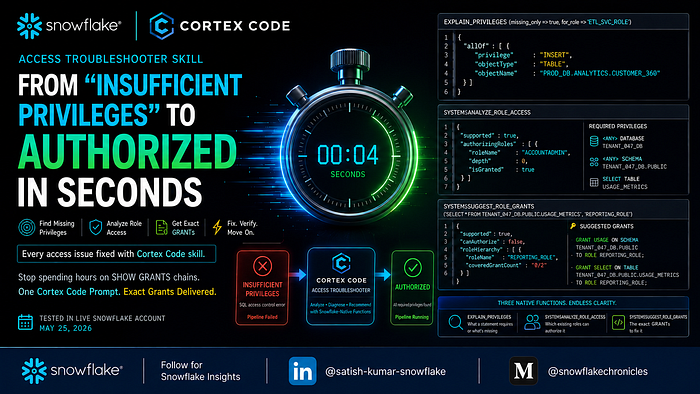
Cortex Code’s Access Troubleshooter Skill: From “Insufficient Privileges” to Authorized in Seconds
Last Updated on May 29, 2026 by Editorial Team
Author(s): Satish Kumar
Originally published on Towards AI.
Cortex Code’s Access Troubleshooter Skill: From “Insufficient Privileges” to Authorized in Seconds

It is 3 AM. Your data pipeline just failed:
SQL access control error: Insufficient privileges to operate on table
'PROD_DB.ANALYTICS.CUSTOMER_360'
Your ETL service account worked fine yesterday. Nobody changed anything — or so they say.
What follows is usually an hour of SHOW GRANTS ON ROLE chains, role hierarchy archaeology, and educated guessing about which of the dozen privileges in the chain broke. Cortex Code's Access Troubleshooter collapses that to a single function call that returns exactly what is missing and generates the fix — with JSON you can validate yourself.
Everything in this article was tested against a live Snowflake account on May 25, 2026. The outputs shown are real.
What the Access Troubleshooter Actually Uses
The skill is built on three Snowflake-native privilege analysis functions:
Function What It Does EXPLAIN_PRIVILEGES Returns all privileges a SQL statement requires — or, with missing_only => true and for_role, only what a specific role is missing SYSTEM$ANALYZE_ROLE_ACCESS Scans your account and returns which existing roles can authorize a statement SYSTEM$SUGGEST_ROLE_GRANTS Generates the specific GRANTs a role needs to run a statement
Two things worth knowing before you use them:
<ANY> in the output means USAGE. When you see "privilege" : "<ANY>", "objectType" : "SCHEMA", translate that as GRANT USAGE ON SCHEMA.
Warehouse USAGE is not detected by these functions. It is a runtime requirement, not a compile-time privilege. If queries hang with no error, check warehouse grants separately.
Valid EXPLAIN_PRIVILEGES signatures:
-- Full privilege list (no role)
CALL EXPLAIN_PRIVILEGES(statement => '...');

-- What is missing for a specific role
CALL EXPLAIN_PRIVILEGES(statement => '...', missing_only => true, for_role => 'ROLE');
When a role has everything it needs, the function returns { "authorized" : true }. That is your fix-confirmed signal.
Five Core Workflows
The Access Troubleshooter in Cortex Code supports five natural language workflows:
| What You Ask | What Happens |
| ---------------------------------------- | ------------------------------------------------------------------------------------------------------------------------------------- |
| "Why does this SQL fail for this role?" | `EXPLAIN_PRIVILEGES` with `missing_only => true` and `for_role` specified identifies only the missing permissions blocking execution. |
| "What privileges does this SQL require?" | `EXPLAIN_PRIVILEGES` without a role performs a full privilege enumeration for the SQL statement. |
| "Which existing roles can run this SQL?" | `SYSTEM$ANALYZE_ROLE_ACCESS` evaluates existing roles and identifies which ones already have sufficient access. |
| "Create a minimal role for this SQL" | Full privilege enumeration is used to automatically generate a least-privilege `CREATE ROLE` + `GRANT` script. |
| "Fix this role so it can run this SQL" | `EXPLAIN_PRIVILEGES` in missing-only mode feeds into `SYSTEM$SUGGEST_ROLE_GRANTS` to generate the required grant recommendations. |
The following scenarios walk through the ones most relevant in production, with actual function output.
Finding the Missing Piece — Three Patterns in Practice
Pattern 1: Single Missing Privilege (The Broken ETL)
This is the most common pattern: a role has most of what it needs, but one grant was missed or revoked.
Scenario: A fintech’s nightly ETL pipeline refreshing CUSTOMER_360 failed after a routine role cleanup. The role can SELECT from the source — but cannot INSERT into the target.
Cortex Code runs:
CALL EXPLAIN_PRIVILEGES(
 statement => 'INSERT INTO PROD_DB.ANALYTICS.CUSTOMER_360 (customer_id, name, email)
 SELECT customer_id, name, email
 FROM PROD_DB.STAGING.CUSTOMER_RAW',
 missing_only => true,
 for_role => 'ETL_SVC_ROLE'
);
Actual output:
{
 "allOf" : [ {
 "privilege" : "INSERT",
 "objectType" : "TABLE",
 "objectName" : "PROD_DB.ANALYTICS.CUSTOMER_360"
 } ]
}
One item. One fix:
GRANT INSERT ON TABLE PROD_DB.ANALYTICS.CUSTOMER_360 TO ROLE ETL_SVC_ROLE;
Re-run after applying the fix:
{ "authorized" : true }
The SHOW GRANTS loop that would have taken 90 minutes — replaced by a function call that returns one line.
Pattern 2: Stacked Gaps (The New Analyst)
This pattern is trickier because Snowflake’s “Object does not exist or not authorized” error is intentionally ambiguous. You cannot tell from the message whether the problem is at the database, schema, or table level. The troubleshooter removes the ambiguity.
Scenario: A healthcare analytics company. A newly onboarded analyst assigned the ANALYST role cannot see any tables in CLINICAL_DATA. The error is the generic "does not exist or not authorized" — which reveals nothing about where in the privilege chain the gap is.
Cortex Code runs:
CALL EXPLAIN_PRIVILEGES(
 statement => 'SELECT * FROM HEALTHCARE_DB.CLINICAL_DATA.PATIENT_VISITS',
 missing_only => true,
 for_role => 'ANALYST'
);
Actual output:
{
 "allOf" : [ {
 "privilege" : "SELECT",
 "objectType" : "TABLE",
 "objectName" : "HEALTHCARE_DB.CLINICAL_DATA.PATIENT_VISITS"
 }, {
 "privilege" : "<ANY>",
 "objectType" : "SCHEMA",
 "objectName" : "HEALTHCARE_DB.CLINICAL_DATA"
 } ]
}
Two problems stacked: the role has no schema visibility (<ANY> = USAGE missing) and no table-level SELECT. Both have to be fixed — fixing only the SELECT without USAGE on the schema still leaves the analyst blocked.
GRANT USAGE ON SCHEMA HEALTHCARE_DB.CLINICAL_DATA TO ROLE ANALYST;
GRANT SELECT ON TABLE HEALTHCARE_DB.CLINICAL_DATA.PATIENT_VISITS TO ROLE ANALYST;
Pattern 3: Precise Object Grant (The dbt Role)
After a database ownership transfer, all dbt models fail with “insufficient privileges to create table.” The assumption is that everything was wiped — but the troubleshooter is precise about what actually happened.
Scenario: DBT_SERVICE_ROLE can read from staging, schemas have USAGE, but CREATE TABLE on the marts schema is gone.
Cortex Code runs:
CALL EXPLAIN_PRIVILEGES(
 statement => 'CREATE TABLE ANALYTICS_DB.MARTS.DIM_CUSTOMERS AS
 SELECT * FROM ANALYTICS_DB.STAGING.STG_CUSTOMERS',
 missing_only => true,
 for_role => 'DBT_SERVICE_ROLE'
);
Actual output:
{
 "allOf" : [ {
 "privilege" : "CREATE TABLE",
 "objectType" : "SCHEMA",
 "objectName" : "ANALYTICS_DB.MARTS"
 } ]
}
Only one grant is missing, despite an ownership transfer that many teams assume wipes everything. The USAGE and SELECT grants survived. Applying a blanket re-grant script would have been unnecessary.
GRANT CREATE TABLE ON SCHEMA ANALYTICS_DB.MARTS TO ROLE DBT_SERVICE_ROLE;
Why this matters:
REVOKE CURRENT GRANTS(the default on ownership transfer) wipes grants selectively, not universally. The troubleshooter tells you exactly what is missing now — preventing over-granting during remediation.
Going Deeper — The Two-Step Role Investigation
When the question is not just “what is missing” but “which existing role already has access,” SYSTEM$ANALYZE_ROLE_ACCESS is the right starting point.
Scenario: A SaaS platform with 200+ tenant databases. REPORTING_ROLE cannot access TENANT_047. Before creating new grants, the team wants to know if any existing role already has access that can be inherited.
Step 1 — Find which roles can already authorize the query:
SELECT SYSTEM$ANALYZE_ROLE_ACCESS(
 'SELECT * FROM TENANT_047_DB.PUBLIC.USAGE_METRICS'
) AS authorizing_roles;
Actual output (condensed):
{
 "supported" : true,
 "authorizingRoles" : [ {
 "roleName" : "ACCOUNTADMIN",
 "parentRoleNames" : [ ],
 "depth" : 0,
 "isGranted" : true
 } ],
 "requiredPrivileges" : [
 { "privilege" : "<ANY>", "securableType" : "DATABASE", "securableName" : "TENANT_047_DB" },
 { "privilege" : "<ANY>", "securableType" : "SCHEMA", "securableName" : "TENANT_047_DB.PUBLIC" },
 { "privilege" : "SELECT","securableType" : "TABLE", "securableName" : "TENANT_047_DB.PUBLIC.USAGE_METRICS" }
 ]
}
Only ACCOUNTADMIN can authorize this query. TENANT_047_READER exists but has not been granted the table yet. The team needs to add grants rather than inherit from an existing role.
Step 2 — What is REPORTING_ROLE specifically missing?
CALL EXPLAIN_PRIVILEGES(
 statement => 'SELECT * FROM TENANT_047_DB.PUBLIC.USAGE_METRICS',
 missing_only => true,
 for_role => 'REPORTING_ROLE'
);
Actual output:
{
 "allOf" : [ {
 "privilege" : "<ANY>",
 "objectType" : "SCHEMA",
 "objectName" : "TENANT_047_DB.PUBLIC"
 }, {
 "privilege" : "SELECT",
 "objectType" : "TABLE",
 "objectName" : "TENANT_047_DB.PUBLIC.USAGE_METRICS"
 } ]
}
Step 3 — Confirm with SYSTEM$SUGGEST_ROLE_GRANTS:
SELECT SYSTEM$SUGGEST_ROLE_GRANTS(
 'SELECT * FROM TENANT_047_DB.PUBLIC.USAGE_METRICS',
 'REPORTING_ROLE'
) AS suggested_grants;
Actual output (condensed):
{
 "supported" : true,
 "canAuthorize" : false,
 "roleHierarchy" : [ {
 "roleName" : "REPORTING_ROLE",
 "coveredGrantCount" : "0/2"
 } ]
}
coveredGrantCount: "0/2" — REPORTING_ROLE covers none of the two required grants. The fix:
GRANT USAGE ON SCHEMA TENANT_047_DB.PUBLIC TO ROLE REPORTING_ROLE;
GRANT SELECT ON TABLE TENANT_047_DB.PUBLIC.USAGE_METRICS TO ROLE REPORTING_ROLE;
Building a Least-Privilege Role From Scratch
For new projects where security requires a purpose-built role, EXPLAIN_PRIVILEGES without a role argument enumerates everything the query needs — giving you an exact CREATE ROLE + GRANT script with zero guessing.
Scenario: An ML team needs a role for a multi-table JOIN. Security wants minimum privileges — no schema-wide SELECT, no inherited excess.
Cortex Code runs (no for_role, no missing_only — full enumeration):
CALL EXPLAIN_PRIVILEGES(
 statement => 'SELECT c.customer_id, c.segment, o.order_total
 FROM ECOM_DB.BEHAVIOR.CUSTOMERS c
 JOIN ECOM_DB.ORDERS.ORDER_ITEMS o
 ON c.customer_id = o.customer_id'
);
Actual output:
{
 "allOf" : [ {
 "privilege" : "<ANY>",
 "objectType" : "DATABASE",
 "objectName" : "ECOM_DB"
 }, {
 "privilege" : "<ANY>",
 "objectType" : "SCHEMA",
 "objectName" : "ECOM_DB.BEHAVIOR"
 }, {
 "privilege" : "<ANY>",
 "objectType" : "SCHEMA",
 "objectName" : "ECOM_DB.ORDERS"
 }, {
 "privilege" : "SELECT",
 "objectType" : "TABLE",
 "objectName" : "ECOM_DB.ORDERS.ORDER_ITEMS"
 }, {
 "privilege" : "SELECT",
 "objectType" : "TABLE",
 "objectName" : "ECOM_DB.BEHAVIOR.CUSTOMERS"
 } ]
}
Five items. Translating <ANY> to USAGE:
CREATE ROLE ML_RECOMMENDATIONS_READER;

GRANT USAGE ON DATABASE ECOM_DB TO ROLE ML_RECOMMENDATIONS_READER;
GRANT USAGE ON SCHEMA ECOM_DB.BEHAVIOR TO ROLE ML_RECOMMENDATIONS_READER;
GRANT USAGE ON SCHEMA ECOM_DB.ORDERS TO ROLE ML_RECOMMENDATIONS_READER;
GRANT SELECT ON TABLE ECOM_DB.BEHAVIOR.CUSTOMERS TO ROLE ML_RECOMMENDATIONS_READER;
GRANT SELECT ON TABLE ECOM_DB.ORDERS.ORDER_ITEMS TO ROLE ML_RECOMMENDATIONS_READER;
GRANT ROLE ML_RECOMMENDATIONS_READER TO ROLE SYSADMIN;
Exactly five grants. No schema-wide SELECT. No inheritance from a broader role. The function told you exactly what the query needs — and nothing else was added.
Extending an Existing Role Without Over-Granting
When the task is to extend a role rather than create one, missing_only => true ensures you only add what is absent. Existing grants stay untouched. Audit trails stay clean.
Scenario: REPORTING_ROLE has access to one schema in FINANCE_DB but needs a new 3-way JOIN query that spans two additional schemas.
What Cortex Code finds missing:
{
 "allOf" : [ {
 "privilege" : "<ANY>",
 "objectType" : "SCHEMA",
 "objectName" : "FINANCE_DB.TRANSACTIONS"
 }, {
 "privilege" : "SELECT",
 "objectType" : "TABLE",
 "objectName" : "FINANCE_DB.DIMENSIONS.REGIONS"
 }, {
 "privilege" : "SELECT",
 "objectType" : "TABLE",
 "objectName" : "FINANCE_DB.TRANSACTIONS.LEDGER"
 }, {
 "privilege" : "<ANY>",
 "objectType" : "SCHEMA",
 "objectName" : "FINANCE_DB.DIMENSIONS"
 } ]
}
The FINANCE_DB.ACCOUNTS schema and table are already granted — they do not appear in the output. The role's existing access is preserved exactly as-is.
GRANT USAGE ON SCHEMA FINANCE_DB.TRANSACTIONS TO ROLE REPORTING_ROLE;
GRANT SELECT ON TABLE FINANCE_DB.TRANSACTIONS.LEDGER TO ROLE REPORTING_ROLE;
GRANT USAGE ON SCHEMA FINANCE_DB.DIMENSIONS TO ROLE REPORTING_ROLE;
GRANT SELECT ON TABLE FINANCE_DB.DIMENSIONS.REGIONS TO ROLE REPORTING_ROLE;
Four targeted grants. Nothing re-granted, nothing over-granted.
Reading the Output — Quick Reference
| JSON Field Combination | Meaning | Fix |
| ---------------------------- | ---------------------------------- | ------------------------------------------ |
| `"<ANY>" + "DATABASE"` | USAGE on database needed | `GRANT USAGE ON DATABASE x TO ROLE y` |
| `"<ANY>" + "SCHEMA"` | USAGE on schema needed | `GRANT USAGE ON SCHEMA x TO ROLE y` |
| `"SELECT" + "TABLE"` | SELECT on table needed | `GRANT SELECT ON TABLE x TO ROLE y` |
| `"INSERT" + "TABLE"` | INSERT on table needed | `GRANT INSERT ON TABLE x TO ROLE y` |
| `"CREATE TABLE" + "SCHEMA"` | CREATE TABLE on schema needed | `GRANT CREATE TABLE ON SCHEMA x TO ROLE y` |
| `"USAGE" + "PROCEDURE"` | USAGE on procedure needed | `GRANT USAGE ON PROCEDURE x TO ROLE y` |
| `"authorized": true` | Role has all required privileges | No action needed |
| `"canAuthorize": false` | Role cannot run this statement | Add the listed grants |
| `"coveredGrantCount": "0/4"` | Role covers 0 of 4 required grants | All 4 grants must be added |
Known Boundaries — What the Functions Do Not Detect
Testing these functions in production surfaces a few limits worth knowing before you rely on them.
Warehouse USAGE does not appear in EXPLAIN_PRIVILEGES output. It is a runtime requirement, not a compile-time privilege. If a query hangs with no error — no "access denied," just a spinner — check warehouse grants manually with SHOW GRANTS TO ROLE x. This is one gap the troubleshooter will not surface.
Tag-based masking policy conflicts are flagged as "supported" : false by SYSTEM$ANALYZE_ROLE_ACCESS. These are runtime authorization decisions that the function cannot evaluate at parse time. Use the data governance skill or check masking policy assignments directly.
EXECUTE AS CALLER procedures are partially supported. EXPLAIN_PRIVILEGES diagnoses the CALL-level privilege correctly. But the calling role also needs privileges on every object accessed inside the procedure body — those must be debugged separately by running each internal statement through EXPLAIN_PRIVILEGES individually. The skill advises you of this when it detects a CALLER procedure.
Orphaned task ownership and secondary role activation (DEFAULT_SECONDARY_ROLES) are not privilege analysis problems. They require direct admin intervention outside of what these functions address.
How to Use It
Open Snowsight, click Cortex Code, and provide the exact SQL statement that is failing and the role experiencing the issue. Prompts that work:
- “ETL_ROLE gets insufficient privileges on [paste SQL] — debug it”
- “What privileges does this query need: [paste SQL]”
- “Create a least-privilege role for: [paste SQL]”
- “Which roles can run: [paste SQL]”
- “Grant REPORTING_ROLE whatever it’s missing for: [paste SQL]”
The Access Troubleshooter is also available via Cortex Code CLI (generally available) and Cortex Code Desktop (preview).
The rule is simple: always bring the failing SQL statement. These functions analyze exact statements, not descriptions. The more specific your input, the more precise the JSON — and the more precise the fix.
Stop spending hours on SHOW GRANTS chains. One function call. Real JSON. Exact GRANTs.
Live Demo: Simulating, Detecting, and Fixing Privilege Drift with Cortex Code:
https://youtube.com/watch?v=sJwnS86kCp8
Have you run into a permission pattern that stumped you? Drop it in the comments — happy to work through the function output with you.
📖 Follow on Medium: @snowflakechronicles
🔗 Connect on LinkedIn: satishkumar-snowflake
Tags: #Snowflake #DataEngineering #RBAC #Security #CortexCode #DataOps #CloudData #AI #SnowflakeChronicles #DataGovernance
Disclaimer: The company names and scenarios in this article are fictional examples created to demonstrate Snowflake Cortex Code’s Access Troubleshooter capabilities. The JSON outputs were validated in a live Snowflake test environment on May 25, 2026, and are reproducible. All privilege analysis examples were executed using the
ACCOUNTADMINrole withCOMPUTE_WH. Always review and validate permission changes in your own environment before applying them. The views expressed here are my own and do not represent my employer or Snowflake.
Join thousands of data leaders on the AI newsletter. Join over 80,000 subscribers and keep up to date with the latest developments in AI. From research to projects and ideas. If you are building an AI startup, an AI-related product, or a service, we invite you to consider becoming a sponsor.
Published via Towards AI
Towards AI Academy
We Build Enterprise-Grade AI. We'll Teach You to Master It Too.
15 engineers. 100,000+ students. Towards AI Academy teaches what actually survives production.
Start free — no commitment:
→ 6-Day Agentic AI Engineering Email Guide — one practical lesson per day
→ Agents Architecture Cheatsheet — 3 years of architecture decisions in 6 pages
Our courses:
→ AI Engineering Certification — 90+ lessons from project selection to deployed product. The most comprehensive practical LLM course out there.
→ Agent Engineering Course — Hands on with production agent architectures, memory, routing, and eval frameworks — built from real enterprise engagements.
→ AI for Work — Understand, evaluate, and apply AI for complex work tasks.
Note: Article content contains the views of the contributing authors and not Towards AI.
Related posts
Recent Posts






