


AutoGen vs CrewAI: Two Approaches to Multi-Agent Orchestration
Last Updated on September 17, 2025 by Editorial Team
Author(s): Neha Manna
Originally published on Towards AI.

Table of Contents
- Overview
- AutoGen
2.1 History & Evolution
2.2 Why AutoGen Matters
2.3 How AutoGen Works
2.4 AutoGen Examples
2.5 Architecture (v0.4) with analogies - CrewAI
3.1 History & Evolution
3.2 Why CrewAI
3.3 How CrewAI Operates
3.4 CrewAI Examples
3.5 Architecture with analogies - Workflow Diagrams
- Decision Matrix
- References
Overview
AutoGen is an open-source framework for building multi-agent systems, developed by Microsoft Research. It provides a conversational, event-driven architecture that enables LLM-powered agents, humans, and tools to collaborate through structured dialogues and workflows. It supports human-in-the-loop, tool/API integration, and safe code execution (e.g., via Docker), and includes AutoGen Studio, a no-code UI for designing and testing agent workflows.
CrewAI is an open-source Python framework for orchestrating role-based multi-agent teams. It focuses on Agents → Tasks → Crew primitives, enabling structured, modular workflows. CrewAI integrates seamlessly with LangChain tools for memory, retrieval, and external actions, making it ideal for developers already using LangChain or LangGraph.

History & Evolution
Origins (2023)
- Initial release: AutoGen started as a basic coordination tool for multi-agent conversations, enabling LLM-driven agents to collaborate on tasks like code generation and debugging.
- Architecture: Early versions (v0.1–v0.2) used a synchronous design, which limited scalability and flexibility.
- Features: Basic AssistantAgent, UserProxyAgent, and simple GroupChat patterns for two-agent or small-team interactions.
AutoGen v0.2 (2023–2024)
- Introduced AgentChat API for structured multi-agent workflows.
- Supported basic tool use, group chats, and state persistence.
- Limitations: Blocking calls, limited observability, and rigid APIs.
AutoGen v0.4 (Jan 2025) — Complete Redesign
- Why the revamp? Community feedback demanded better observability, interactive control, and scalability.
- Key changes:
Asynchronous, event-driven architecture (actor model) for concurrency and distributed execution.
Layered design: Core, AgentChat and Extensions
Cross-language support (Python + .NET, more planned).
Observability: Built-in tracing, OpenTelemetry, debugging tools.
AutoGen Studio: Drag-and-drop UI, real-time agent updates, mid-execution control.
Ecosystem: Integration with Semantic Kernel, introduction of Magentic-One and TinyTroupe for orchestration and simulation.
Future Roadmap
- More language bindings, teachable agents, advanced RAG agents, and enterprise-grade governance.
Why AutoGen Matters
Multi-agent workflows are powerful but complex to manage manually. AutoGen simplifies this by:
- Providing configurable agent roles and conversation loops.
- Supporting human-in-the-loop for governance.
- Enabling dynamic collaboration for tasks like delegation, verification, and decision-making.
How AutoGen Works
- Agents & Roles: Define agents with roles, memory, and capabilities (e.g., planning, executing, critiquing).
- Conversation Loops: Use GroupChat patterns (RoundRobin or Selector) for structured turn-taking.
- Tool Integration: Agents can call APIs, run code, or interact with files.
AutoGen Examples
Example 1: Planner–Critic Verification Loop
from autogen_agentchat.agents import AssistantAgent
from autogen_agentchat.teams import RoundRobinGroupChat
from autogen_agentchat.conditions import TextMentionTermination
from autogen_ext.models.openai import OpenAIChatCompletionClient
model = OpenAIChatCompletionClient(model="gpt-4o")
planner = AssistantAgent("planner", model_client=model, system_message="Plan steps.")
critic = AssistantAgent("critic", model_client=model, system_message="Review and approve.")team = RoundRobinGroupChat([planner, critic], termination_condition=TextMentionTermination("APPROVED"))
result = team.run(task="Fix this Python bug: def add(a,b): return a-b")
print(result.messages[-1].content)
Example 2: Human-in-the-Loop Approval
from autogen_agentchat.agents import AssistantAgent, UserProxyAgent
from autogen_agentchat.teams import RoundRobinGroupChat
writer = AssistantAgent("writer", model_client=model, system_message="Draft the report.")
approver = UserProxyAgent("approver")team = RoundRobinGroupChat([writer, approver])
team.run(task="Draft a summary and wait for approval.")
AutoGen Architecture Analogy
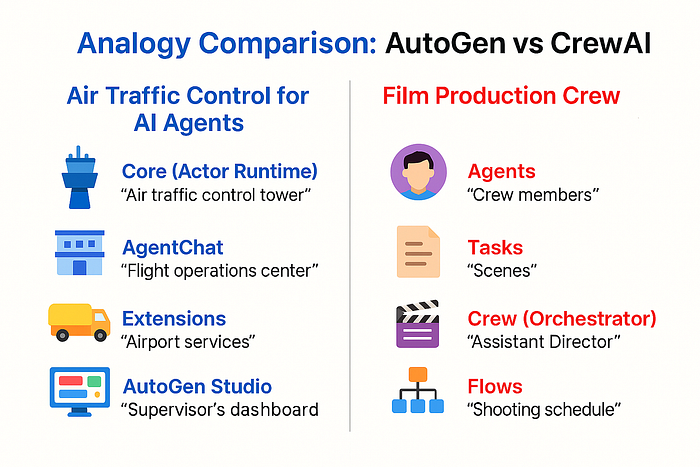
“Air Traffic Control for AI Agents”
- Core (Actor Runtime) → the air traffic control tower: ensures safe, asynchronous communication, decouples routing from pilot behavior, and scales to many flights (agents).
- AgentChat → the flight operations center: standard operating procedures (e.g., round‑robin / selector group chat), state/memory, and streaming so pilots know who speaks when and how to coordinate.
- Extensions → airport services (special vehicles & ground support): advanced agents/clients/tools and ecosystem integrations.
- AutoGen Studio → the supervisor’s dashboard: visualize flows, control runs mid‑execution, and drag‑and‑drop components without heavy coding.
AutoGen Architecture (v0.4)

Layered design.
- Core implements the actor model: agents exchange asynchronous messages handled by an event‑driven runtime. This decoupling improves modularity, concurrency, and deployment flexibility (multi‑process, cross‑language).
- AgentChat adds a high‑level, task‑driven API with typed interfaces, state/memory, streaming, and built‑in multi‑agent patterns (e.g., GroupChat with Round‑Robin or Selector).
- Extensions deliver advanced clients/runtimes/teams and third‑party integrations (tools & services).
- Observability & control. Built‑in tracing/metrics/debugging (with OpenTelemetry support) to inspect agent interactions, replay, and steer behavior responsibly.
- Developer experience AutoGen Studio (rebuilt on AgentChat) provides drag‑and‑drop authoring, real‑time updates, and run controls.
- Ecosystem. Example application Magentic‑One and collaboration with Semantic Kernel for enterprise‑grade runtime indicate the platform’s direction.
CrewAI
History & Evolution
Initial Release (v0.1, 2024)
- Launched as a lean, Python-native framework for role-based multi-agent orchestration.
- Core concept: Agents → Tasks → Crew, enabling structured workflows with clear handoffs.
- Differentiator: Independent of LangChain, but later added optional LangChain tool wrappers for ecosystem reuse.
Rapid Iteration (2024–2025)
- v0.6x–0.9x: Added Flows for event-driven orchestration, memory systems (short-term, entity, vector), and observability hooks.
- v0.126+: Introduced CLI, YAML configs, and enterprise features (RBAC, telemetry).
- v0.150+: Added LangDB integration, guardrail events, and evaluation tools.
- v0.165+: Enhanced Flow resumability, RAG configuration system, and Qdrant support.
- v0.175+: Centralized embedding configs, improved tracing, and automation triggers.
- v0.186 (latest): Partial flow resumability, generic RAG clients, and config reset for enterprise deployments.
Current Position
- CrewAI Enterprise Suite: Adds control plane, observability dashboards, security/compliance features, and on-prem/cloud deployment options.
- Community: 100K+ developers, strong GitHub activity, and frequent releases (~weekly).
Why CrewAI
CrewAI makes multi-agent workflows easy to define and maintain by:
- Encouraging role-based modularity.
- Supporting LangChain integration for tools and memory.
- Allowing reusable agent teams for scalability.
How CrewAI Operates
- Agent: Role, backstory, tools, and LLM config.
- Task: Defines what needs to be done and who does it.
- Crew: Orchestrates execution and handoffs.
CrewAI Examples
Example 1: Research → Code → Review
from crewai import Agent, Task, Crew
researcher = Agent(role="Researcher", goal="Collect data.")
coder = Agent(role="Coder", goal="Generate Python report.")
reviewer = Agent(role="Reviewer", goal="Check quality.")tasks = [
 Task("Collect 5 sources on AI trends.", agent=researcher),
 Task("Write Python script for summary.", agent=coder),
 Task("Review and finalize report.", agent=reviewer)
]crew = Crew(agents=[researcher, coder, reviewer], tasks=tasks)
print(crew.kickoff())Workflow Diagrams
CrewAI Architecture Analogy
“Film Production Crew”
- Agents → crew members (Director/Scriptwriter/Cameraperson/Editor) with roles, skills, and tools.
- Tasks → scenes in a script; each scene is assigned to the right specialist.
- Crew (Orchestrator) → the Assistant Director managing sequence, handoffs, and reshoots (sequential vs. hierarchical with a manager).
- Flows → the shooting schedule with state, persistence/resume, and event‑driven triggers for long‑running processes.
- Tools/Memory → cameras/props/continuity notes (LangChain tools, vector knowledge, RAG).
- Observability → the production monitor tracking progress, costs, and quality via tracing integrations.
CrewAI Architecture Details
- Core primitives.Agents → Tasks → Crew, plus Flows for event‑driven orchestrations with persistence/resume. Agents have role, backstory, tools, and memory; Tasks specify work and expected outputs; Crew coordinates who does what and when.
- Execution patterns
Sequential: deterministic, dependency‑aware pipelines with shared context.
Hierarchical: a manager agent delegates, reviews, and consolidates outputs; Crew tracks execution logs and results. - Tools & RAG. First‑class tool system, plus LangChain tool reuse via wrappers (e.g.,
LangChainTool) to tap the LangChain ecosystem inside CrewAI agents. - Memory/Knowledge Short‑/long‑/entity memory and built‑in vector knowledge with Chroma/Qdrant options; provider‑neutral RAG.
- Observability & enterprise Tracing/metrics with integrations (Langfuse, Phoenix, etc.), CLI for run/test/deploy, YAML config support, and multi‑tenant enterprise features.
How CrewAI Operates
- Define agents (role, backstory, tools, LLM config).
- Define tasks and assign responsibility.
- Create a crew to sequence execution & handoffs (or manager‑led delegation).
- Optionally add flows for event‑driven routing, state, persistence/resume.
AutoGen Workflow

CrewAI Workflow

Decision Matrix

References
AutoGen
- AutoGen — Top‑level documentation
- AutoGen (Microsoft Research overview)
- AgentChat Teams: RoundRobinGroupChat
- AgentChat Teams: SelectorGroupChat
- UserProxyAgent reference
- Group Chat pattern (Core API)
- AutoGen GitHub repository
CrewAI (official)
- CrewAI Documentation (index)
- Tasks concept
- CrewAI + LangChain tools (LangChainTool)
- CrewAI examples repository
Context on related orchestration frameworks
Join thousands of data leaders on the AI newsletter. Join over 80,000 subscribers and keep up to date with the latest developments in AI. From research to projects and ideas. If you are building an AI startup, an AI-related product, or a service, we invite you to consider becoming a sponsor.
Published via Towards AI
Towards AI Academy
We Build Enterprise-Grade AI. We'll Teach You to Master It Too.
15 engineers. 100,000+ students. Towards AI Academy teaches what actually survives production.
Start free — no commitment:
→ 6-Day Agentic AI Engineering Email Guide — one practical lesson per day
→ Agents Architecture Cheatsheet — 3 years of architecture decisions in 6 pages
Our courses:
→ AI Engineering Certification — 90+ lessons from project selection to deployed product. The most comprehensive practical LLM course out there.
→ Agent Engineering Course — Hands on with production agent architectures, memory, routing, and eval frameworks — built from real enterprise engagements.
→ AI for Work — Understand, evaluate, and apply AI for complex work tasks.
Note: Article content contains the views of the contributing authors and not Towards AI.
Related posts
Recent Posts






