Taming the Monolith: A Claude Code Setup Guide for Large Codebases
Last Updated on June 3, 2026 by Editorial Team
Author(s): Arijit Dutta
Originally published on Towards AI.
Taming the Monolith: A Claude Code Setup Guide for Large Codebases
A practical guide for teams working with large and complex enterprise codebase

If you’re working with a large on-prem codebase, a monolith with dozens of services, multiple backend components and client applications all living in one massive repo, you already know the pain. Coding agents have a finite context window and they perform best when that window is used deliberately. Large monolith codebases if not setup correctly for AI-assisted development, can quickly fill up available context and agents start hallucinating not giving expected responses.
1. Your CLAUDE.md Is Your Most Important File
Like any other project, the first step of setting up Claude Code is to create a CLAUDE.md file. Claude can scan through your project and generate one automatically via the /init command. Modify this to suit your project's needs.
For a large repo, this file is what bridges the gap between Claude’s general knowledge and your project’s custom implementation.
Nested CLAUDE.md Files
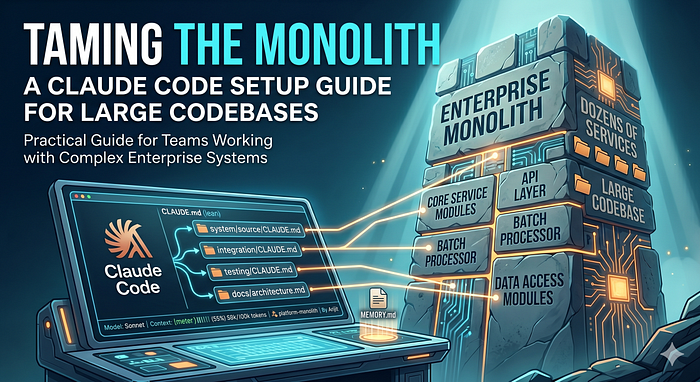
Don’t cram everything into one file. Keep the root CLAUDE.md lean, around 200 to 300 lines, with enough context to guide Claude. For a large repo, use a layered approach: keep the root file under 200 lines and use @file references to point Claude to deeper docs on demand. Subsystems can have their own CLAUDE.md files.
project-root/ # Server/runtime root
├── CLAUDE.md # Lean entry point (~200 lines)
├── docs/
│ ├── coding-guidelines.md # Coding standards and patterns
│ ├── architecture.md # System architecture overview
│ └── db-schema.md # Key tables and relationships
├── system/ # Core system files and configuration
│ ├── source/ # Custom policy/data modules
│ │ └── CLAUDE.md # Module development rules
├── lib/ # Shared libraries
├── header/ # Header files
├── bin/ # Executables and scripts
├── jars/ # Java libraries
├── conf/ # Environment configs
├── integration/ # Integration framework
│ └── CLAUDE.md # Integration/rating rules
├── apps/ # Batch jobs and utilities
│ └── CLAUDE.md # Batch job rules and utilities
├── 3rdParty/ # Third-party libraries
├── logs/ # Runtime log directory
└── testing/ # Integration and regression tests
 └── CLAUDE.md # Test conventions and run instructions
What Goes in the Root CLAUDE.md
We can use /init build the initial CLAUDE.md file, then add custom implementation details Claude wouldn't know. e.g the project architecture, log locations, how to compile source, how to run test cases, and environment files to source.
# Project Overview: Enterprise Transaction Platform

## Architecture
This is a 5-tier on-prem system:
Client App → API Layer → Request Gateway → Core Service Modules
 → Data Access Modules → Relational DB

- API Layer: Handles external API contracts, authentication, and request normalization.
- Request Gateway: Central request router. Loads service and data modules as shared libraries.
- Core Service Modules: Domain workflows, validation rules, and orchestration logic.
- Data Access Modules: Database abstraction layer. Primary DB connector handles all DB operations.
- Batch Processor: Offline processing engine for scheduled and high-volume workloads.

## Repo Map
| Directory | Purpose |
|-------------|--------------------------------------------------|
| server/ | Core server runtime root |
| processing/ | Offline data processing framework |
| apps/ | Batch applications, utilities, custom scripts |
| conf/ | Environment configs: APIs, schemas, SQL, params |

## Key Commands
- Compile module: `cd $PROJECT_HOME/source/modules/core && make`
- Run tests: `make test`
- Restart services: `app restart all`
Teaching Claude What It Doesn’t Know
This is crucial for proprietary or niche systems. Add custom context that Claude can’t find via web search or isn’t pretrained on:
The principle: if Claude would need to look something up in your internal wiki to understand it, put it in
CLAUDE.mdor a referenced doc.
2. Custom Status Line in Claude code CLI
Microservice or monolith repo, it is helpful for both to put up a status line.
Use the built-in /statusline command to configure a custom status line. It's handy for a quick peek at vital Claude session stats.
TIP: Ask claude to generate a helpful statusline, something like below
// Settings (~/.claude/settings.json)
"statusLine": {
 "type": "command",
 "command": "bash /home/arijit/.claude/statusline-command.sh"
}

// The script displays:
// 1. Model name (cyan)
// 2. Context usage bar — 20-char, color-coded
// green (<50%) | yellow (50-79%) | red (80%+)
// 3. Context percentage & token count
// 4. Git branch (magenta, bold)
// 5. Project name (blue, bold)

3. Guard Your Context Window Like It’s Production Memory
Run /context regularly to check utilization. Customize the status line to keep context usage always in sight. Too much context utilization makes the agent hallucinate and degrades session performance.
What Eats Your Context
Bloated CLAUDE.md — if your root file is 500+ lines, you’re burning tokens before you even ask a question. Keep it under 200 lines and reference deeper docs.
Too many MCP servers — each connected server adds tool definitions to context. If you have 8 MCPs connected but only use 2 for coding, disable the rest during dev sessions.
@-file references that embed entire files — don’t write @docs/full-api-spec.md if that file is 2000 lines. Instead, write "For API spec details, see docs/full-api-spec.md" and Claude will read it on demand when needed.
Avoid stale sessions, triggering old/stale sessions can try to refresh cache with old/previous conversation which can burn unnecessary tokens. Start fresh session if you don’t need the old session context.
4. One Session, One Task — No Exceptions
Every CC session should have exactly one purpose:
Start a new session for every new task, design, build, debug, research. For complex and larger tasks use agent teams to extend you context, which we will discuss in later part.
Session A: Build the new rating API endpoint.
Session B: Debug the CM crash on opcode routing.
Session C: Review the PR for batch pipeline changes.
Session D: Answer a question about the storable class hierarchy.
What you should never do: start a session to build an API, then ask Claude to debug an unrelated CM issue, then paste in a PR for review, then ask about the database schema — all in the same session.
Why? Context pollution. By the time you’re on task #3, Claude’s context is filled with code from task #1, debug logs from task #2, and the instructions from your original prompt are buried. The quality of every subsequent response degrades.
5. Delegate Side Tasks to Sub-Agents
When you’re deep in a build session and realize you need a utility function, a test fixture, or a configuration file — don’t do it in your main session. Delegate.
Claude Code supports sub-agents that run in their own context. The main session stays clean, and the sub-agent returns only the final result. You can trigger this explicitly:
6. Always start a session in “Plan” Mode
This applies to every type of task, building a feature, debugging an issue, refactoring a module. Always start with /plan mode.
Execute /plan to switch to plan mode.
Once claude is done with the planning phase it creates a plan.md file which contains the blueprint for the tasks in hand.
Iterate the planning cycle till the plan looks good, ask claude to modify the plan on the points which needs correction.
For complex task consider using frontier models opus etc, with increased /effort and thinking on(from /config).
TIP: For implementation tasks, tell agent upfront your goal or the success criteria, or test scearios. That way agent re-iterates the Test case till the success criteria is met. It makes a whole lot of difference than testing in a seperate agent session.

Phase 1 — Plan
Switch to the highest available model with /model opus, then describe what you need. Don't jump to "write the code." Instead:
I need to implement a new API
getTransactionsthat retrieves transaction events in a paginated format for display in an upstream UI.
Phase 2 — Implementation
Once the plan is solid, switch to a lower model for implementation `/model sonnet`. Sonnet is faster, cheaper, and perfectly capable of following a well-defined plan. The plan from Phase 1 is still in context.
Or use /model opusplan which automatically switches to sonnet once agent exits from plan mode. Though 1M context is not available with mentioned model as of I am writing this post.
TIP: Treat
plan.mdas a living document. Update it as work progresses, and pass it to future agents (e.g. for bug fixes or follow-up tasks) so they start with full context rather than from scratch.
7. Save Session Learnings — Build a Living Memory for the agents
Asking CLAUDE to save the learnings after a long session. It will remember the mistakes you helped claude to fix via MEMORY.md file. Example of a memory below.
If you don’t capture critical these learnings, they die with the session.
The MEMORY.md File
Claude Code has an auto-memory system that saves to `~/.claude/projects/<repo-hash>/memory/MEMORY.md`. The first 200 lines are loaded at the start of every session. Here’s what a real entry looks like after a debugging session:
CLAUDE.md vs MEMORY.md — What Goes Where
Architecture, conventions, commands → CLAUDE.md (team-shared, version-controlled)
Debugging patterns, session learnings, gotchas → MEMORY.md (personal, machine-local)
Custom domain knowledge Claude can’t find online → CLAUDE.md (in referenced docs)
“Claude kept making this mistake, here’s the fix” → MEMORY.md
8. Tackle large implemenation projects with multiphase implementation plan
Large implementaions can quickly eat up your context window and impact the deliverable quality. During planning phase itself instruct claude to prepare a multi phase implemenation /plan which can be invoked by serveral sequential agents, Agent teams or sub-agents.
Join thousands of data leaders on the AI newsletter. Join over 80,000 subscribers and keep up to date with the latest developments in AI. From research to projects and ideas. If you are building an AI startup, an AI-related product, or a service, we invite you to consider becoming a sponsor.
Published via Towards AI
Towards AI Academy
We Build Enterprise-Grade AI. We'll Teach You to Master It Too.
15 engineers. 100,000+ students. Towards AI Academy teaches what actually survives production.
Start free — no commitment:
→ 6-Day Agentic AI Engineering Email Guide — one practical lesson per day
→ Agents Architecture Cheatsheet — 3 years of architecture decisions in 6 pages
Our courses:
→ AI Engineering Certification — 90+ lessons from project selection to deployed product. The most comprehensive practical LLM course out there.
→ Agent Engineering Course — Hands on with production agent architectures, memory, routing, and eval frameworks — built from real enterprise engagements.
→ AI for Work — Understand, evaluate, and apply AI for complex work tasks.
Note: Article content contains the views of the contributing authors and not Towards AI.
Related posts
Recent Posts