


20 Must Visit SQL Questions For Interviews
Last Updated on February 19, 2026 by Editorial Team
Author(s): Ananya
Originally published on Towards AI.
Q1. Find the total number of orders placed by a customer (101) in a day.
Table: Order_Details
cust_id | order_id | order_date
Code:
select
date_trunc(‘day’, order_date) as day,
cust_id as customers
count(distinct order_id) as orders
from Order_Details
where cust_id = 101
group by 1
Q2. Find the Monthly Cart Conversion Rate for a store with store code ‘APJ’
- Event can be add_to_cart or checkout — item is added to cart and then checked out.
- Cart Conversion Rate = Total Items Checked out / Total Items Added to Cart
Table: stores
store_code | item_id | event | event_time_utc
Code:
select
date_trunc(‘day’, event_time_utc) as day,
count(distinct case when event = ‘add_to_cart’ then item_id else null end)/count(distinct case when event = ‘checkout’ then item_id else null end) as conversion_rate
from stores
where store_code = ‘APJ’
group by 1
Q3. Create a daily funnel of authentication events such that first column is — page_view, second column is password_collect, third column is signin_attempt and fourth column is signin_success
Column event_name mapping to each of these activities —
pageview, password_collect, signin_attempt, signin_success
Table: auth_events
user_id | event_name | event_time_utc
Code:
Select
date_trunc(‘day’, event_time_utc) as day,
count(distinct case when event_name = ‘pageview’ then user_id else null end) as page_view,
count(distinct case when event_name = ‘password_collect’ then user_id else null end) as password_collect,
count(distinct case when event_name = ‘sigin_attempt’ then user_id else null end ) as signin_attempt,
count(distinct case when event_name = ‘signin_success’ then user_id else null end) as signin_success
from auth_events
group by 1
Q4. Get minimum, average and maximum sales for each month.
**each row represents one order line item, this query works as intended.
Table: Order_Details
cust_id | order_id | order_date | units | price
select
date_trunc(‘month’, order_date) as month,
sum(units*price) as total_sales,
avg(units*price) as avg_sales,
min(units*price) as min_sales,
max(units*price) as max_sales
from order_details
group by 1
Q5. Give 3 ways to find duplicates in a table called order_details
Table: Order_Details
cust_id | order_id | order_date | units | price
Method 1:
SELECT
cust_id,
order_id,
order_date,
units,
price,
COUNT(*) AS cnt
FROM order_details
GROUP BY
cust_id, order_id, order_date, units, price
HAVING COUNT(*) > 1;
Method 2:
SELECT *
FROM (
SELECT
*,
ROW_NUMBER() OVER (
PARTITION BY cust_id, order_id, order_date, units, price
ORDER BY order_date
) AS rn
FROM order_details
) t
WHERE rn > 1;
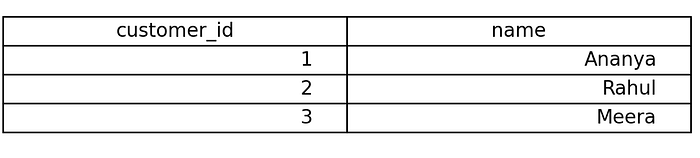
Q6. Write a SQL query to return all customers and their total order amount, including customers who have never placed an order,
but exclude rows where the final total amount is NULL.
Skills: Order of Execution


SELECT
c.customer_id,
c.name,
SUM(o.amount) AS total_amount
FROM customers c
LEFT JOIN orders o
ON c.customer_id = o.customer_id
GROUP BY c.customer_id, c.name
HAVING SUM(o.amount) IS NOT NULL;
- *This highlights join happens before where clause
- Order of Execution : FROM → JOIN → WHERE → GROUP BY → HAVING → SELECT → ORDER BY → LIMIT
Q7. Give the code to solve for below problem:
Skills : Making useful intermediate tables using window functions
Table : Seats

- *availability 1 means seat is empty
- grain — seat_id, movie_id, zone
- Output — Print the seat id if three consecutive seats are free.
Approach :
Lay Output -> Consider Edge Cases -> Create intermediate outputs if needed -> create queries for each step -> create final query
a) Lay output

b)
e1 — can have following 3 seats empty(eg. seat 3)
e2-can have preceding 3 seats empty(eg. seat 5)
e3- can have consecutive left and right seat empty(eg. seat 4)
c) create intermediate table

d) Create query for above tables
WITH free_seats AS (
SELECT *,
seat_id — ROW_NUMBER() OVER (
PARTITION BY movie_id, zone
ORDER BY seat_id
) AS grp
FROM Seats
WHERE availability = 1
)
e) To reach from c to a, we can take a cummulative sum with window being curr window -1 to curr window +1 and ensure the availability sum > 3
SELECT seat_id
FROM free_seats
GROUP BY movie_id, zone, grp, seat_id
HAVING sum(availability)>= 3;
Q8. Could you solve above question purely using joins
yes — we need to cover three edge cases and consider 3 self joins (3 tables, s1, s2 and s3).
SELECT DISTINCT seat_id
FROM (
SELECT s1.seat_id
FROM Seats s1
JOIN Seats s2
ON s2.seat_id = s1.seat_id + 1
AND s2.movie_id = s1.movie_id
AND s2.zone = s1.zone
JOIN Seats s3
ON s3.seat_id = s1.seat_id + 2
AND s3.movie_id = s1.movie_id
AND s3.zone = s1.zone
WHERE s1.availability = 1
AND s2.availability = 1
AND s3.availability = 1UNION ALL
SELECT s1.seat_id + 1 FROM Seats s1
JOIN Seats s2 ON s2.seat_id = s1.seat_id + 1
AND s2.movie_id = s1.movie_id
AND s2.zone = s1.zone
JOIN Seats s3 ON s3.seat_id = s1.seat_id + 2
AND s3.movie_id = s1.movie_id
AND s3.zone = s1.zone
WHERE s1.availability = 1
AND s2.availability = 1
AND s3.availability = 1UNION ALL
SELECT s1.seat_id + 2 FROM Seats s1
JOIN Seats s2 ON s2.seat_id = s1.seat_id + 1
AND s2.movie_id = s1.movie_id
AND s2.zone = s1.zone
JOIN Seats s3 ON s3.seat_id = s1.seat_id + 2
AND s3.movie_id = s1.movie_id
AND s3.zone = s1.zone
WHERE s1.availability = 1
AND s2.availability = 1
AND s3.availability = 1
) t
ORDER BY seat_id;
Q9. You are given a sales table with below schema –
sales(
employee_id INT,
sale_date DATE,
sales_amount INT
)
For each sale record, display:
1. employee_id
2. sale_year
3. sales_amount
4. Total sales made by that employee across all time
5. Total Sales made up till now
5. Difference between the employee’s highest sale made ever and current sale
Approach :
Lay Output -> Consider Edge Cases -> Create intermediate outputs if needed -> create queries for each step -> create final query
a) Output:
employee_id | sale_year | sales_amount | Total_sales_made | Total_sales_made_till_now| Diff
b) Direct question
c) no intermediate table(IT) required
d) no IT so no Query
e)
select
employee_id,
date_trunc(‘year’, sale_date),
sale_amount,
sum(sale_amount) over (partition by employee_id order by sale_date rows between unbounded preceding and unbounded following) as total_sales_made,
sum(sale_amount) over (partition by employee_id order by sale_date rows between unbounded preceding and current row) as total_sales_made_till_now,
sale_amount — max(sale_amount) over(partition by employee_id )
from sales
Q10. How would window function behave if the argument after over is empty?
select
employee_id,
sum(sale_amount) over ()
from sales
Since partitions and order by isn’t there nor window limits, SQL will treat whole dataset as one window and would aggregate across all records.
Q11. Give an example of 3 scenarios where you will use different dist keys and different sort keys.
In Amazon Redshift, there are four distribution styles used based on workload: KEY, where you choose a high-cardinality join column like customer_id in large tables such as orders and payments to colocate data and optimize large-to-large joins; ALL, where a small dimension table like country_dim is copied to all nodes to avoid redistribution when joining with large fact tables; EVEN, where data is distributed round-robin when there is no clear join column or the table is mostly standalone; and AUTO, where Redshift automatically decides the best distribution style based on table size and query patterns, making it useful when workloads evolve over time.
Q12. Give the number of records for each of the below joins (inner, left, right, full, cross).


inner join — 10 records
left outer join — 11 records
right outer join — 12 records
full outer join — 13 records
cross join — 24 records
Q13. Give real life scenarios where you will use different SORT Keys.
An interleaved sort key in Amazon Redshift distributes sorting importance evenly across multiple columns instead of prioritizing one. For example, a table sorted by (merchant_id, city_id, device_type) allows efficient filtering on any of these fields individually or together, making it ideal for multidimensional analytics and ad-hoc queries, though it requires more maintenance.
In Amazon Redshift, a compound sort key like (order_date, customer_id) works best when queries primarily filter by date first, then customer, improving sequential scan efficiency.
Q14. What is the difference between rank, dense rank and row_number?

Dense Rank Output: Give same serial number when duplicates are encountered eg. if we dense rank on salary it would give 1 2 2 3 4 4.
Rank Output: Skips serial number for next entry when duplicates are encountered eg. if we dense rank on salary it would give 1 2 2 4 5 5.
Row_Number Output: Gives different serial number randomly in case of duplicates. eg. if we row number on salary it would give 1 2 3 4 5 6 7
Q15. What is the difference between DROP, DELETE and TRUNCATE?
DELETE removes selected rows from a table using a WHERE clause and logs each row deletion, making it slower but transactional and recoverable before commit; TRUNCATE removes all rows from a table without logging individual deletions, making it much faster but without row-level filtering; whereas DROP completely removes the table structure itself along with its data, indexes, and metadata from the database.
Q16. What is the difference between a CTE, Temp Table and View?
CTE (Common Table Expression)
- Defined using
WITHand exists only for the duration of a single query - Improves readability and structure of complex queries.
- Not physically stored; re-evaluated each time it is referenced (unless optimized by the engine).
- Use when you need to simplify or structure a complex query within a single execution.
Temp Table
- Physically stored temporary table that exists for the session or transaction.
- Useful for breaking complex queries into intermediate steps.
- Can be indexed and reused multiple times within the session.
- Use when you need to store and reuse intermediate results across multiple steps in a session.
View
- Virtual table defined by a saved query.
- Does not store data (unless materialized view); pulls fresh data when queried.
- Simplifies repeated complex logic and provides abstraction/security layer.
- Use when you want to save reusable query logic for repeated access or abstraction.
Q17. Why do we need a primary key?
We need a primary key for ensuring –
- Ensures uniqueness — each record is uniquely identifiable, preventing duplicate rows.
- Enforces entity integrity — primary key columns cannot be NULL.
- Automatically creates an index (in most databases), improving search and join performance.
- Improves query optimization, as the optimizer can rely on uniqueness assumptions.
- Establishes relationships — used as a reference by foreign keys in other tables.
Q18. How do we optimize a query?
- Filter data as early as possible using
WHEREclauses and partition columns to reduce scanned data. - Ensure large tables are properly indexed or distributed so joins are efficient.
- Use temporary tables for complex queries to process filtered chunks before joining.
- Avoid
SELECT *; select only required columns, especially in columnar databases like Amazon Redshift. - Avoid using heavy functions in join conditions, as they prevent index usage and increase computation cost. (eg. unhashing_Cust_ID_function(Customer_ID))
Q19. Are joins better than Window Functions why and why not?
- Window functions are usually better for calculations like ranking, running totals, lag/lead, and comparisons with previous/next rows because they avoid duplicating data.
- Self joins increase row count, especially in one-to-many relationships, which can significantly increase memory and compute usage.
- Window functions are more readable and concise, making queries easier to maintain.
- Self joins may perform worse on large tables due to additional scan and join overhead.
- Self joins are better when you truly need to compare different rows as separate datasets (e.g., hierarchical relationships like employee-manager).
Q20. What are correlated sub queries?
- A correlated subquery is a subquery that references columns from the outer query, meaning it depends on the outer query for its values.
- It executes once for every row processed by the outer query, which can impact performance on large datasets.
- Commonly used for row-by-row comparisons, such as finding records that meet conditions relative to values in the same or related table.
Join thousands of data leaders on the AI newsletter. Join over 80,000 subscribers and keep up to date with the latest developments in AI. From research to projects and ideas. If you are building an AI startup, an AI-related product, or a service, we invite you to consider becoming a sponsor.
Published via Towards AI
Towards AI Academy
We Build Enterprise-Grade AI. We'll Teach You to Master It Too.
15 engineers. 100,000+ students. Towards AI Academy teaches what actually survives production.
Start free — no commitment:
→ 6-Day Agentic AI Engineering Email Guide — one practical lesson per day
→ Agents Architecture Cheatsheet — 3 years of architecture decisions in 6 pages
Our courses:
→ AI Engineering Certification — 90+ lessons from project selection to deployed product. The most comprehensive practical LLM course out there.
→ Agent Engineering Course — Hands on with production agent architectures, memory, routing, and eval frameworks — built from real enterprise engagements.
→ AI for Work — Understand, evaluate, and apply AI for complex work tasks.
Note: Article content contains the views of the contributing authors and not Towards AI.
Related posts
Recent Posts


