


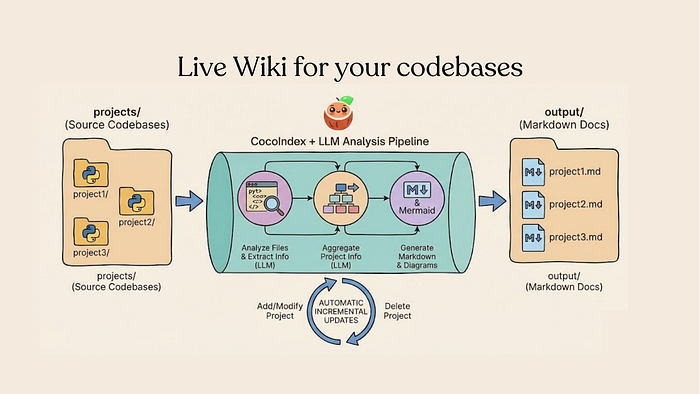
Build LLM-Powered Documentation that Always Stays True to latest codebeases
Last Updated on February 6, 2026 by Editorial Team
Author(s): Cocoindex
Originally published on Towards AI.
A practical guide to using Pydantic, Instructor, and incremental processing with CocoIndex to generate always-fresh Markdown docs from source code. Code is Open-sourced, and available in Github. (Apache 2.0) ⭐ Star if you like it!

Documentation goes stale the moment you write it. By the time a new engineer joins the team, half of what’s documented no longer reflects reality. The standard advice — “keep docs updated” — ignores the fundamental problem: documentation is a manual process bolted onto an automated codebase.

What if documentation generation was part of the codebase itself? Not comments or docstrings, but a genuine transformation pipeline: source code goes in, structured documentation comes out, and when the source changes, the docs change with it.
In this tutorial, I’ll show you how to build exactly that — an LLM-powered documentation pipeline that:
- Extracts structured metadata from Python files (classes, functions, relationships)
- Generates Markdown with Mermaid diagrams automatically
- Only re-processes files that actually changed (saving 90%+ on LLM costs)
- Scales to dozens of projects without blowing up your API bill
The full source code is available on GitHub under Apache 2.0: CocoIndex
The Core Insight: Documentation as a Transformation
Most documentation tools treat docs as a static artifact. You write them, maybe add some auto-generated API references, and hope someone remembers to update them.
A better mental model:
documentation = transformation(source_code)
If you can express this transformation declaratively, then a framework can figure out what needs to be re-run when something changes. Edit one file? Only that file’s documentation regenerates. Add a new project? Only the new project gets processed. Change your extraction prompt? Everything re-runs (because the transformation logic changed).
This is incremental processing — and it’s what makes LLM-powered documentation practical at scale.
Architecture Overview
The pipeline has four stages:
┌─────────────────────────────────────────────────────────────┐
│ app_main │
│ Loop through project directories, mount each for processing│
└─────────────────────────┬───────────────────────────────────┘
 │
 ┌───────────────▼───────────────┐
 │ process_project │
 │ Orchestrates file processing │
 └───────────────┬───────────────┘
 │
 ┌─────────────────────┼─────────────────────┐
 │ │ │
 ▼ ▼ ▼
┌────────┐ ┌────────┐ ┌────────┐
│ File 1 │ │ File 2 │ ... │ File N │
└────┬───┘ └────┬───┘ └────┬───┘
 │ │ │
 └─────────┬─────────┴────────────────────┘
 │
 ▼
 ┌─────────────────────┐
 │ aggregate_project │
 │ Combine into summary│
 └──────────┬──────────┘
 │
 ▼
 ┌─────────────────────┐
 │ generate_markdown │
 │ Output: project.md │
 └─────────────────────┘
Each file extraction runs concurrently with asyncio.gather(). If a project has 10 Python files, all 10 LLM calls fire simultaneously — not sequentially.
Step 1: Define Your Extraction Schema
The key to reliable LLM extraction is telling the model exactly what structure you want. Pydantic makes this trivial:
from pydantic import BaseModel, Field
from typing import List
class FunctionInfo(BaseModel):
 """Metadata about a public function."""
 name: str = Field(description="Function name")
 signature: str = Field(
 description="Full signature, e.g., 'async def process(data: List[str]) -> Dict'"
 )
 summary: str = Field(description="One-sentence description of what the function does")
 is_entry_point: bool = Field(
 description="True if this is a main entry point (decorated with @app.route, @coco.function, etc.)"
 )

class ClassInfo(BaseModel):
 """Metadata about a public class."""
 name: str = Field(description="Class name")
 summary: str = Field(description="One-sentence description of the class's purpose")
 key_methods: List[str] = Field(
 default_factory=list,
 description="Names of the most important public methods"
 )

class FileAnalysis(BaseModel):
 """Complete analysis of a single source file."""
 file_path: str = Field(description="Relative path to the file")
 summary: str = Field(description="2-3 sentence overview of the file's purpose")
 public_classes: List[ClassInfo] = Field(default_factory=list)
 public_functions: List[FunctionInfo] = Field(default_factory=list)
 dependencies: List[str] = Field(
 default_factory=list,
 description="Key external packages this file imports"
 )
 mermaid_diagram: str = Field(
 default="",
 description="Mermaid flowchart showing relationships between components"
 )
class ClassInfo(BaseModel):
 """Metadata about a public class."""
 name: str = Field(description="Class name")
 summary: str = Field(description="One-sentence description of the class's purpose")
 key_methods: List[str] = Field(
 default_factory=list,
 description="Names of the most important public methods"
 )class FileAnalysis(BaseModel):
 """Complete analysis of a single source file."""
 file_path: str = Field(description="Relative path to the file")
 summary: str = Field(description="2-3 sentence overview of the file's purpose")
 public_classes: List[ClassInfo] = Field(default_factory=list)
 public_functions: List[FunctionInfo] = Field(default_factory=list)
 dependencies: List[str] = Field(
 default_factory=list,
 description="Key external packages this file imports"
 )
 mermaid_diagram: str = Field(
 default="",
 description="Mermaid flowchart showing relationships between components"
 )
Notice how Field(description=...) isn't just for documentation — it's prompt engineering baked into your schema. The LLM reads these descriptions and uses them to understand what you want.
Step 2: Extract with Instructor
Instructor wraps your LLM client and enforces Pydantic schemas on the output:
import instructor
from litellm import acompletion
# Create an Instructor-wrapped async client
client = instructor.from_litellm(acompletion, mode=instructor.Mode.JSON)
async def extract_file_metadata(file_content: str, file_path: str) -> FileAnalysis:
 """Extract structured metadata from a Python file using an LLM."""
 prompt = f"""Analyze this Python file and extract structured documentation.
File: {file_path} {file_content}
Instructions:
1. Identify all public classes (names not starting with _) and summarize each
2. Identify all public functions and their purposes
3. Note key external dependencies (imports from outside the project)
4. If there are multiple related components, create a Mermaid flowchart showing their relationships
5. Write a concise summary of what this file does
Focus on the PUBLIC API - skip internal helpers and implementation details."""
 response = await client.chat.completions.create(
 model="gemini/gemini-2.5-flash", # Or any LiteLLM-supported model
 response_model=FileAnalysis,
 messages=[{"role": "user", "content": prompt}],
 )
 return response
The magic here: response_model=FileAnalysis tells Instructor to validate the LLM's output against your Pydantic schema. If the model returns malformed data, Instructor retries automatically.
Step 3: Add Memoization for Incremental Processing
LLM calls are expensive. Re-analyzing unchanged files wastes money and time. The solution: memoize based on file content.
With CocoIndex, this is a single decorator:
import cocoindex as coco
@coco.function(memo=True)
async def extract_file_metadata(file_content: str, file_path: str) -> FileAnalysis:
 # ... same implementation as above
memo=True means:
- Same input → cached result. If the file content hasn’t changed, skip the LLM call entirely.
- Different input → fresh extraction. Edit the file, and it gets re-analyzed.
- Automatic invalidation. Change the function’s code? All cached results for that function are invalidated.
In practice, this cuts costs by 80–90% on iterative runs. When you’re maintaining 20+ projects, that’s the difference between “$50/month” and “$5/month.”
Step 4: Aggregate File-Level Data
Individual file analyses are useful, but what you really want is a project-level summary. Here’s where a second LLM pass synthesizes the pieces:
@coco.function
async def aggregate_project(
 project_name: str,
 file_analyses: List[FileAnalysis]
) -> ProjectSummary:
 """Combine multiple file analyses into a coherent project overview."""
# Single file? Just promote it directly
 if len(file_analyses) == 1:
 fa = file_analyses[0]
 return ProjectSummary(
 name=project_name,
 summary=fa.summary,
 key_components=[c.name for c in fa.public_classes],
 architecture_diagram=fa.mermaid_diagram
 )
 # Multiple files: ask LLM to synthesize
 files_summary = "\n\n".join(
 f"**{fa.file_path}**: {fa.summary}\n"
 f"Classes: {', '.join(c.name for c in fa.public_classes) or 'None'}\n"
 f"Functions: {', '.join(f.name for f in fa.public_functions) or 'None'}"
 for fa in file_analyses
 )
 prompt = f"""Synthesize these file analyses into a project-level summary.
Project: {project_name}
Files:
{files_summary}
Create:
1. A 2-3 sentence project overview (not file-by-file, but the big picture)
2. A list of the most important components across all files
3. A Mermaid diagram showing how the major components connect"""
 response = await client.chat.completions.create(
 model="gemini/gemini-2.5-flash",
 response_model=ProjectSummary,
 messages=[{"role": "user", "content": prompt}],
 )
 return response
Notice the early exit for single-file projects. Why waste an LLM call synthesizing one file into itself? Small optimizations like this add up.
Step 5: Generate Markdown Output
Finally, convert the structured data into readable documentation:
def generate_markdown(project: ProjectSummary, files: List[FileAnalysis]) -> str:
 """Render project documentation as Markdown."""
 lines = [
 f"# {project.name}",
 "",
 "## Overview",
 "",
 project.summary,
 "",
 ]
 # Architecture diagram
 if project.architecture_diagram:
 lines.extend([
 "## Architecture",
 "",
 "```mermaid",
 project.architecture_diagram,
 "```",
 "",
 ])
 # Key components
 if project.key_components:
 lines.extend([
 "## Key Components",
 "",
 *[f"- `{comp}`" for comp in project.key_components],
 "",
 ])
 # File details
 if len(files) > 1:
 lines.extend(["## Files", ""])
 for fa in files:
 lines.extend([
 f"### {fa.file_path}",
 "",
 fa.summary,
 "",
 ])
 return "\n".join(lines)
The output: clean Markdown files with Mermaid diagrams that render beautifully on GitHub, Notion, or any modern documentation platform.
Putting It Together
Here’s the full orchestration:
import asyncio
from pathlib import Path
from cocoindex.connectors import localfs
@coco.function(memo=True)
async def process_project(
 project_dir: Path,
 output_dir: Path
) -> None:
 """Process a single project: extract, aggregate, generate."""
 # Find all Python files
 files = list(localfs.walk_dir(
 project_dir,
 recursive=True,
 path_matcher=PatternFilePathMatcher(
 included_patterns=["*.py"],
 excluded_patterns=[".*", "__pycache__", "*.pyc"]
 )
 ))
 if not files:
 return
 # Extract metadata from all files concurrently
 file_analyses = await asyncio.gather(*[
 extract_file_metadata(f.read_text(), str(f.file_path))
 for f in files
 ])
 # Aggregate into project summary
 project_summary = await aggregate_project(
 project_dir.name,
 file_analyses
 )
 # Generate and write Markdown
 markdown = generate_markdown(project_summary, file_analyses)
 output_path = output_dir / f"{project_dir.name}.md"
 localfs.declare_file(output_path, markdown, create_parent_dirs=True)
Run it:
pip install cocoindex instructor litellm pydantic
export GEMINI_API_KEY="your-key"
cocoindex update main.py
Your output/ directory now contains fresh Markdown documentation for every project — and it stays fresh automatically.
Why This Approach Works
1. Structured extraction beats regex parsing.
Pydantic schemas + Instructor = validated, typed data every time. No more regex hell trying to extract class names from LLM prose.
2. Incremental processing makes LLMs economical.
Without memoization, this would cost a fortune at scale. With it, you only pay for actual changes.
3. Concurrent execution is faster and cheaper.
asyncio.gather() means 10 files = 10 parallel API calls, not 10 sequential waits.
4. The transformation is declarative.
You describe what to extract, not how to manage caching, invalidation, or scheduling. The framework handles the rest.
Try It Yourself
The complete implementation is available under Apache 2.0:
🌟GitHub: github.com/cocoindex-io/cocoindex
If you find it useful, a star on GitHub helps more developers discover the project.
What’s Next?
This same pattern — structured LLM extraction + incremental processing — applies to far more than documentation:
- Code review automation: Extract issues, suggestions, and risk areas
- Codebase Q&A: Build a semantic index for natural language queries
- Dependency analysis: Map relationships across a monorepo
- Migration planning: Identify patterns that need updating
The key insight: treat your codebase as a data source, and LLMs as transformation functions. Make those transformations incremental, and suddenly large-scale code intelligence becomes practical.
Thanks for reading! If you have questions or build something interesting with this approach, I’d love to hear about it in the comments.
Join thousands of data leaders on the AI newsletter. Join over 80,000 subscribers and keep up to date with the latest developments in AI. From research to projects and ideas. If you are building an AI startup, an AI-related product, or a service, we invite you to consider becoming a sponsor.
Published via Towards AI
Towards AI Academy
We Build Enterprise-Grade AI. We'll Teach You to Master It Too.
15 engineers. 100,000+ students. Towards AI Academy teaches what actually survives production.
Start free — no commitment:
→ 6-Day Agentic AI Engineering Email Guide — one practical lesson per day
→ Agents Architecture Cheatsheet — 3 years of architecture decisions in 6 pages
Our courses:
→ AI Engineering Certification — 90+ lessons from project selection to deployed product. The most comprehensive practical LLM course out there.
→ Agent Engineering Course — Hands on with production agent architectures, memory, routing, and eval frameworks — built from real enterprise engagements.
→ AI for Work — Understand, evaluate, and apply AI for complex work tasks.
Note: Article content contains the views of the contributing authors and not Towards AI.
Related posts
Recent Posts






