


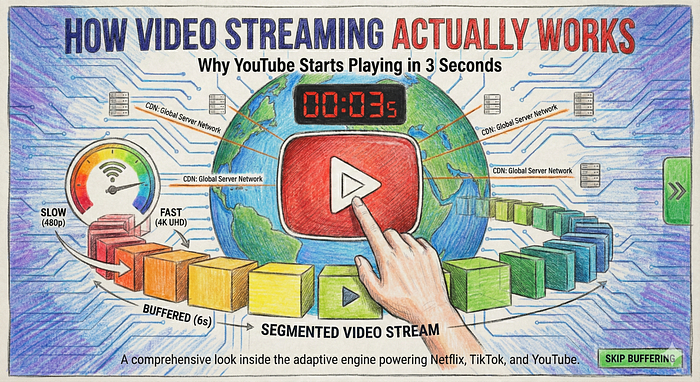
How Video Streaming Actually Works: Why YouTube Starts Playing in 3 Seconds (System Design Explained)
Last Updated on January 2, 2026 by Editorial Team
Author(s): Divy Yadav
Originally published on Towards AI.

You click play on a YouTube video. Within 2 seconds, it starts playing. But here’s what blows my mind: that video is 4 GB, sitting on a server thousands of miles away, yet it starts instantly.
But How?
Here’s the secret:
Video streaming is not about downloading videos. It’s about staying just a few seconds ahead of the viewer at all times.
Let me take you on a journey behind the scenes of what happens in those crucial first 2 seconds — and why your video never stops playing, even when your internet hiccups.
let’s go
Topics

What is Adaptive Bitrate Streaming?

Before we dive deeper, let’s understand what makes this all work: Adaptive Bitrate Streaming (ABS).
ABS is the technology that enables smooth video playback across different devices and internet speeds. Whether you’re watching on a phone with spotty 3G or a 4K TV with fibre internet, ABS ensures you get the best possible experience with minimal buffering and fast start times.
Here’s how it works:
The video player (your client) constantly monitors two things:
- Your network speed — How fast data is coming through
- Your buffer health — How many seconds of video are pre-loaded
Based on these measurements, the player makes real-time decisions:
- Fast internet + healthy buffer? → Request higher quality segments (upgrade from 480p to 720p)
- Slow internet + shrinking buffer? → Request lower quality segments (drop from 720p to 480p)
- Network fluctuating? → Keep adjusting to maintain smooth playback
The key insight: The player doesn’t commit to one quality for the entire video. It adapts segment-by-segment, choosing the best quality it can stream smoothly at that moment.
Most players start conservatively with lower bitrate segments (like 360p or 480p) to achieve fast initial playback. Once the video is playing and the player has measured your actual network speed, it gradually upgrades to higher quality if your connection can handle it.
The magic formula:
If (download speed > segment bitrate) AND (buffer is healthy):
 Player can try higher quality

If (download speed < segment bitrate) OR (buffer is shrinking):
 Player must drop to lower quality
For ABS to work, you need:
- Multiple quality versions of the same video (240p, 360p, 480p, 720p, 1080p)
- A manifest file that lists all available qualities and their segments
- Segmented video files that allow switching between qualities seamlessly
- A smart video player that monitors conditions and makes switching decisions
This is fundamentally different from traditional progressive download, where you commit to one quality and download the entire file. With ABS, you’re constantly adapting — hence the name.
The two main protocols that enable ABS:
HTTP Live Streaming (HLS):
- Developed by Apple
- Uses M3U8 manifest files
- Widely supported across devices and browsers
- Segments typically use .ts (transport stream) format
Dynamic Adaptive Streaming over HTTP (MPEG-DASH):
- An open standard developed by MPEG
- Uses MPD (Media Presentation Description) manifest files
- More flexible than HLS
- Codec-agnostic (works with H.264, VP9, AV1, etc.)
Both protocols work over regular HTTP, which means they can leverage existing CDN infrastructure. This is crucial — it allows video platforms to use the same caching and distribution systems that work for regular web content.
The Moment You Click Play

Let’s say you’re about to watch a 10-minute cooking tutorial. The complete video in 1080p is about 450 MB. With an average internet speed, downloading 450 MB would take at least 1–2 minutes. But you don’t want to wait that long staring at a loading screen, right?
Here’s where the genius of modern streaming kicks in.
Second 0–1: The Handshake
The moment you hit play, your video player sends a request to YouTube’s server: “Hey, I want to watch this video.”
But instead of asking for the entire 450 MB file, it asks for something tiny — a file called the M3U8 manifest (or MPD for DASH). This file is only a few kilobytes (think of it as the size of a simple text document).
Second 1–2: Reading the Menu
Your video player downloads this manifest file in milliseconds. When it opens this file, here’s what it sees:
#EXTM3U
#EXT-X-STREAM-INF:BANDWIDTH=400000,RESOLUTION=426x240
240p/playlist.m3u8
#EXT-X-STREAM-INF:BANDWIDTH=800000,RESOLUTION=640x360
360p/playlist.m3u8#EXT-X-STREAM-INF:BANDWIDTH=2700000,RESOLUTION=854x480
480p/playlist.m3u8#EXT-X-STREAM-INF:BANDWIDTH=5000000,RESOLUTION=1280x720
720p/playlist.m3u8#EXT-X-STREAM-INF:BANDWIDTH=8000000,RESOLUTION=1920x1080
1080p/playlist.m3u8
This master manifest is basically a menu that says: “This video comes in 240p, 360p, 480p, 720p, and 1080p. Each quality has its own playlist file that lists the actual segments.”
Important note: In practice, the master manifest points to separate quality-specific playlists, which then list the actual video segments. This two-level structure allows for flexible quality switching.
The Segment Strategy: Why Videos Load Instantly
Now here’s the brilliant part. That 10-minute video isn’t stored as one big file. It’s chopped into 60–120 tiny pieces called segments, each lasting 2–6 seconds.
Think about it like a Netflix series. Instead of releasing one 10-hour movie, they give you 10 episodes of 1 hour each. You can start watching episode 1 immediately without downloading episodes 2–10.
Segments work the same way:
- Your 10-minute video = 100 segments of 6 seconds each
- Each 480p segment is only about 2 MB
- To start playing, you only need to download the first segment
Second 2: The Smart Decision
Your video player quickly checks:
- Your internet speed (let’s say it measures 5 Mbps)
- Your screen size (phone, laptop, or TV)
- Your device capability (can it even play 4K?)
Based on this, it makes a split-second decision: “I’ll start with 480p. It’s good enough quality, and I can download segments fast enough to avoid buffering.”
Second 2–5: First Playback
The player requests the 480p playlist, then downloads the first segment (480p, first 6 seconds), which is about 2 MB. At 5 Mbps, this takes roughly 3.2 seconds.
As soon as this first segment downloads, the video starts playing. You see the first 6 seconds while the player is already downloading the second segment in the background.
The Buffer Zone: Your Safety Net

Here’s where it gets really clever. While you’re watching the first segment, the video player doesn’t just download the next segment. It downloads the next 3–4 segments ahead of you.
This creates a “buffer” — a safety cushion of pre-downloaded content. Think of it like this:
- You’re watching: Segment 1 (seconds 0–6)
- Already downloaded: Segments 2, 3, 4, 5 (seconds 6–30)
- Currently downloading: Segment 6 (seconds 30–36)
This is why videos can keep playing smoothly even if your internet briefly cuts out. You’ve got 20–30 seconds of video already stored locally on your device.
The Constant Adaptation: Quality Switching in Action

Now here’s where adaptive bitrate streaming really shines. Let me paint you a real scenario:
At 0:00 — You start watching in 480p. Internet speed is good at 5 Mbps.
At 0:30 — The player notices: “Hey, I’m downloading segments faster than the user is watching them. My buffer is growing. I can try higher quality!”
It switches to 720p for segment 6 onwards. You don’t even notice the switch — it happens between segments seamlessly.
At 2:15 — You walk into an elevator. Your internet speed drops to 2 Mbps suddenly.
At 2:21 — The player notices: “Uh oh, segment downloads are taking longer. My buffer is shrinking. If this continues, we’ll run out of video and hit buffering.”
It immediately drops back to 360p. Again, you barely notice because the switch happens at a segment boundary.
At 3:45 — You exit the elevator. Internet speed recovers to 6 Mbps.
The player gradually increases the quality back to 720p over the next 20–30 seconds.
Behind the Scenes:
Let me show you exactly what’s happening at the technical level with a real example:
Your original video URL:
https://youtube.com/watch?v=abc123
What actually happens behind the scenes:
- Request the master manifest:
GET https://cdn.youtube.com/video-abc123/master.m3u8
- Master manifest returns available quality playlists:
#EXTM3U
#EXT-X-STREAM-INF:BANDWIDTH=2700000
480p/playlist.m3u8
#EXT-X-STREAM-INF:BANDWIDTH=5000000
720p/playlist.m3u8
- Player chooses 480p and requests its segment list:
GET https://cdn.youtube.com/video-abc123/480p/playlist.m3u8
- That playlist contains actual segment URLs:
#EXTM3U
#EXT-X-TARGETDURATION:6
#EXTINF:6.0
segment-001.ts
#EXTINF:6.0
segment-002.ts
#EXTINF:6.0
segment-003.ts
- Player starts downloading segments one by one:
GET https://cdn.youtube.com/video-abc123/480p/segment-001.ts
GET https://cdn.youtube.com/video-abc123/480p/segment-002.ts
Each segment file is a tiny 2 MB video chunk that plays for 6 seconds.
Note on YouTube’s actual implementation: YouTube internally uses a mix of MPEG-DASH, fMP4 segments, and QUIC over HTTP/3, but the core idea is identical to HLS. The segment-based adaptive streaming concept remains the same regardless of the specific protocol.
Real-World Numbers: How Fast Does This Happen?
Let me break down the actual timeline with real numbers:
A 10-minute video (compressed bitrate example):
- 240p: 50 MB total (100 segments × 0.5 MB each, ~667 Kbps)
- 360p: 80 MB total (100 segments × 0.8 MB each, ~1.1 Mbps)
- 480p: 200 MB total (100 segments × 2 MB each, ~2.7 Mbps)
- 720p: 380 MB total (100 segments × 3.8 MB each, ~5 Mbps)
- 1080p: 600 MB total (100 segments × 6 MB each, ~8 Mbps)
Your viewing experience:
- Manifest download: 0.1 seconds
- First segment download (480p, 2 MB): 3.2 seconds at 5 Mbps
- Video starts playing: 3.3 seconds total
- Buffer fills to 30 seconds: 15 seconds after starting
- Total wait before playback: ~3 seconds
Compare this to downloading the full 600 MB 1080p file, which would take 15+ minutes on a 5 Mbps connection!
Resolution vs Bitrate vs Quality: What Actually Matters
Here’s something crucial that most people don’t understand: resolution is not the same as file size or quality.
A 720p video encoded with the modern AV1 codec can look better and have a smaller file size than a 1080p video encoded with the older H.264 codec.
Common video codecs:
- H.264: The workhorse. Used everywhere, compatible with everything, decent compression
- VP9: Google’s codec. Better compression than H.264, used heavily by YouTube
- AV1: The newest. Amazing compression, can save 30–50% file size vs H.264, but requires more processing power
This is why a 1080p video on YouTube might be 600 MB while the same video on an older platform could be 800 MB. The codec makes a huge difference.
When streaming platforms create those multiple quality versions, they’re not just changing resolution — they’re also adjusting bitrate (how much data per second) and sometimes even the codec to optimise for different devices and connections.
The Quality Switch Algorithm
Want to know how the player decides when to switch quality? Here’s the simplified logic:
# Pseudo-code for quality switching

current_buffer_size = 30 # seconds of video buffered
download_speed = measure_speed() # Mbps
current_quality = "480p"

if buffer_size > 40 and download_speed > 5:
# We have plenty of buffer and fast internet
switch_to("720p")


elif buffer_size < 15 and download_speed < 3:
 # Buffer is running low and internet is slow
 switch_to("360p")


elif buffer_size < 8:
 # Critical! About to buffer
 switch_to("240p")
The player constantly runs these checks every few seconds, making micro-adjustments to give you the best experience.
Why Segments Are 2–6 Seconds Long
You might wonder: why not 1-second segments? Or 30-second segments?
Too short (1 second):
- Too many segments to manage (a 10-min video = 600 segments!)
- Too many HTTP requests
- Overhead kills efficiency
Too long (30 seconds):
- Takes longer to download the first segment = longer wait before playback
- Quality switches happen less frequently = more buffering
- Larger buffer needed
Sweet spot (4–6 seconds):
- Fast initial playback
- Smooth quality transitions
- Manageable number of files
- Efficient CDN caching
The CDN Magic: Why Location Matters

Here’s another fascinating piece. When you request a segment, you’re not actually downloading it from YouTube’s main servers in California.
YouTube uses CDNs (Content Delivery Networks) with servers worldwide. When you’re in New York and request segment-001.ts, here’s what happens:
- Request goes to the nearest CDN server (maybe in New Jersey)
- If that server has the segment cached: instant delivery (10ms)
- If not cached, CDN fetches from the origin server, caches it, and then sends it to you
This is why the same video loads faster the second time you watch it — it’s already cached on a CDN server near you.
The Platform Differences
Different platforms make different choices:
YouTube:
- Uses 4–6 second segments
- Aggressive quality switching
- Prioritises smooth playback over maximum quality
Netflix:
- Uses 2–4 second segments for better adaptation
- Pre-downloads more content during buffering
- Optimises for binge-watching (pre-loads next episode)
TikTok/Instagram:
- Shorter videos, so they use 1–2 second segments
- Pre-loads multiple videos ahead
- Optimised for quick swiping between videos
When Things Go Wrong While Streaming
Ever experienced that annoying spinning wheel? Here’s what’s actually happening:
Your internet suddenly drops to 0.5 Mbps.
The segments you’ve buffered run out before the next segment finishes downloading. The player shows the buffering wheel while simultaneously dropping quality to 240p for future segments, hoping to catch up.
The Future: Even Smarter Streaming
Modern streaming is getting even more sophisticated:
AI-Powered Prediction: Some platforms now use machine learning to predict when your internet will slow down based on patterns, and proactively lower the quality before buffering happens.
Scene-Based Encoding: Dark scenes or static shots compress better, so some platforms vary bitrate within a quality level based on scene complexity.
Predictive Pre-loading: If you pause a video, some players use that time to download more buffer at a higher quality.
Wrapping Up
The next time you click play on a video and it starts instantly, remember the incredible engineering happening in those first few seconds:
- A tiny manifest file is downloaded
- The perfect quality is selected based on your connection
- The first 6-second segment is grabbed and played
- Multiple segments buffer ahead of you
- Quality constantly adapts as your connection changes
- Hundreds of segments coordinate seamlessly
- CDN servers worldwide ensure fast delivery
All of this happens automatically, invisibly, in real-time. That’s the magic of adaptive bitrate streaming — incredibly complex technology designed to feel effortlessly simple.
Pretty amazing for something we take for granted every single day, isn’t it?
Join thousands of data leaders on the AI newsletter. Join over 80,000 subscribers and keep up to date with the latest developments in AI. From research to projects and ideas. If you are building an AI startup, an AI-related product, or a service, we invite you to consider becoming a sponsor.
Published via Towards AI
Towards AI Academy
We Build Enterprise-Grade AI. We'll Teach You to Master It Too.
15 engineers. 100,000+ students. Towards AI Academy teaches what actually survives production.
Start free — no commitment:
→ 6-Day Agentic AI Engineering Email Guide — one practical lesson per day
→ Agents Architecture Cheatsheet — 3 years of architecture decisions in 6 pages
Our courses:
→ AI Engineering Certification — 90+ lessons from project selection to deployed product. The most comprehensive practical LLM course out there.
→ Agent Engineering Course — Hands on with production agent architectures, memory, routing, and eval frameworks — built from real enterprise engagements.
→ AI for Work — Understand, evaluate, and apply AI for complex work tasks.
Note: Article content contains the views of the contributing authors and not Towards AI.
Related posts
Recent Posts


