


MCP Servers That Are Actually Useful
Last Updated on December 9, 2025 by Editorial Team
Author(s): Kushal Banda
Originally published on Towards AI.
Let’s explore Model Context Protocol (MCP) a powerful way to connect tools, data, and models. MCP lets you run servers that expose capabilities like search, file operations, or custom APIs, and make them instantly available to your agents or AI apps.

Understanding → Model Context Protocol(MCP)
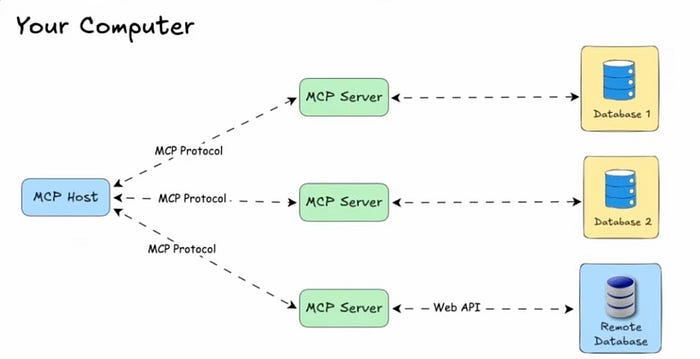
MCP (Model Context Protocol) is a standardized way to let AI models interact with tools, APIs, and data in real time. Since its launch by Anthropic in Nov 2024, MCP adoption has grown quickly with many developers and companies building their own servers.
Why it matters:
- Standardization: Clear, structured communication between models and tools.
- Flexibility: Works with any LLM or AI agent.
- Scalability: Client-server architecture supports multiple integrations from a single host.
- Extensibility: Add custom servers for search, file ops, APIs, or any domain-specific task.
We’ve curated 10 MCP servers you should check out perfect for developers building powerful AI workflows.
Coding, Dev & Automation
#1 wcgw MCP Server
wcgw is an MCP server with tightly integrated shell and code editing tools.

Gives the model safe shell and file access so it can run commands and edit your repo.
⚠️ Warning: do not allow BashCommand tool without reviewing the command, it may result in data loss.
{
 "mcpServers": {
 "wcgw": {
 "command": "uvx",
 "args": ["wcgw@latest"]
 }
 }
}
#2 GitHub MCP Server
GitHub MCP Server
Connect AI directly to GitHub. Query repos, manage issues and PRs, monitor workflows, analyze code all through natural language.
What you can do:
- Browse & search code, files, commits, and project structure across any repo you can access
- Automate issues & PRs create, update, triage bugs, review changes
- Monitor CI/CD track workflow runs, analyze build failures, manage releases
- Analyze code surface security findings, Dependabot alerts, and codebase patterns
From simple questions to complex multi-step workflows, give your AI tools full GitHub context and capabilities.
- Using OAuth (MCP Server)
{
 "servers": {
 "github": {
 "type": "http",
 "url": "https://api.githubcopilot.com/mcp/"
 }
 }
}
- Using a GitHub PAT
{
 "servers": {
 "github": {
 "type": "http",
 "url": "https://api.githubcopilot.com/mcp/",
 "headers": {
 "Authorization": "Bearer ${input:github_mcp_pat}"
 }
 }
 },
 "inputs": [
 {
 "type": "promptString",
 "id": "github_mcp_pat",
 "description": "GitHub Personal Access Token",
 "password": true
 }
 ]
}
#3 docker-mcp
An MCP server for Docker operations, enabling seamless container and compose stack management through Claude AI.
Features
- Container creation and instantiation
- Docker Compose stack deployment
- Container logs retrieval
- Container listing and status monitoring
{
 "mcpServers": {
 "docker-mcp": {
 "command": "uvx",
 "args": [
 "docker-mcp"
 ]
 }
 }
}
Databases & Storage
#4 PostgreSQL MCP Server
Postgres MCP Pro is an open source Model Context Protocol (MCP) server built to support you and your AI agents throughout the entire development process from initial coding, through testing and deployment, and to production tuning and maintenance.
Postgres MCP Pro does much more than wrap a database connection.
Features include:
- Database Health analyze
- Index Tuning
- Query Plans validate and optimize performance
- Schema Intelligence context-aware SQL generation
- Safe SQL Execution
{
 "mcpServers": {
 "postgres": {
 "command": "uv",
 "args": [
 "run",
 "postgres-mcp",
 "--access-mode=unrestricted"
 ],
 "env": {
 "DATABASE_URI": "postgresql://username:password@localhost:5432/dbname"
 }
 }
 }
}
#5 SQLite MCP Server

Spins up a lightweight local database for quick experiments and scratch data without touching prod.
{
 "mcpServers": {
 "MCP SQLite Server": {
 "command": "npx",
 "args": [
 "-y",
 "mcp-sqlite",
 "<path-to-your-sqlite-database.db>"
 ]
 }
 }
}
#6 AWS S3 MCP Server
An Amazon S3 Model Context Protocol (MCP) server that provides tools for interacting with S3 buckets and objects.
Tools
- list-buckets – List accessible S3 buckets with filtering
- list-objects – Browse objects within buckets with prefix filtering
- get-object – Retrieve object contents (text/binary support)
{
 "mcpServers": {
 "s3": {
 "command": "npx",
 "args": ["aws-s3-mcp", "--stdio"],
 "env": {
 "AWS_REGION": "us-east-1",
 "S3_BUCKETS": "bucket1,bucket2,bucket3",
 "S3_MAX_BUCKETS": "5",
 "AWS_ACCESS_KEY_ID": "your-access-key",
 "AWS_SECRET_ACCESS_KEY": "your-secret-key"
 }
 }
 }
}
Search, Web and Crawling
#7 Ref tool MCP Server

A MCP server that gives your AI coding tool or agent access to documentation for APIs, services, libraries etc. It’s your one-stop-shop to keep your agent up-to-date on documentation in a fast and token-efficient way.
For more complex situations, the LLM will try to refine it’s prompt as it reads results. For example:
SEARCH 'n8n merge node vs Code node multiple inputs best practices' (126)
READ https://docs.n8n.io/integrations/builtin/core-nodes/n8n-nodes-base.merge/#merge (4961)
READ https://docs.n8n.io/flow-logic/merging/#merge-data-from-multiple-node-executions (138)
SEARCH 'n8n Code node multiple inputs best practices when to use' (107)
READ https://docs.n8n.io/code/code-node/#usage (80)
SEARCH 'n8n Code node access multiple inputs from different nodes' (370)
SEARCH 'n8n Code node $input access multiple node inputs' (372)
READ https://docs.n8n.io/code/builtin/output-other-nodes/#output-of-other-nodes (2310)
Ref takes advantage of MCP sessions to track search trajectory and minimize context usage. There’s a lot more ideas cooking but here’s what we’ve implemented so far.
- Filtering search results
- Fetching the part of the page that matters
"Ref": {
 "type": "http",
 "url": "https://api.ref.tools/mcp?apiKey=YOUR_API_KEY"
}
#8 Playwright MCP Server
A MCP server that provides browser automation capabilities using Playwright. This server enables LLMs to interact with web pages through structured accessibility snapshots, bypassing the need for screenshots or visually-tuned models.
- Fast and lightweight. Uses Playwright’s accessibility tree, not pixel-based input.
- LLM-friendly. No vision models needed, operates purely on structured data.
- Deterministic tool application. Avoids ambiguity common with screenshot-based approaches.
{
 "mcpServers": {
 "playwright": {
 "command": "npx",
 "args": [
 "@playwright/mcp@latest"
 ]
 }
 }
}
#9 Firecrawl MCP Server
A MCP server implementation that integrates with Firecrawl for web scraping capabilities.
- Web scraping, crawling, and discovery
- Search and content extraction
- Deep research and batch scraping
- Automatic retries and rate limiting
- Cloud and self-hosted support
- SSE support
{
 "mcpServers": {
 "firecrawl-mcp": {
 "command": "npx",
 "args": ["-y", "firecrawl-mcp"],
 "env": {
 "FIRECRAWL_API_KEY": "YOUR-API-KEY"
 }
 }
 }
}
Productivity & SaaS
#10 Google Calendar MCP Server

A MCP server that provides Google Calendar integration for AI assistants like Claude.
Features
- Multi-Account Support: Connect and query multiple Google accounts simultaneously (e.g. work, personal)
- Multi-Calendar Support: List events from multiple calendars simultaneously
- Multi-Account Access: Connect personal, work, and test Google accounts at the same time
- Cross-Account Conflicts: Detect overlapping events across any combination of calendars
- Event Management: Create, update, delete, and search calendar events
- Recurring Events: Advanced modification capabilities for recurring events
- Free/Busy Queries: Check availability across calendars
- Smart Scheduling: Natural language understanding for dates and times
- Inteligent Import: Add calendar events from images, PDFs or web links
{
 "mcpServers": {
 "google-calendar": {
 "command": "npx",
 "args": ["@cocal/google-calendar-mcp"],
 "env": {
 "GOOGLE_OAUTH_CREDENTIALS": "/path/to/your/gcp-oauth.keys.json"
 }
 }
 }
}
#11 Notion MCP Server
Gives the model access to your Notion workspace to search, create and updates docs, notes and spaces.
{
 "mcpServers": {
 "notionApi": {
 "command": "npx",
 "args": ["-y", "@notionhq/notion-mcp-server"],
 "env": {
 "NOTION_TOKEN": "ntn_****"
 }
 }
 }
}
#12 Slack MCP Server
MCP server for Slack Workspaces. The Slack MCP server supports Stdio, SSE and HTTP transports, proxy settings, DMs, Group DMs, Smart History fetch (by date or count), may work via OAuth or in complete stealth mode with no permissions and scopes in Workspace.

{
 "mcpServers": {
 "slack": {
 "command": "npx",
 "args": [
 "-y",
 "slack-mcp-server@latest",
 "--transport",
 "stdio"
 ],
 "env": {
 "SLACK_MCP_XOXP_TOKEN": "xoxp-..."
 }
 }
 }
}
Quick Tip
Only turn on the MCP servers you actually need for what your are doing now.
Every extra server adds its own prompts into the conversation and shrinks the context the model can use for your code, and docs.
Resources
- Coding, Dev & Automation
2. Databases & Storage
3. Search, Web and Crawling
4. Productivity & SaaS
🌐 Connect
For more insights on AI, data formats, and LLM systems follow me on:
Join thousands of data leaders on the AI newsletter. Join over 80,000 subscribers and keep up to date with the latest developments in AI. From research to projects and ideas. If you are building an AI startup, an AI-related product, or a service, we invite you to consider becoming a sponsor.
Published via Towards AI
Towards AI Academy
We Build Enterprise-Grade AI. We'll Teach You to Master It Too.
15 engineers. 100,000+ students. Towards AI Academy teaches what actually survives production.
Start free — no commitment:
→ 6-Day Agentic AI Engineering Email Guide — one practical lesson per day
→ Agents Architecture Cheatsheet — 3 years of architecture decisions in 6 pages
Our courses:
→ AI Engineering Certification — 90+ lessons from project selection to deployed product. The most comprehensive practical LLM course out there.
→ Agent Engineering Course — Hands on with production agent architectures, memory, routing, and eval frameworks — built from real enterprise engagements.
→ AI for Work — Understand, evaluate, and apply AI for complex work tasks.
Note: Article content contains the views of the contributing authors and not Towards AI.
Related posts
Recent Posts


