FastAPI Observability Lab with Prometheus and Grafana: Complete Guide
Author(s): Faizulkhan
Originally published on Towards AI.
Table of Contents
- Lab Overview & Concept
- Project Architecture
- Code Deep Dive
- Prometheus Operations
- Grafana Operations
- FastAPI Metrics: Complete Reference
- Metrics Counting Process
- Practical Examples
Lab Overview & Concept
What is This Lab?
This is a hands-on observability lab designed to learn how to monitor a FastAPI application using industry-standard tools: Prometheus for metrics collection and Grafana for visualization. The lab demonstrates real-world observability patterns that we can apply to production applications.
Learning Objectives
By completing this lab, we will learn:
- How to instrument a FastAPI application with Prometheus metrics.
- How Prometheus scrapes and stores metrics from applications.
- How to build Grafana dashboards using PromQL queries.
- How to monitor key application metrics:
- Request rates (traffic)
- Latency percentiles (performance)
- Error rates (reliability)
- Status code breakdowns (health)
Lab Concept: The Three Pillars of Observability
This lab focuses on metrics, one of the three pillars of observability:
- Metrics: Quantitative measurements over time (this lab).
- Logs: Discrete events with timestamps.
- Traces: Request flows through distributed systems.
Why FastAPI + Prometheus + Grafana?
- FastAPI: Modern, high-performance Python web framework.
- Prometheus: Industry-standard metrics collection and storage system.
- Grafana: Powerful visualization and alerting platform.
Together, they form a complete observability stack that’s can be widely used in production environments.
Project Architecture
System Components
┌─────────────────┐
│ FastAPI App │ ← Exposes /metrics endpoint
│ (Port 8000) │
└────────┬────────┘
 │ HTTP GET /metrics
 │ (every 15 seconds)
 ▼
┌─────────────────┐
│ Prometheus │ ← Scrapes and stores metrics
│ (Port 9090) │
└────────┬────────┘
 │ PromQL Queries
 │ (via HTTP API)
 ▼
┌─────────────────┐
│ Grafana │ ← Visualizes metrics in dashboards
│ (Port 3030) │
└─────────────────┘
Project Structure
fastapi_observability_lab/
├── app/
│ └── main.py # FastAPI application with metrics instrumentation
├── docker-compose.yml # Orchestrates all three services
├── Dockerfile # Builds the FastAPI application container
├── prometheus.yml # Prometheus scrape configuration
├── requirements.txt # Python dependencies
├── metrics_cheatsheet.md # Quick PromQL reference
├── fastapi_metric_explained.md # Detailed metric explanations
└── README.md # Setup and usage instructions
Technology Stack
Application Layer:
- Python 3.11
- FastAPI 0.115.0
- Uvicorn (ASGI server)
Observability Layer:
- prometheus-client 0.20.0 (Python Prometheus client library)
- prometheus-fastapi-instrumentator 6.1.0 (automatic FastAPI instrumentation)
Infrastructure:
- Docker & Docker Compose
- Prometheus (latest)
- Grafana (latest)
Code Deep Dive
Application Entry Point: app/main.py
Let’s break down the FastAPI application code section by section:
1. Imports and Dependencies
from fastapi import FastAPI, HTTPException
from contextlib import asynccontextmanager
from prometheus_client import Counter, Histogram
from prometheus_fastapi_instrumentator import Instrumentator
from typing import List, Dict
import logging
import random
import time
Key Components:
prometheus_client: ProvidesCounterandHistogramfor custom metricsprometheus_fastapi_instrumentator: Automatically instruments FastAPI routesasynccontextmanager: Manages application lifecycle (startup/shutdown)
2. Logging Configuration
logging.basicConfig(
 level=logging.INFO,
 format="%(asctime)s - %(name)s - %(levelname)s - %(message)s",
)
logger = logging.getLogger("fastapi-observability")
Purpose: Structured logging for application events. While this lab focuses on metrics, logging complements observability.
log from fast-api container
2025-12-03 06:28:13,111 - fastapi-observability - INFO - Creating todo with title=todo20
INFO: 192.168.176.1:54714 - "POST /todos?title=todo20 HTTP/1.1" 200 OK
INFO: 192.168.176.2:44812 - "GET /metrics HTTP/1.1" 200 OK
2025-12-03 06:28:24,979 - fastapi-observability - INFO - Fetching all todos
INFO: 192.168.176.1:38270 - "GET /todos HTTP/1.1" 200 OK
INFO: 192.168.176.2:38074 - "GET /metrics HTTP/1.1" 200 OK
Purpose: Structured logging for application events. While this lab focuses on metrics, logging complements observability.
3. Custom Application Metrics
REQUEST_COUNTER = Counter(
 "app_requests_total",
 "Total number of processed requests in FastAPI app",
 ["endpoint", "method", "http_status"],
)

REQUEST_LATENCY = Histogram(
 "app_request_latency_seconds",
 "Latency of FastAPI requests in seconds",
 ["endpoint", "method"],
)
Explanation:
REQUEST_COUNTER:
- Type: Counter (monotonically increasing)
- Metric Name:
app_requests_total - Labels:
endpoint,method,http_status - Purpose: Track total requests per endpoint, method, and status code
- Example:
app_requests_total{endpoint="/todos", method="GET", http_status="200"} 125
REQUEST_LATENCY:
- Type: Histogram (bucketed distribution)
- Metric Name:
app_request_latency_seconds - Labels:
endpoint,method - Purpose: Measure request duration distribution
- Creates:
_bucket,_count,_summetrics automatically
4. Application Lifespan Management
@asynccontextmanager
async def lifespan(app: FastAPI):
 logger.info("🚀 FastAPI application starting up")
 yield
 logger.info("🛑 FastAPI application shutting down")
Purpose: Lifecycle hooks for startup and shutdown operations. Useful for:
- Database connections
- Background tasks
- Resource cleanup
5. FastAPI App Initialization
app = FastAPI(
 title="FastAPI Observability Lab",
 description="FastAPI app instrumented with Prometheus & Grafana",
 version="1.0.0",
 lifespan=lifespan,
)
Purpose: Creates the FastAPI application instance with metadata.
6. Automatic Instrumentation
Instrumentator().instrument(app).expose(app, endpoint="/metrics")
What This Does:
The prometheus-fastapi-instrumentator library automatically:
- Wraps all route handlers to capture:
- Request count
- Request duration
- Status codes
- HTTP methods
- Exposes
/metricsendpoint that returns Prometheus-formatted metrics:
# HELP http_requests_total Total number of HTTP requests
# TYPE http_requests_total counter
http_requests_total{handler="/",method="GET",status="2xx"} 10.0
http_requests_total{handler="/todos",method="GET",status="2xx"} 5.0
...
- Creates standard metrics:
http_requests_total(counter)http_request_duration_seconds_bucket(histogram buckets)http_request_duration_seconds_count(histogram count)http_request_duration_seconds_sum(histogram sum)
7. Request Timer Helper Class
class RequestTimer:
 def __init__(self, endpoint: str, method: str):
 self.endpoint = endpoint
 self.method = method
 self.start = None

 def __enter__(self):
 self.start = time.time()
 return self

 def __exit__(self, exc_type, exc_val, exc_tb):
 elapsed = time.time() - self.start
 REQUEST_LATENCY.labels(endpoint=self.endpoint, method=self.method).observe(elapsed)
Purpose: Context manager for manual latency measurement. Uses Python’s context manager protocol (__enter__/__exit__) to automatically record request duration.
Usage Pattern:
with RequestTimer(endpoint, method):
 # ... route handler code ...
8. Route Handlers
GET / – Health Check
@app.get("/")
async def read_root():
 endpoint = "/"
 method = "GET"
 with RequestTimer(endpoint, method):
 logger.info("Root endpoint accessed")
 REQUEST_COUNTER.labels(
 endpoint=endpoint,
 method=method,
 http_status="200",
 ).inc()
 return {"status": "healthy"}
log response from app container
2025-12-03 06:45:34,070 - fastapi-observability - INFO - Root endpoint accessed
INFO: 192.168.176.1:35520 - "GET / HTTP/1.1" 200 OK
What Happens:
- Timer starts
- Logs access
- Increments custom counter
- Returns response
- Timer records latency
GET /todos – List Todos
@app.get("/todos")
async def get_todos():
 endpoint = "/todos"
 method = "GET"
 with RequestTimer(endpoint, method):
 logger.info("Fetching all todos")
 # simulate random latency between 100ms and 400ms
 time.sleep(random.uniform(0.1, 0.4))

 REQUEST_COUNTER.labels(
 endpoint=endpoint,
 method=method,
 http_status="200",
 ).inc()
 return TODOS
Key Feature: Artificial latency (time.sleep) to make metrics visible in dashboards.
POST /todos – Create Todo
@app.post("/todos")
async def create_todo(title: str):
 endpoint = "/todos"
 method = "POST"
 with RequestTimer(endpoint, method):
 logger.info("Creating todo with title=%s", title)

 if not title:
 REQUEST_COUNTER.labels(
 endpoint=endpoint,
 method=method,
 http_status="400",
 ).inc()
 raise HTTPException(status_code=400, detail="Title cannot be empty")

 # ... create todo ...

 REQUEST_COUNTER.labels(
 endpoint=endpoint,
 method=method,
 http_status="201",
 ).inc()
 return todo
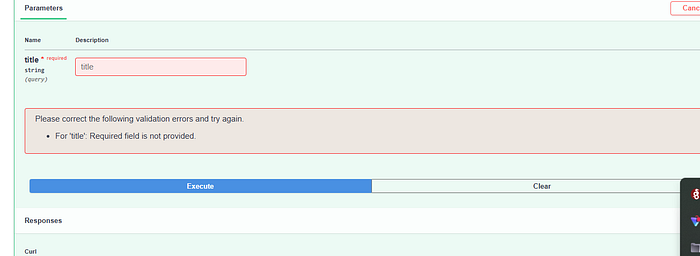
Key Feature: Different status codes (400 for validation errors, 201 for success).
for empty title

GET /error – Error Endpoint
@app.get("/error")
async def trigger_error():
 endpoint = "/error"
 method = "GET"
 with RequestTimer(endpoint, method):
 logger.error("Simulated error endpoint accessed")
 REQUEST_COUNTER.labels(
 endpoint=endpoint,
 method=method,
 http_status="500",
 ).inc()
 raise HTTPException(status_code=500, detail="Simulated error for observability lab")
Purpose: Intentionally generates 5xx errors for testing error rate monitoring.
error log view from container
2025-12-03 06:55:19,465 - fastapi-observability - ERROR - Simulated error endpoint accessed
INFO: 192.168.176.1:44198 - "GET /error HTTP/1.1" 500 Internal Server Error
2025-12-03 06:55:21,984 - fastapi-observability - ERROR - Simulated error endpoint accessed
INFO: 192.168.176.1:44198 - "GET /error HTTP/1.1" 500 Internal Server Error
2025-12-03 06:55:22,838 - fastapi-observability - ERROR - Simulated error endpoint accessed
Docker Configuration
Dockerfile
FROM python:3.11-slim

ENV PYTHONDONTWRITEBYTECODE=1
ENV PYTHONUNBUFFERED=1

WORKDIR /app

RUN apt-get update && apt-get install -y --no-install-recommends \
 curl \
 && rm -rf /var/lib/apt/lists/*

COPY requirements.txt .
RUN pip install --no-cache-dir -r requirements.txt

COPY app ./app

EXPOSE 8000

CMD ["uvicorn", "app.main:app", "--host", "0.0.0.0", "--port", "8000"]
Key Points:
- Uses Python 3.11 slim image (minimal size)
- Sets environment variables for Python behavior
- Installs dependencies from
requirements.txt - Runs Uvicorn ASGI server on port 8000
docker-compose.yml
version: "3.8"

services:
 app:
 build: .
 container_name: fastapi-observability-app
 ports:
 - "8000:8000"
 networks:
 - monitoring
 environment:
 - PYTHONUNBUFFERED=1

 prometheus:
 image: prom/prometheus:latest
 container_name: fastapi-observability-prometheus
 volumes:
 - ./prometheus.yml:/etc/prometheus/prometheus.yml
 ports:
 - "9090:9090"
 networks:
 - monitoring

 grafana:
 image: grafana/grafana:latest
 container_name: fastapi-observability-grafana
 ports:
 - "3030:3000"
 environment:
 - GF_SECURITY_ADMIN_USER=admin
 - GF_SECURITY_ADMIN_PASSWORD=admin
 volumes:
 - grafana-storage:/var/lib/grafana
 depends_on:
 - prometheus
 networks:
 - monitoring

networks:
 monitoring:
 driver: bridge

volumes:
 grafana-storage:
Architecture Decisions:
- Shared Network (
monitoring): All services can communicate by service name - Volume Mounts:
- Prometheus config file mounted from host
- Grafana data persisted in named volume
3. Port Mappings:
- App: 8000 (host) → 8000 (container)
- Prometheus: 9090 (host) → 9090 (container)
- Grafana: 3030 (host) → 3000 (container, Grafana default)
Prometheus Operations
What is Prometheus?
Prometheus is an open-source monitoring and alerting toolkit. It:
- Pulls metrics from targets (HTTP endpoints)
- Stores time-series data in its own database
- Provides PromQL query language for data analysis
- Supports alerting based on metric thresholds
Prometheus Configuration: prometheus.yml
global:
 scrape_interval: 15s

scrape_configs:
 - job_name: "fastapi"
 metrics_path: "/metrics"
 static_configs:
 - targets: ["app:8000"]

Configuration Breakdown:
global.scrape_interval: 15s
- Prometheus scrapes metrics every 15 seconds
- Balance between freshness and resource usage
job_name: "fastapi"
- Logical grouping of targets
- Appears in metric labels as
job="fastapi"
metrics_path: "/metrics"
- HTTP path to scrape
- Default is
/metrics(Prometheus standard)
targets: ["app:8000"]
- Service name from docker-compose network
- Prometheus will scrape
http://app:8000/metrics
How Prometheus Scrapes Metrics
Scrape Process:
- Prometheus sends HTTP GET to
http://app:8000/metrics - FastAPI responds with Prometheus-formatted text:
# HELP http_requests_total Total number of HTTP requests
# TYPE http_requests_total counter
http_requests_total{handler="/",method="GET",status="2xx"} 10.0
http_requests_total{handler="/todos",method="GET",status="2xx"} 5.0
...
- Prometheus parses the response
- Metrics stored in time-series database
- Process repeats every 15 seconds
Prometheus UI Operations
Access: http://localhost:9090
Key Features:
- Graph Tab
- Enter PromQL queries
- Visualize metrics over time
- Example:
rate(http_requests_total[5m])
2. Status → Targets
- View scrape target health
- Should show
fastapijob as UP - Shows last scrape time and errors
3. Status → Configuration
- View loaded configuration
- Verify scrape settings

4. Alerts Tab
- View active alerts (if configured)
- Alert rules defined in separate config

PromQL Basics
PromQL (Prometheus Query Language) is used to query metrics:
Counter Rate:
rate(http_requests_total[5m])
- Converts counter to requests per second
[5m]= time window (5 minutes)
Aggregation:
sum by (handler) (rate(http_requests_total[5m]))

- Groups by
handlerlabel - Sums rates for each endpoint
Histogram Quantile:
histogram_quantile(0.95, sum(rate(http_request_duration_seconds_bucket[5m])) by (le))
- Calculates 95th percentile latency
le= "less than or equal" (bucket boundaries)
Grafana Operations
What is Grafana?
Grafana is an open-source analytics and visualization platform. It:
- Connects to data sources (Prometheus, databases, APIs)
- Creates dashboards with panels and visualizations
- Supports alerting based on queries
- Provides rich visualization options (graphs, tables, gauges, etc.)
Initial Setup
Access: http://localhost:3030
Default Credentials:
- Username:
admin - Password:
admin - (Change on first login)
Configuring Prometheus Data Source
Steps:
- Navigate to Connections → Data sources
- Click Add data source
- Select Prometheus
- Set URL:
http://prometheus:9090
- Uses Docker service name (not
localhost)

5. Click Save & test
- Should show: “Successfully queried the Prometheus API.”
6. Why http://prometheus:9090?
- Services in Docker Compose can resolve each other by service name
prometheusresolves to the Prometheus container- Port 9090 is Prometheus’s default port
Creating Dashboards
Dashboard Structure:
- Dashboard: Collection of panels
- Panel: Single visualization (graph, table, stat, etc.)
- Query: PromQL expression that fetches data
Example Dashboard Creation
1. Create New Dashboard:
- Click Dashboards → New → New dashboard
2. Add Panel:
- Click Add visualization
- Select data source:
Prometheus

3. Configure Query:
- Switch to Code mode (for PromQL)
- Enter query:
rate(http_requests_total[5m])

- Set Format to
Time series
4. Configure Visualization:
- Panel type: Time series
- Title: “Requests per Second”
- Y-axis label: “req/s”
5. Save Dashboard:
- Click Save dashboard
- Give it a name: “FastAPI Observability”


Common Dashboard Panels
1. Requests per Second (Time Series)
Query:
sum by (handler) (rate(http_requests_total[5m]))
Visualization: Time series graph Purpose: Shows traffic patterns over time per endpoint.
2. Status Code Breakdown (Pie Chart)
Query:
sum by (status) (rate(http_requests_total[5m]))
Visualization: Pie chart Purpose: Visual distribution of 2xx, 4xx, 5xx responses
3. Error Rate Percentage (Stat)
Query:
100 * sum(rate(http_requests_total{status="5xx"}[5m])) / sum(rate(http_requests_total[5m]))
Visualization: Stat panel with gauge Purpose: Single number showing error percentage
4. P95 Latency (Time Series)
Query:
histogram_quantile(0.95, sum(rate(http_request_duration_seconds_bucket[5m])) by (le))

Visualization: Time series graph Purpose: 95th percentile latency over time
5. Request Count by Endpoint (Bar Chart)
Query:
sum by (handler) (increase(http_requests_total[5m]))
Visualization: Bar chart Purpose: Total requests per endpoint in last 5 minutes

Grafana Best Practices
- Use meaningful panel titles
- Add descriptions explaining what each panel shows
- Set appropriate time ranges (last 1 hour, 6 hours, 24 hours)
- Use variables for dynamic dashboards (e.g., endpoint selector)
- Export dashboards as JSON for version control
FastAPI Metrics: Complete Reference
This section provides a comprehensive explanation of all metrics exposed by the FastAPI application.
Metric Categories
The application exposes metrics in two categories:
- Automatic Metrics (from
prometheus-fastapi-instrumentator) - Custom Metrics (manually defined in code)
Automatic Metrics (from Instrumentator)
These metrics are automatically created by the prometheus-fastapi-instrumentator library.
1. http_requests_total
Type: Counter
Description: Total number of HTTP requests processed since application startup
Labels:
handler: HTTP route path (e.g.,/,/todos,/error)method: HTTP method (GET, POST, PUT, DELETE, etc.)status: HTTP status code group (2xx,4xx,5xx)instance: Target instance identifierjob: Prometheus job name (fastapi)
Example Metric:
http_requests_total{handler="/todos",method="GET",status="2xx",instance="app:8000",job="fastapi"} 125.0
Interpretation:
- 125 GET requests to
/todosreturned 2xx status codes - Counter only increases (never decreases)
- Resets to 0 on application restart
Use Cases:
- Total request count (not useful for graphs directly)
- Calculate rates:
rate(http_requests_total[5m]) - Calculate increases:
increase(http_requests_total[5m])
Common Queries:
Requests per second (all):
rate(http_requests_total[5m])
Requests per second by endpoint:
sum by (handler) (rate(http_requests_total[5m]))

Requests per second by status:
sum by (status) (rate(http_requests_total[5m]))

Total requests in last 5 minutes:
sum(increase(http_requests_total[5m]))
2. http_request_duration_seconds_bucket
Type: Histogram (bucket)
Description: Count of requests that completed within specific latency buckets
Labels:
handler: HTTP route pathmethod: HTTP methodle: "less than or equal" (bucket boundary in seconds)instance: Target instancejob: Prometheus job name
Example Metrics:
http_request_duration_seconds_bucket{handler="/todos",method="GET",le="0.005"} 10.0
http_request_duration_seconds_bucket{handler="/todos",method="GET",le="0.01"} 25.0
http_request_duration_seconds_bucket{handler="/todos",method="GET",le="0.025"} 50.0
http_request_duration_seconds_bucket{handler="/todos",method="GET",le="0.05"} 75.0
http_request_duration_seconds_bucket{handler="/todos",method="GET",le="0.1"} 100.0
http_request_duration_seconds_bucket{handler="/todos",method="GET",le="0.25"} 120.0
http_request_duration_seconds_bucket{handler="/todos",method="GET",le="0.5"} 125.0
http_request_duration_seconds_bucket{handler="/todos",method="GET",le="1.0"} 125.0
http_request_duration_seconds_bucket{handler="/todos",method="GET",le="2.5"} 125.0
http_request_duration_seconds_bucket{handler="/todos",method="GET",le="5.0"} 125.0
http_request_duration_seconds_bucket{handler="/todos",method="GET",le="10.0"} 125.0
http_request_duration_seconds_bucket{handler="/todos",method="GET",le="+Inf"} 125.0
Interpretation:
le="0.1"bucket = 100 requests completed in ≤ 0.1 secondsle="+Inf"bucket = total requests (125)- Buckets are cumulative (each includes previous buckets)
Use Cases:
- Calculate percentiles (P50, P95, P99)
- Understand latency distribution
- Identify slow endpoints
Common Queries:
P50 (median) latency:
histogram_quantile(0.50, sum(rate(http_request_duration_seconds_bucket[5m])) by (le))
P95 latency:
histogram_quantile(0.95, sum(rate(http_request_duration_seconds_bucket[5m])) by (le))
P95 latency by endpoint:
histogram_quantile(0.95, sum(rate(http_request_duration_seconds_bucket[5m])) by (handler, le))
3. http_request_duration_seconds_count
Type: Counter (derived from histogram)
Description: Total number of requests (same as _bucket{le="+Inf"})
Labels:
handler: HTTP route pathmethod: HTTP methodinstance: Target instancejob: Prometheus job name
Example Metric:
http_request_duration_seconds_count{handler="/todos",method="GET",instance="app:8000",job="fastapi"} 125.0
Use Cases:
- Total request count (alternative to
http_requests_total) - Calculate average latency (with
_sum)
Common Queries:
Average latency:
rate(http_request_duration_seconds_sum[5m]) / rate(http_request_duration_seconds_count[5m])
4. http_request_duration_seconds_sum
Type: Counter
Description: Sum of all request durations (in seconds)
Labels:
handler: HTTP route pathmethod: HTTP methodinstance: Target instancejob: Prometheus job name
Example Metric:
http_request_duration_seconds_sum{handler="/todos",method="GET",instance="app:8000",job="fastapi"} 12.5
Interpretation:
- Total time spent processing 125 requests = 12.5 seconds
- Average = 12.5 / 125 = 0.1 seconds per request
Use Cases:
- Calculate average latency
- Calculate total time spent
Common Queries:
Average latency (seconds):
rate(http_request_duration_seconds_sum[5m]) / rate(http_request_duration_seconds_count[5m])
Average latency by endpoint:
sum by (handler) (rate(http_request_duration_seconds_sum[5m])) / sum by (handler) (rate(http_request_duration_seconds_count[5m]))
Custom Metrics (Manual)
These metrics are manually defined in the application code.
5. app_requests_total
Type: Counter
Description: Total number of requests tracked by application code
Labels:
endpoint: HTTP route pathmethod: HTTP methodhttp_status: HTTP status code (200, 201, 400, 500, etc.)
Example Metric:
app_requests_total{endpoint="/todos",method="GET",http_status="200"} 100.0
app_requests_total{endpoint="/todos",method="POST",http_status="201"} 25.0
app_requests_total{endpoint="/error",method="GET",http_status="500"} 5.0

Differences from http_requests_total:
- Uses
endpointinstead ofhandlerlabel - Uses
http_statuswith exact codes (200, 201, 400, 500) instead of groups (2xx, 4xx, 5xx) - Manually incremented in code (more control)
Use Cases:
- Application-level request tracking
- Status code-specific monitoring
- Custom business logic metrics
Common Queries:
Requests per second by endpoint:
sum by (endpoint) (rate(app_requests_total[5m]))
Requests per second by status code:
sum by (http_status) (rate(app_requests_total[5m]))
6. app_request_latency_seconds
Type: Histogram
Description: Request latency measured manually in application code
Labels:
endpoint: HTTP route pathmethod: HTTP method
Creates Three Metrics:
app_request_latency_seconds_bucket(histogram buckets)app_request_latency_seconds_count(total count)app_request_latency_seconds_sum(sum of durations)
Example Metrics:
app_request_latency_seconds_bucket{endpoint="/todos",method="GET",le="0.1"} 50.0
app_request_latency_seconds_bucket{endpoint="/todos",method="GET",le="0.5"} 100.0
app_request_latency_seconds_count{endpoint="/todos",method="GET"} 100.0
app_request_latency_seconds_sum{endpoint="/todos",method="GET"} 25.0
Differences from http_request_duration_seconds:
- Uses
endpointinstead ofhandlerlabel - Manually measured (more control over measurement points)
- Can measure specific code sections
Use Cases:
- Custom latency tracking
- Measuring specific code paths
- Comparing with automatic metrics
Common Queries:
P95 latency (custom):
histogram_quantile(0.95, sum(rate(app_request_latency_seconds_bucket[5m])) by (le))
Average latency (custom):
rate(app_request_latency_seconds_sum[5m]) / rate(app_request_latency_seconds_count[5m])

Metrics Counting Process
How Metrics Are Collected and Counted
Understanding the complete flow of how metrics are generated, collected, and stored:
Step 1: Request Arrives at FastAPI
Client → HTTP Request → FastAPI Application
Example:
GET http://localhost:8000/todos
Step 2: Instrumentator Intercepts Request
The prometheus-fastapi-instrumentator middleware:
- Records start time:
start_time = time.time() - Extracts metadata:
- Route path:
/todos - HTTP method:
GET
3. Waits for response
Step 3: Route Handler Executes
@app.get("/todos")
async def get_todos():
 # Custom metrics code executes:
 with RequestTimer(endpoint, method): # Start timer
 # ... handler logic ...
 REQUEST_COUNTER.labels(...).inc() # Increment counter
 return TODOS
 # Timer ends, records latency
What Happens:
RequestTimer.__enter__()records start time- Handler executes (may include
time.sleep()for simulation) REQUEST_COUNTERincrements with labelsRequestTimer.__exit__()calculates elapsed time and records in histogram
Step 4: Response Sent
FastAPI sends HTTP response:
- Status code: 200
- Body: JSON array of todos
Step 5: Instrumentator Records Metrics
After response, instrumentator:
- Calculates duration:
duration = time.time() - start_time - Determines status group: 200 →
2xx - Increments counter
http_requests_total{handler="/todos", method="GET", status="2xx"} += 1
4. Records latency in histogram:
http_request_duration_seconds_bucket{handler="/todos", method="GET", le="0.1"} += 1
http_request_duration_seconds_bucket{handler="/todos", method="GET", le="0.5"} += 1
...
(All buckets >= duration are incremented)
Step 6: Metrics Exposed via /metrics Endpoint
When Prometheus scrapes http://app:8000/metrics, FastAPI returns:
# HELP http_requests_total Total number of HTTP requests
# TYPE http_requests_total counter
http_requests_total{handler="/",method="GET",status="2xx"} 10.0
http_requests_total{handler="/todos",method="GET",status="2xx"} 5.0
http_requests_total{handler="/todos",method="POST",status="201"} 2.0
http_requests_total{handler="/error",method="GET",status="5xx"} 1.0

# HELP http_request_duration_seconds Request duration in seconds
# TYPE http_request_duration_seconds histogram
http_request_duration_seconds_bucket{handler="/todos",method="GET",le="0.005"} 0.0
http_request_duration_seconds_bucket{handler="/todos",method="GET",le="0.01"} 0.0
http_request_duration_seconds_bucket{handler="/todos",method="GET",le="0.025"} 0.0
http_request_duration_seconds_bucket{handler="/todos",method="GET",le="0.05"} 0.0
http_request_duration_seconds_bucket{handler="/todos",method="GET",le="0.1"} 2.0
http_request_duration_seconds_bucket{handler="/todos",method="GET",le="0.25"} 3.0
http_request_duration_seconds_bucket{handler="/todos",method="GET",le="0.5"} 5.0
http_request_duration_seconds_bucket{handler="/todos",method="GET",le="1.0"} 5.0
http_request_duration_seconds_bucket{handler="/todos",method="GET",le="2.5"} 5.0
http_request_duration_seconds_bucket{handler="/todos",method="GET",le="5.0"} 5.0
http_request_duration_seconds_bucket{handler="/todos",method="GET",le="10.0"} 5.0
http_request_duration_seconds_bucket{handler="/todos",method="GET",le="+Inf"} 5.0
http_request_duration_seconds_count{handler="/todos",method="GET"} 5.0
http_request_duration_seconds_sum{handler="/todos",method="GET"} 0.75

# Custom metrics
# HELP app_requests_total Total number of processed requests in FastAPI app
# TYPE app_requests_total counter
app_requests_total{endpoint="/todos",method="GET",http_status="200"} 5.0

# HELP app_request_latency_seconds Latency of FastAPI requests in seconds
# TYPE app_request_latency_seconds histogram
app_request_latency_seconds_bucket{endpoint="/todos",method="GET",le="0.1"} 2.0
app_request_latency_seconds_bucket{endpoint="/todos",method="GET",le="0.5"} 5.0
...
app_request_latency_seconds_count{endpoint="/todos",method="GET"} 5.0
app_request_latency_seconds_sum{endpoint="/todos",method="GET"} 0.75
Step 7: Prometheus Scrapes and Stores
Prometheus:
- Sends HTTP GET to
/metricsevery 15 seconds - Parses response (Prometheus text format)
- Stores time-series data:
- Timestamp:
2024-01-15T10:30:00Z - Metric:
http_requests_total{handler="/todos",...} - Value:
5.0
4. Indexes by labels for fast queries
Step 8: Grafana Queries Prometheus
When we create a Grafana panel with query:
rate(http_requests_total[5m])
Process:
- Grafana sends PromQL query to Prometheus API
- Prometheus:
- Retrieves time-series data for last 5 minutes
- Calculates rate:
(current_value - old_value) / time_delta - Returns result
3. Grafana visualizes result in panel
Counter Behavior
Counters are monotonically increasing:
Time Value
10:00 0
10:01 5 (+5 requests)
10:02 12 (+7 requests)
10:03 20 (+8 requests)
10:04 25 (+5 requests)
To get rate (requests per second):
rate(http_requests_total[5m])
Calculation:
- At 10:04:
(25 - 0) / 240 seconds = 0.104 req/s - Uses sliding window (last 5 minutes)
To get increase (total requests in window):
increase(http_requests_total[5m])
Calculation:
- At 10:04:
25 - 0 = 25 requests(over 5 minutes)
Histogram Behavior
Histograms track distribution:
For a request that took 0.15 seconds:
Bucket (le) Count Before Count After
0.005 0 0
0.01 0 0
0.025 0 0
0.05 0 0
0.1 0 0
0.25 0 1 ← Request fits here
0.5 0 1
1.0 0 1
...
+Inf 0 1
All buckets >= observed value are incremented.
To calculate percentiles:
histogram_quantile(0.95, sum(rate(http_request_duration_seconds_bucket[5m])) by (le))
Process:
- Calculate rate for each bucket
- Find bucket where 95% of requests fall
- Interpolate within bucket
- Return latency value
Practical Examples
Example 1: Monitoring Traffic Patterns
Scenario: You want to see which endpoints receive the most traffic.
Grafana Panel Setup:
- Query:
sum by (handler) (rate(http_requests_total[5m]))
2. Visualization: Time series graph
3. Title: “Requests per Second by Endpoint”
Result: Line graph showing traffic per endpoint over time.
Example 2: Detecting Error Spikes
Scenario: You want to be alerted when error rate exceeds 5%.
Grafana Panel Setup:
- Query:
100 * sum(rate(http_requests_total{status="5xx"}[5m])) / sum(rate(http_requests_total[5m]))

2. Visualization: Stat panel with threshold
3. Thresholds:
- Green: < 1%
- Yellow: 1–5%
- Red: > 5%
Result: Single number showing error percentage with color coding.
Example 3: Performance Monitoring
Scenario: You want to track P95 latency to identify slow endpoints.
Grafana Panel Setup:
- Query
histogram_quantile(0.95, sum(rate(http_request_duration_seconds_bucket[5m])) by (handler, le))
2. Visualization: Time series graph
3. Y-axis unit: seconds
4. Title: “P95 Latency by Endpoint”
Example 4: Comparing Custom vs Automatic Metrics
Scenario: You want to verify that custom metrics match automatic metrics.
Grafana Panel Setup:
- Panel 1 — Automatic:
sum(rate(http_requests_total[5m]))
2. Panel 2 — Custom
sum(rate(app_requests_total[5m]))
Result: Two numbers that should be similar (may differ slightly due to timing).
Conclusion
This FastAPI Observability Lab provides a complete, production-ready example of:
- Instrumenting FastAPI applications with Prometheus metrics
- Configuring Prometheus to scrape and store metrics
- Building Grafana dashboards to visualize application health
- Understanding metric types (counters, histograms) and their use cases
- Writing PromQL queries for common monitoring scenarios
Key Takeaways
- Metrics are essential for understanding application behavior
- Prometheus provides powerful querying capabilities
- Grafana makes metrics accessible through visualizations
- Both automatic and custom metrics have their place
- Percentiles (P95, P99) are crucial for performance monitoring
Next Steps
- Add more endpoints and observe how metrics change
- Create alerting rules in Prometheus for error rates and latency
- Export Grafana dashboards as JSON for version control
- Add business metrics (e.g., todos created, users active)
- Integrate with logging and tracing for complete observability
Join thousands of data leaders on the AI newsletter. Join over 80,000 subscribers and keep up to date with the latest developments in AI. From research to projects and ideas. If you are building an AI startup, an AI-related product, or a service, we invite you to consider becoming a sponsor.
Published via Towards AI
Towards AI Academy
We Build Enterprise-Grade AI. We'll Teach You to Master It Too.
15 engineers. 100,000+ students. Towards AI Academy teaches what actually survives production.
Start free — no commitment:
→ 6-Day Agentic AI Engineering Email Guide — one practical lesson per day
→ Agents Architecture Cheatsheet — 3 years of architecture decisions in 6 pages
Our courses:
→ AI Engineering Certification — 90+ lessons from project selection to deployed product. The most comprehensive practical LLM course out there.
→ Agent Engineering Course — Hands on with production agent architectures, memory, routing, and eval frameworks — built from real enterprise engagements.
→ AI for Work — Understand, evaluate, and apply AI for complex work tasks.
Note: Article content contains the views of the contributing authors and not Towards AI.
Related posts
Recent Posts